Bar chart race JavaScript
A bar chart is one of the most fundamental ways of data visualization and is highly easy to understand. Formally speaking, a bar chart is a chart in which different variables are represented by mapping their numerical values to bars.

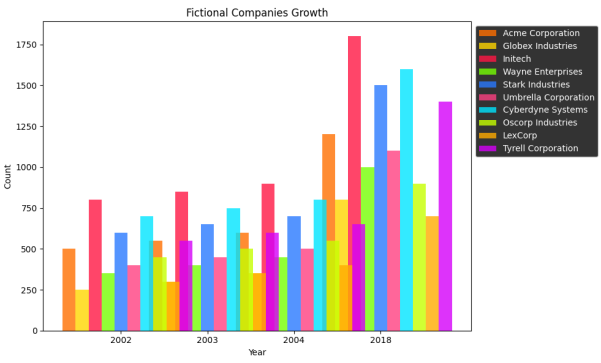
Bar chart race
Although bar charts are useful for showing how data ranks, we can not use them to show how it changed over time. For this purpose, a bar chart race can be incorporated.
Simply put, a bar chart race is an animation that displays the changes in the heights of the bars as their corresponding numerical value changes.
amCharts library in Javascript
amCharts is a JavaScript library that we can use for creating interactive charts and graphs on the web. It provides a wide range of charts, like bar charts, pie charts, etc.
Why amCharts?
It's a great library since it offers many customization options, including various themes, colors, and even animations. Since a bar chart requires animations, we'll use this library for our code.
Note: The amCharts library hosts it's official documentation.
Code sample
In this Answer, we will be visualizing a data set taken from amCharts representing the trend in the usage of various applications.
The data
var allData = {"2002": {"Friendster": 0,"Facebook": 0,"Flickr": 0,"Google Buzz": 0,"Google+": 0,"Hi5": 0,"Instagram": 0,"MySpace": 0,"Orkut": 0,"Pinterest": 0,"Reddit": 0,"Snapchat": 0,"TikTok": 0,"Tumblr": 0,"Twitter": 0,"WeChat": 0,"Weibo": 0,"Whatsapp": 0,"YouTube": 0},"2003": {"Friendster": 4470000,"Facebook": 0,"Flickr": 0,"Google Buzz": 0,"Google+": 0,"Hi5": 0,"Instagram": 0,"MySpace": 0,"Orkut": 0,"Pinterest": 0,"Reddit": 0,"Snapchat": 0,"TikTok": 0,"Tumblr": 0,"Twitter": 0,"WeChat": 0,"Weibo": 0,"Whatsapp": 0,"YouTube": 0},"2004": {"Friendster": 5970054,"Facebook": 0,"Flickr": 3675135,"Google Buzz": 0,"Google+": 0,"Hi5": 0,"Instagram": 0,"MySpace": 980036,"Orkut": 4900180,"Pinterest": 0,"Reddit": 0,"Snapchat": 0,"TikTok": 0,"Tumblr": 0,"Twitter": 0,"WeChat": 0,"Weibo": 0,"Whatsapp": 0,"YouTube": 0},"2005": {"Friendster": 7459742,"Facebook": 0,"Flickr": 7399354,"Google Buzz": 0,"Google+": 0,"Hi5": 9731610,"Instagram": 0,"MySpace": 19490059,"Orkut": 9865805,"Pinterest": 0,"Reddit": 0,"Snapchat": 0,"TikTok": 0,"Tumblr": 0,"Twitter": 0,"WeChat": 0,"Weibo": 0,"Whatsapp": 0,"YouTube": 1946322},"2006": {"Friendster": 8989854,"Facebook": 0,"Flickr": 14949270,"Google Buzz": 0,"Google+": 0,"Hi5": 19932360,"Instagram": 0,"MySpace": 54763260,"Orkut": 14966180,"Pinterest": 0,"Reddit": 248309,"Snapchat": 0,"TikTok": 0,"Tumblr": 0,"Twitter": 0,"WeChat": 0,"Weibo": 0,"Whatsapp": 0,"YouTube": 19878248},"2007": {"Friendster": 24253200,"Facebook": 0,"Flickr": 29299875,"Google Buzz": 0,"Google+": 0,"Hi5": 29533250,"Instagram": 0,"MySpace": 69299875,"Orkut": 26916562,"Pinterest": 0,"Reddit": 488331,"Snapchat": 0,"TikTok": 0,"Tumblr": 0,"Twitter": 0,"WeChat": 0,"Weibo": 0,"Whatsapp": 0,"YouTube": 143932250},"2008": {"Friendster": 51008911,"Facebook": 100000000,"Flickr": 30000000,"Google Buzz": 0,"Google+": 0,"Hi5": 55045618,"Instagram": 0,"MySpace": 72408233,"Orkut": 44357628,"Pinterest": 0,"Reddit": 1944940,"Snapchat": 0,"TikTok": 0,"Tumblr": 0,"Twitter": 0,"WeChat": 0,"Weibo": 0,"Whatsapp": 0,"YouTube": 294493950},"2009": {"Friendster": 28804331,"Facebook": 276000000,"Flickr": 41834525,"Google Buzz": 0,"Google+": 0,"Hi5": 57893524,"Instagram": 0,"MySpace": 70133095,"Orkut": 47366905,"Pinterest": 0,"Reddit": 3893524,"Snapchat": 0,"TikTok": 0,"Tumblr": 0,"Twitter": 0,"WeChat": 0,"Weibo": 0,"Whatsapp": 0,"YouTube": 413611440},"2010": {"Friendster": 0,"Facebook": 517750000,"Flickr": 54708063,"Google Buzz": 166029650,"Google+": 0,"Hi5": 59953290,"Instagram": 0,"MySpace": 68046710,"Orkut": 49941613,"Pinterest": 0,"Reddit": 0,"Snapchat": 0,"TikTok": 0,"Tumblr": 0,"Twitter": 43250000,"WeChat": 0,"Weibo": 19532900,"Whatsapp": 0,"YouTube": 480551990},"2011": {"Friendster": 0,"Facebook": 766000000,"Flickr": 66954600,"Google Buzz": 170000000,"Google+": 0,"Hi5": 46610848,"Instagram": 0,"MySpace": 46003536,"Orkut": 47609080,"Pinterest": 0,"Reddit": 0,"Snapchat": 0,"TikTok": 0,"Tumblr": 0,"Twitter": 92750000,"WeChat": 47818400,"Weibo": 48691040,"Whatsapp": 0,"YouTube": 642669824},"2012": {"Friendster": 0,"Facebook": 979750000,"Flickr": 79664888,"Google Buzz": 170000000,"Google+": 107319100,"Hi5": 0,"Instagram": 0,"MySpace": 0,"Orkut": 45067022,"Pinterest": 0,"Reddit": 0,"Snapchat": 0,"TikTok": 0,"Tumblr": 146890156,"Twitter": 160250000,"WeChat": 118123370,"Weibo": 79195730,"Whatsapp": 0,"YouTube": 844638200},"2013": {"Friendster": 0,"Facebook": 1170500000,"Flickr": 80000000,"Google Buzz": 170000000,"Google+": 205654700,"Hi5": 0,"Instagram": 117500000,"MySpace": 0,"Orkut": 0,"Pinterest": 0,"Reddit": 0,"Snapchat": 0,"TikTok": 0,"Tumblr": 293482050,"Twitter": 223675000,"WeChat": 196523760,"Weibo": 118261880,"Whatsapp": 300000000,"YouTube": 1065223075},"2014": {"Friendster": 0,"Facebook": 1334000000,"Flickr": 0,"Google Buzz": 170000000,"Google+": 254859015,"Hi5": 0,"Instagram": 250000000,"MySpace": 0,"Orkut": 0,"Pinterest": 0,"Reddit": 135786956,"Snapchat": 0,"TikTok": 0,"Tumblr": 388721163,"Twitter": 223675000,"WeChat": 444232415,"Weibo": 154890345,"Whatsapp": 498750000,"YouTube": 1249451725},"2015": {"Friendster": 0,"Facebook": 1516750000,"Flickr": 0,"Google Buzz": 170000000,"Google+": 298950015,"Hi5": 0,"Instagram": 400000000,"MySpace": 0,"Orkut": 0,"Pinterest": 0,"Reddit": 163346676,"Snapchat": 0,"TikTok": 0,"Tumblr": 475923363,"Twitter": 304500000,"WeChat": 660843407,"Weibo": 208716685,"Whatsapp": 800000000,"YouTube": 1328133360},"2016": {"Friendster": 0,"Facebook": 1753500000,"Flickr": 0,"Google Buzz": 0,"Google+": 398648000,"Hi5": 0,"Instagram": 550000000,"MySpace": 0,"Orkut": 0,"Pinterest": 143250000,"Reddit": 238972480,"Snapchat": 238648000,"TikTok": 0,"Tumblr": 565796720,"Twitter": 314500000,"WeChat": 847512320,"Weibo": 281026560,"Whatsapp": 1000000000,"YouTube": 1399053600},"2017": {"Friendster": 0,"Facebook": 2035750000,"Flickr": 0,"Google Buzz": 0,"Google+": 495657000,"Hi5": 0,"Instagram": 750000000,"MySpace": 0,"Orkut": 0,"Pinterest": 195000000,"Reddit": 297394200,"Snapchat": 0,"TikTok": 239142500,"Tumblr": 593783960,"Twitter": 328250000,"WeChat": 921742750,"Weibo": 357569030,"Whatsapp": 1333333333,"YouTube": 1495657000},"2018": {"Friendster": 0,"Facebook": 2255250000,"Flickr": 0,"Google Buzz": 0,"Google+": 430000000,"Hi5": 0,"Instagram": 1000000000,"MySpace": 0,"Orkut": 0,"Pinterest": 246500000,"Reddit": 355000000,"Snapchat": 0,"TikTok": 500000000,"Tumblr": 624000000,"Twitter": 329500000,"WeChat": 1000000000,"Weibo": 431000000,"Whatsapp": 1433333333,"YouTube": 1900000000}};module.exports = allData
Let's dive right in!
HTML
The
<!DOCTYPE html>declaration shows the document type.The
<html>element represents the root of the HTML document.The
<head>section contains some meta-information about the document. This includes the title and included scripts.The
<title>element sets the title of the HTML document to "Barchart race"The
<style>block defines CSS styles for the chart container (#chartdiv), setting its width to 100% and height to 500 pixels.
The
<body>section represents the content of the HTML document.The
<div>element with theid="chartdiv"serves as the container for the chart.Several
<script>tags are included to import external JavaScript files from the amCharts CDN and a local "data.js" file.
Script
The main JavaScript code is wrapped within a <script> tag.
The
am5.ready()function is called, which ensures that the code executes only when the amCharts library is ready.A new
am5.Rootinstance is created and assigned to theroot. We pass the "chartdiv" element as the container.The
am5themes_Animatedtheme is imported from the amCharts library and applied to therootinstance. We use this theme since we're making an animation.An
am5xy.XYChartinstance is created and assigned to thechartvariable, representing the column chart. It is added to therootcontainer.Axis renderers
am5xy.AxisRendererYandam5xy.AxisRendererXare created and customized.The chart's y-axis
am5xy.CategoryAxisand x-axisam5xy.ValueAxisare created and also customized.A column series
am5xy.ColumnSeriesis added to the chart. We do this to specify the x-axis, y-axis, and data fields.By default, the color for each bar remains the same. So, a custom adapter is added to the series to determine the color based on the index of the column.
Bullets i.e. labels, are added to each column, displaying the value of the column.
A label is created and positioned within the chart's plot container.
Our data set is populated in the series and y-axis.
Functions for updating the data and sorting the category axis are defined.
A
setTimeoutfunction is used to start the chart animation after a 100ms delay.We use
setIntervalfunctions to increment the year, update the data, and sort the category axis after each interval.To end the animation, we put a simple check. Once 2018 is crossed, the
setIntervalfunctions are cleared, and the chart animation stops.
Congratulations, we've finally created a working bar chart race!
Code output
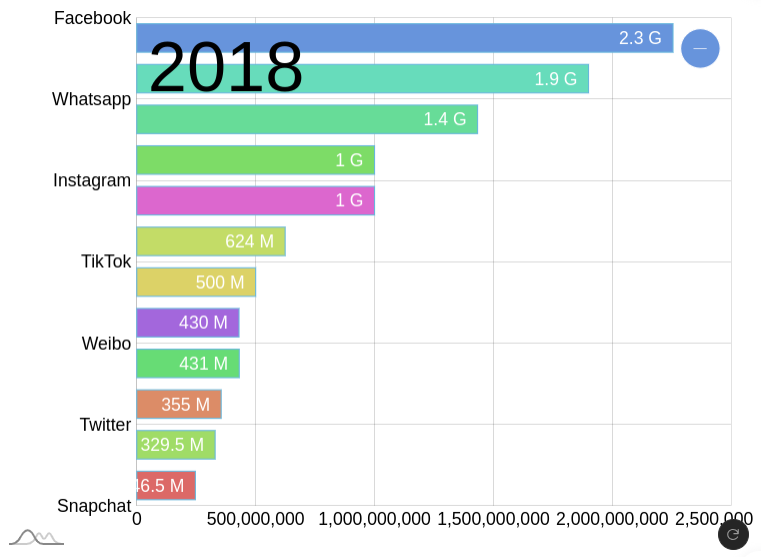
The bar chart shows the trend starting from Friendster initially in "2003" and moving on to cater each year till "2018".
Data representation at the start


Data representation at the end

Use cases of bar chart race
There are various real-life domains in which such a visualization option can be immensely helpful.
Uses of bar charts |
Visualize economic growth over time with a dynamic bar chart race. |
Track sports team rankings through animated bar charts for each season. |
Represent stock market performance with animated bars depicting changing values |
Visualize environmental indicators, like temperature or pollution, over multiple years. |
Track health and disease trends with dynamic bar charts for mortality rates. |
Compare social media engagement with captivating bar chart race visuals. |
How well do you know bar chart races?
What does the change in a the height of a bar represent?
How data changes over time.
Bar chart races can depict:
The change in the numerical values of the data mapping to the bar.
Free Resources