Create a to-do list in Elm
Elm is a functional programming language that was built in 2012 by Evan Czaplicki. It is mainly used to create the frontend of websites. It can create numerous web applications, such as a to-do list. A to-do application is designed to help individuals and teams organize and manage tasks, activities, and goals. It allows us to create, manage, and complete tasks efficiently. This Answer will go through creating a basic to-do list application in Elm.


Expected result
Before creating a to-do list application in ELM, We can see the output below and better understand how the app will look.

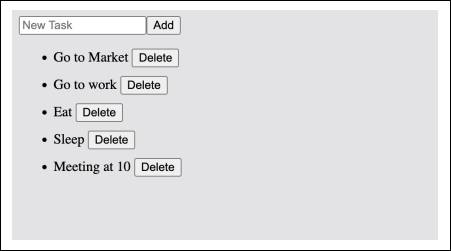
The Elm architecture
Elm programming architecture is commonly called Elm Architecture. It is an Elm application structure pattern based on the Model-View-Update (MVU) paradigm.
There are three main components of the Elm Architecture:
Model: This serves as an application state representation. It is a data structure that contains the important data of the application.
View: This renders the current state of the model. It returns the HTML representation of the user interface after receiving the model as an argument.
Update: This is used to update the state of the model. It returns an updated state for the model after obtaining its current state and action to perform.
Getting started
A few basic steps have to be taken to create a to-do application in Elm:
Import the required modules
In the code snippet below, we import the basic modules, functions, attributes, etc., for form creation in Elm.
import Html exposing (button, Html, div, text, ul, li, input)import Html.Attributes exposing (placeholder,style, value)import Html.Events exposing (onClick, onInput)import List exposing (filter)import Browser
Browser: This module is used to set up web applications.Html: This module is used to handle various events and build and modify HTML components. It is responsible for creating the UI or user interface.List: This module uses thefilterfunction to filter elements based on the given condition.
Define and initialize the Model
In the code snippet below, we define our model.
type alias Model ={ tasks : List Task, currentTask : String, nextId : Int}init : Modelinit ={ tasks = [], currentTask = "", nextId = 1}
type alias: This defines theModelcustom data type with list, string, and int type fields.init: This is a function used to initialize theModeldata structure. It will return theModeldata structure with its initialized values.
Define the update function
In the code snippet below, we define the update function, which takes two arguments (Msg and Model) and returns Model (updated state). The model is updated correctly based on the type of message received through the use of a pattern-matching approach.
update : Msg -> Model -> Modelupdate msg model =case msg ofAdd ->letnewTask ={ id = model.nextId, name = model.currentTask }in{ model | tasks = newTask :: model.tasks, currentTask = "", nextId = model.nextId + 1 }UpdateTask newTask ->{ model | currentTask = newTask }Delete taskId ->{ model | tasks = List.filter (\task -> task.id /= taskId) model.tasks }
Define the view function
In the code snippet below, we define the view function. It takes the parameter Model and creates an HTML user interface. We can insert/add a task in the given field by clicking the “Add” button.
view : Model -> Html Msgview model =div [][ input [ placeholder "New Task", value model.currentTask, onInput UpdateTask ] [], button [ onClick Add ] [ text "Add" ], ul [] (List.map viewTask model.tasks)]
Complete code
The complete code of the to-do application is given below in src/Main.elm. We can run the application by pressing the “Run” button. The elm.json file represents the dependencies.
{
    "type": "application",
    "source-directories": [
        "src"
    ],
    "elm-version": "0.19.0",
    "dependencies": {
        "direct": {
            "elm/browser": "1.0.1",
            "elm/core": "1.0.2",
            "elm/html": "1.0.0",
            "elm/time": "1.0.0",
            "elm/http": "2.0.0",
            "elm/json": "1.1.3"
        },
        "indirect": {
            "elm/url": "1.0.0",
            "elm/virtual-dom": "1.0.2",
            "elm/bytes": "1.0.8",
            "elm/file": "1.0.5"
        }
    },
    "test-dependencies": {
        "direct": {},
        "indirect": {}
    }
}Free Resources