Finger counter using MediaPipe
MediaPipe is a framework developed by Google to facilitate developers with pre-built and customizable AI solutions. It enables the developers to create applications that require real-time observation of video or audio data by providing open-source pre-trained models.
Expected performance
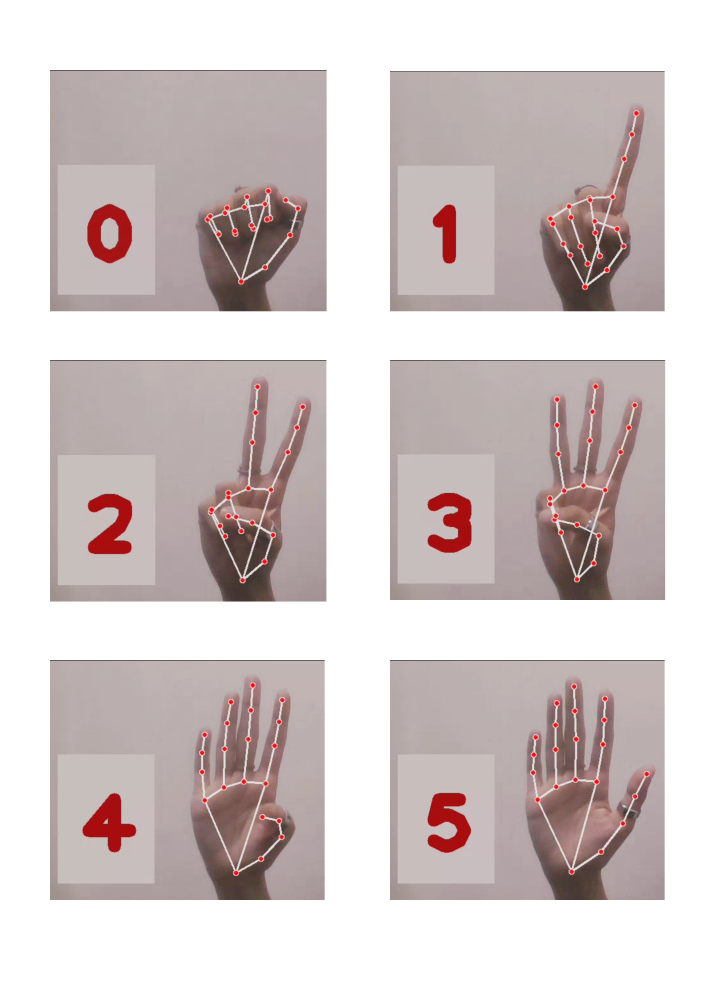
The finger counter model processes the pre-recorded video and a live hand movement via web camera and displays the total fingers extended in the current moment. The model is trained on pre-defined landmarks that are used to check if any of the fingers are extended to add to the count.
The image below shows the six possible use cases, and the model has given correct observations on each of them.

What are landmarks?
Landmarks are the places defined on the hand, like knuckles, palms, and tips. These defined places are used to track the hand gestures and submit observations based on the training and pre-existing data. MediaPipe, by default, contains standard identification values for specific landmarks; for example, the index fingertip is 8.
If we consider the fingertips and the wrist, the following are the default MediaPipe landmarks.


Let's code this understanding and see if the expected output can be achieved easily.
Required imports
To implement this finger counter in code, we first need to import the following libraries and modules.
import cv2import timeimport osimport mediapipe as mpimport HandTrackingModule as htm
cv2:TheOpenCVlibrary that is used for computer vision-related tasks.time:Used to measure the time intervals and delays.os:Used to interact with the operating system and access file operations.mediapipe:Used to build computer vision and AI-related applications.HandTrackingModule:The custom model contains gesture tracking functions and implementations.
Example code
In this code, we implement a model that can detect if a finger is extended and automatically show the count of total extended fingers in the current moment.
import cv2
import mediapipe as mp
import time


class handDetector():
    def __init__(self, mode=False, maxHands=1, detectionCon=0.5, trackCon=0.5):
        self.mode = mode
        self.maxHands = maxHands
        self.detectionCon = detectionCon
        self.trackCon = trackCon

        self.mpHands = mp.solutions.hands
        self.hands = self.mpHands.Hands(self.mode, self.maxHands,
                                        self.detectionCon, self.trackCon)
        self.mpDraw = mp.solutions.drawing_utils

    def findHands(self, img, draw=True):
        imgRGB = cv2.cvtColor(img, cv2.COLOR_BGR2RGB)
        self.results = self.hands.process(imgRGB)
        # print(results.multi_hand_landmarks)

        if self.results.multi_hand_landmarks:
            for handLms in self.results.multi_hand_landmarks:
                if draw:
                    self.mpDraw.draw_landmarks(img, handLms,
                                               self.mpHands.HAND_CONNECTIONS)
        return img

    def findPosition(self, img, handNo=0, draw=True):

        lmList = []
        if self.results.multi_hand_landmarks:
            myHand = self.results.multi_hand_landmarks[handNo]
            for id, lm in enumerate(myHand.landmark):
                # print(id, lm)
                h, w, c = img.shape
                cx, cy = int(lm.x * w), int(lm.y * h)
                # print(id, cx, cy)
                lmList.append([id, cx, cy])
                if draw:
                    cv2.circle(img, (cx, cy), 15, (255, 0, 255), cv2.FILLED)

        return lmList


def main():
    pTime = 0
    cTime = 0
    cap = cv2.VideoCapture('countFingers.mp4')
    detector = handDetector()
    while True:
        success, img = cap.read()
        img = detector.findHands(img)
        lmList = detector.findPosition(img)
        if len(lmList) != 0:
            print(lmList[4])

        cTime = time.time()
        fps = 1 / (cTime - pTime)
        pTime = cTime

        cv2.putText(img, str(int(fps)), (10, 70), cv2.FONT_HERSHEY_PLAIN, 3,
                    (255, 0, 255), 3)

        cv2.imshow("Image", img)
        cv2.waitKey(1)


if __name__ == "__main__":
    main()
Code explanation
FingerCounter.py
It is the main file that contains the customized specification of the application's appearance, the source of data being tested, and checks.
Lines 1–4: Import all the necessary libraries and modules.
Line 6: Set the width and height of the webcam.
Lines 8–10: Use
VideoCapture()to open the camera and specify the video resolutions.Pass
0as a parameter to open a webcam.Pass the filename or file link to open a pre-recorded video inside
"".
Line 12: Initialize a
pTimeattribute that tracks the time of the previous frame.Line 14: Create a
handDetectorclass instance from the importedHandTrackingModule.
Lines 16–17: Define a list containing landmark IDs corresponding to the fingertips and a sum attribute initialized to zero.
Lines 19,59–60: Create a
whileloop for continuous detection, which terminates whenenterkey is pressed, i.e.,13in ASCII.Lines 20–22: Use
read()to capture the image and then callfindHandsmethod to detect hand and track landmarks and call thefindPositionmethod on it to get a list of landmarks.Lines 24–25: If landmarks are detected in the selected frame, then create a
fingers_listlist.Lines 28–38: If the thumb is horizontally extended and the fingers are vertically extended, append one or else append zero to the
finger_list.Lines 40–43: Save the count in
totalFingersand add it to the sum to track the total detections per frame.Lines 46–48: Create an output box inside the frame that shows the current finger count and keeps changing dynamically.
Lines 50–56: Calculate the rate of frames per second displayed inside the frame and keeps changing dynamically.
Line 58: Finally, display the image frame using
imshow()method.
HandTrackingModule.py
It is the custom module file containing a handDetector class that contains all the necessary functions used to detect landmarks and count fingers.
Lines 7–16: Initialize the properties of the hand tracking and Mediapipe objects.
| Set the static image mode. It is false in this example. |
| The number of hands that are being detected. It is 1 in this example. |
| Set the detection confidence threshold to minimize the false positive cases. |
| Set the tracking confidence threshold to minimize the false positive cases. |
| Hold the hands module to |
| Create a |
| Give access to the drawing utility functions. |
Lines 18–28: A
findHandsmethod that converts the image to RGB format and draws the landmarks if the hand is detected usingdraw_landmarks.Lines 30–44: A
findPositionmethod that iterates through a list of landmarks, calculates their dimensions, and stores the positions in thelmList.Lines 47–67: A
mainmethod that sets all the variables, creates ahandDetecterinstance, and calls the methods to make observations and display count andFPS Frames per second
Code output
Once the code showed the expected response on the live dataset through the webcam, it was tested on a pre-recorded video. The code correctly identified the finger count, as seen in the results below.
Note: Learn more about gesture detection in deep learning.
Test your understanding
What should we do if we want the model to detect the count of two hands?
It is not possible.
change maxHands = 1 to maxHands = 2
Add another list to store the tipIds.
Free Resources