How to adjust Kubernetes CPU and memory easily
Assigning and managing CPU and memory resources in Kubernetes can be tricky and easy at the same time. Having done this task for numerous customers, I have decided to create a framework zone. I will show you what Kubernetes resources and limits are, and also how to manage them.

The framework contains the following steps:
- Infographic guide shows what algorithms to follow to determine and assign the resources and limits.
- Code templates allow applying those algorithms with minimal adaptation.
- Algorithms and tools gather the metrics about resource consumption and set up the limits.
- Links to the official documentation are provided, where you can quickly grab some examples and read more detailed information.
What this shot doesn’t contain
My goal here is simplicity. You won’t find detailed descriptions of how resources, limit ranges, and quotas work. There are plentiful articles written about that, and the Kubernetes documentation goes over it thoroughly. Instead, here you will find information on how to quickly start adjusting Kubernetes resources in your projects.
Basic guide on CPU and memory resources
Here are two cheat sheets explaining what resources are in terms of Kubernetes, measurement units, the resource state workflow, and some rules on how to apply it:
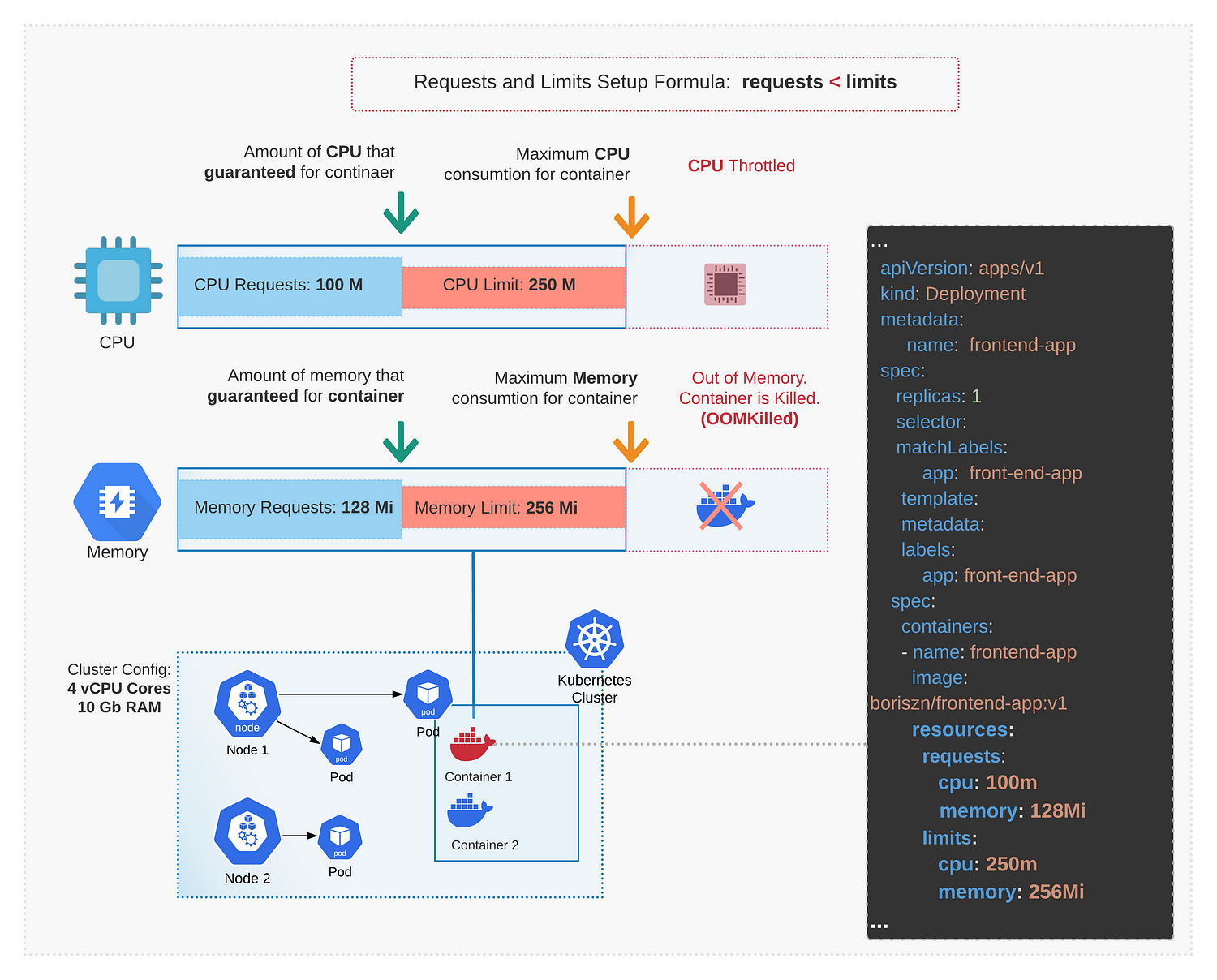
CPU and memory measurement units
Be aware that the CPU calculation formula is not applied to every setup or project. It is used as a starting point in the process of detecting and assigning the resource and limits.
The Kubernetes deployment YAML template includes container, resource, and limits definitions:
apiVersion: apps/v1
kind: Deployment
metadata:
  name: aks-application
spec:
  replicas: 1
  selector:
    matchLabels:
      app: aks-application
  template:
    metadata:
      labels:
        app: aks-application
    spec:
      containers:
      - name: aks-application
        image: hubname/aks-application-image:1.0.0
        resources:
          requests:
            cpu: 100m
            memory: 128Mi
          limits:
            cpu: 250m
            memory: 256Mi
More detailed information and code snippets:
Kubernetes.io. Assign memory resource guide. https://kubernetes.io/docs/tasks/configure-pod-container/assign-memory-resource Kubernetes.io. Assign CPU resource guide. https://kubernetes.io/docs/tasks/configure-pod-container/assign-cpu-resource/ Kubernetes best practices resource requests and limits https://cloud.google.com/blog/products/containers-kubernetes/kubernetes-best-practices-resource-requests-and-limits Azure Kubernetes Services. Developer best practices resource-management https://learn.microsoft.com/en-us/azure/aks/developer-best-practices-resource-management
Resources Quota guide
Quota templates that contain the definition of quotas for persistent volume claims and resources in the backend namespace:
apiVersion: v1
kind: ResourceQuota
metadata:
  name: backend-storage-quota
spec:
  hard:
    persistentvolumeclaims: "2"
    requests.storage: "1Gi"
--
apiVersion: v1
kind: ResourceQuota
metadata:
  name: backend-namespace-quota
spec:
  hard:
    request.cpu: 400m
    request.memory: 9600Mi
    limits.cpu: 1200m
    limits.memory: 11600Mi
You can use the kubectl apply command to set the quota constraints for a namespace.
kubectl apply -f resource-quota.yaml — namespace backend
A detailed explanation of quotas, metrics, and how to use quota expressions and code samples:
Limit ranges guide
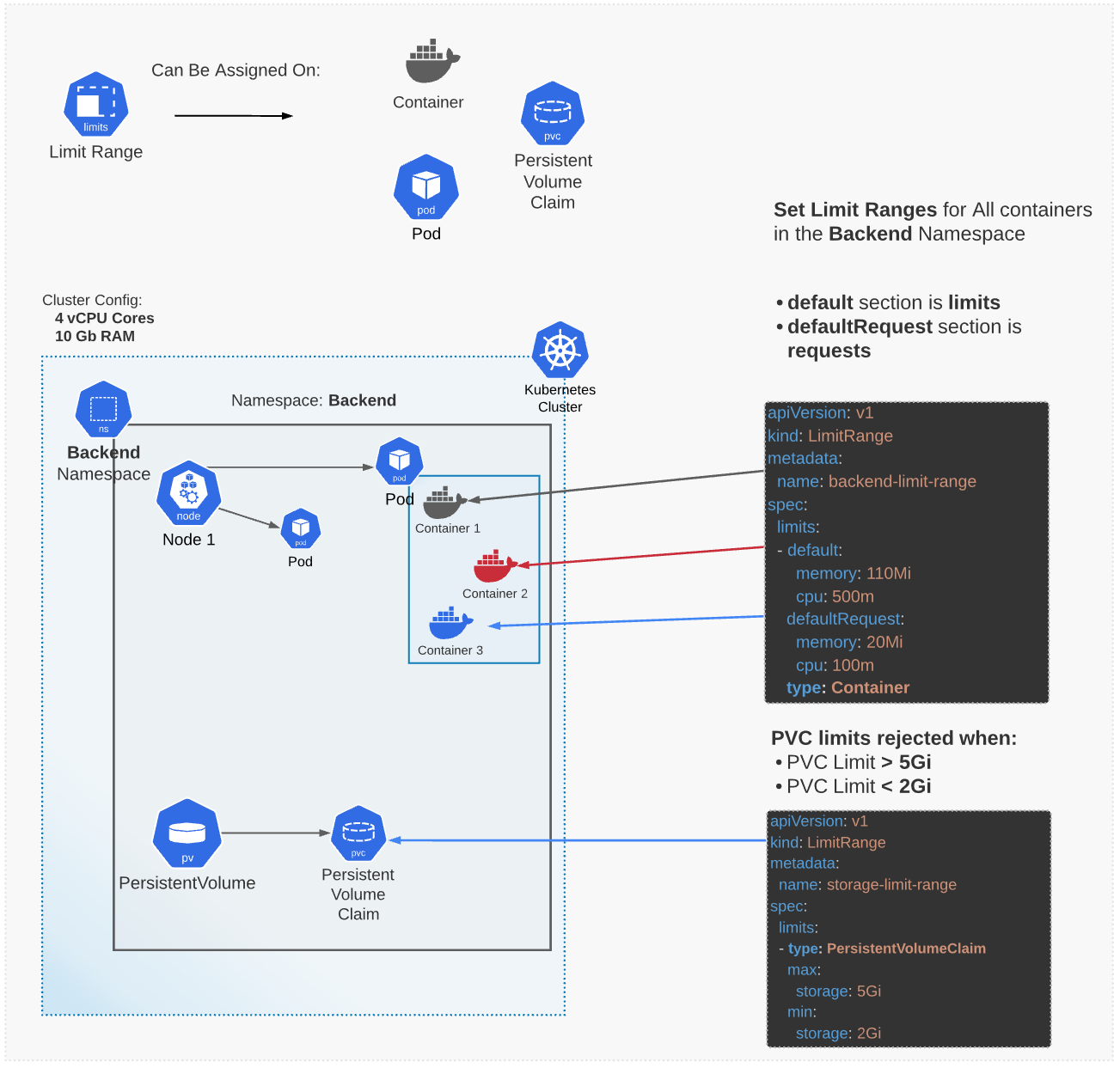
Two limit range code templates to limit CPU and memory resources for the containers and to limit the storage (Persistent Volume Claim) are shown below. To set this constraint, you can also use:
kubectl apply -f path/to/file.yaml -n namespace
apiVersion: v1
kind: LimitRange
metadata:
  name: backend-limit-range
spec:
  limits:
  - default:
      memory: 110Mi
      cpu: 500m
    defaultRequest:
      memory: 20Mi
      cpu: 100m
    type: Container

--
apiVersion: v1
kind: LimitRange
metadata:
  name: backend-storage-limits
spec:
  limits:
  - type: PersistentVolumeClaim
    max:
      storage: 5Gi
    min:
      storage: 2Gi
More detailed information and code snippets:
- Manage resources. CPU default namespace
- Kubernetes io. Limit storage consumption
- Kubernetes io. Limit ranges
Tools and frameworks that help with the resource and limits routine
- Popeye scans your cluster for potential issues with configuration, resources, and network holes, and generates detailed reports with all issues.
- Goldilocks scans pods for resource limits and creates reports with recommended resources.
- Kube-advisor is a simple tool from the Azure team that scans pods for missing resources and limits requests.
- K9s+benchmark provides a command-line interface (CLI) that allows you to easily manage, monitor, and even benchmark your cluster in your favorite terminal software.
The above are some useful free and open-source tools which are easy to set up. You can also combine these tools with Datadog, Grafana+Prometeus, or Azure Monitor to improve resource and limits monitoring.
Algorithm
- Set up resource requests. Get information about the CPU and memory usage of specific applications/containers.
- Set up resource limits. Set up resource requests. Run a load test to detect the CPU and memory of a container under the high load.
- Monitor the CPU and memory usage of containers.
- Monitor persistent storage usage.
- Check if you can apply a resource limit using limit ranges (if you have similar containers, storage set up).
- Apply a limit range for storage if needed. Or, use Quota (it is not recommended to apply Quota for a production environment).
Free Resources
- undefined by undefined