How to check React Native version
React Native is a popular framework for building mobile applications using JavaScript and React. As with any software development framework, it is important to be aware of the version of React Native you are working with, to understand the compatibility of your code, utilize the latest features and bug fixes, and stay up-to-date with the React Native community.
Here are three common approaches to determine the React Native version of your project:
Checking
package.jsonfileUsing
infooptionUtilizing the CLI
Checking package.json file
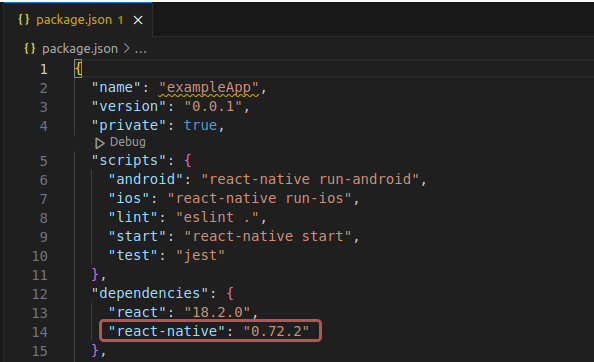
React Native version information is usually stored in the package.json file of React Native project.
Follow these steps to find the installed version of react-native:
Locate the root directory of your React Native project.
Open the
package.jsonfile in a text editor.Look for the
"react-native"key within the"dependencies"section.The value corresponding to
"react-native"key represents the React Native version used in your project.

Using info option
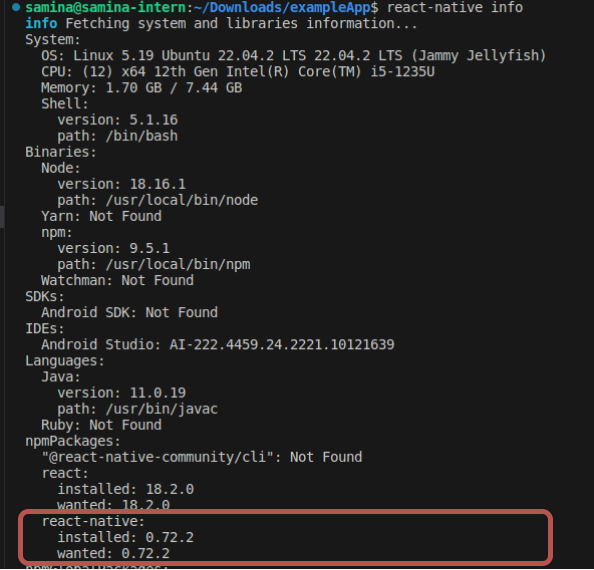
Another method to check the React Native version is by using the info option. This option provides comprehensive information about the React Native environment. Follow these steps:
Open the terminal.
Navigate to the project directory where React Native is installed.
Run the following command:
react-native info
This command gathers and displays detailed information about the React Native setup, including the installed version.
Look for the line that indicates the React Native version. It will typically be listed under the
npmPackagessection.

Utilizing the CLI
We can also check the installed version of React Native using
Open the terminal.
Navigate to the directory where React Native is installed.
Execute the following command:
npx npm view react-native version
This command displays the installed React Native version in the console output.
Conclusion
To find the version of React Native in our project, we have several options. We can check the package.json file by opening it and looking for the "react-native" key under the "dependencies" section. Another method is using the info option by running react-native info in the terminal, which will display information about the installed version of React Native. Alternatively, you can use the CLI command npx npm view react-native version to see the installed version directly in the console.
Free Resources