How to concatenate two or more Pandas DataFrames in Python
Pandas is a Python library used for robust data structure manipulation. Dataframe in Panda allows us to store data in a tabular form and apply multiple functionalities such as data inspection, visualization, merge, and many more.
Create a Pandas DataFrame
Dataframes are two-dimensional data structures, like a 2D array, having labeled rows and columns. We can create a Pandas DataFrame in Python as follows:
import pandas as pd #importing pandas librarydata=[['Cars',5],['Motorbikes',10],['Trucks',2],['Minivans',1]] #populating data for dataframedf=pd.DataFrame(data,columns=['Vehicle','Numbers']) #creating dataframeprint(df) #printing the dataframe created
Explanation
- Line 1: We create
pdas an alias ofPandalibrary to be used later in the code for convenience. - Line 2: We create a list named
dataand store the data that needs to be stored in DataFrame. - Line 3: We use
pd.DataFrame(data,columns)to create the DataFrame, wheredatarepresent the list created in line 2 andcolumnsrepresents the column labels. - Line 4: The Dataframe created is printed on the console.
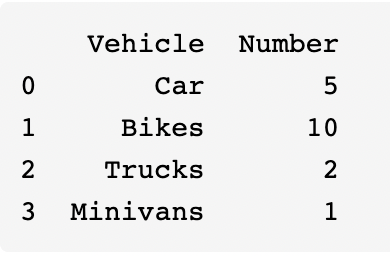
Here's the expected output we'll get when we run the code above:
Concatenating DataFrames
Now let's talk about how we can concatenate Panda DataFrames. A simpler way to concatenate multiple DataFrames is to use the concat function from pandas library. We'll use the above coding example to create multiple Dataframes for simplicity.
import pandas as pd #importing pandas library#DataFrame 1data=[['Cars',5],['Motorbikes',10],['Trucks',2],['Minivans',1]]df1=pd.DataFrame(data,columns=['Vehicle','Numbers'])print('DataFrame 1 \n' , df1)#DataFrame 2data=[['Sport Car',4],['SUVs',5]]df2=pd.DataFrame(data,columns=['Vehicle','Numbers'])print('\n DataFrame 2 \n' ,df2)#DataFrame 3data=[['Wagons',6],['Sedans',10]]df3=pd.DataFrame(data,columns=['Vehicle','Numbers'])print('\n DataFrame 3 \n' ,df3)#concatenationlst = [df1, df2, df3] # List of your dataframesdf_result= pd.concat(lst)print('\n Concatenated Output \n' ,df_result)
Dataframe 2 and 3 are just a repeat of Dataframe 1 created in the previous example with different values.
Explanation
- Line 19: A list
lstof DataFrames is made. - Line 20: The
pd.concatfunction is used to concatenate all the DataFrames present in the listlst.
This is one of the simplest ways we can concatenate multiple DataFrames using a single concat command. The key is to make a list of DataFrames (df1, df2, df3 in this example) and use that list in pd.concat function. We can also add more DataFrames to the list and see them concatenate in the above example.
In this example, we concatenated three DataFrames using the concat function. Here's the expected output when we run this code:
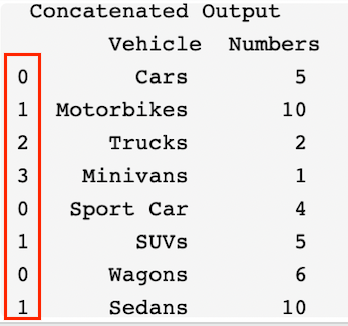
Notice how the index of the vehicles is repeated (highlighted in red). This happens because indexes are copied from the original DataFrames. To remove that we add ignore_index=True to the concat command in line 20 below.
import pandas as pd #importing pandas library#DataFrame 1data=[['Cars',5],['Motorbikes',10],['Trucks',2],['Minivans',1]]df1=pd.DataFrame(data,columns=['Vehicle','Numbers'])print('DataFrame 1 \n' , df1)#DataFrame 2data=[['Sport Car',4],['SUVs',5]]df2=pd.DataFrame(data,columns=['Vehicle','Numbers'])print('\n DataFrame 2 \n' ,df2)#DataFrame 3data=[['Wagons',6],['Sedans',10]]df3=pd.DataFrame(data,columns=['Vehicle','Numbers'])print('\n DataFrame 3 \n' ,df3)#concatenationlst = [df1, df2, df3] # List of your dataframesdf_result= pd.concat(lst, ignore_index=True)print('\n Concatenated Output \n' ,df_result)
The output of the coding example above is as follows:
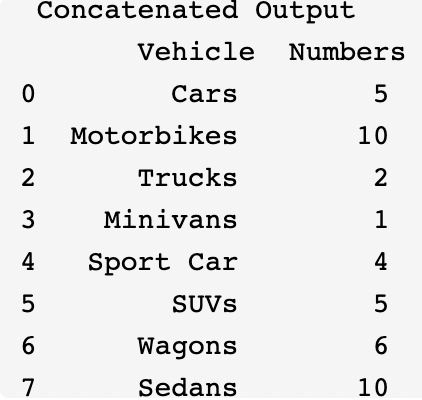
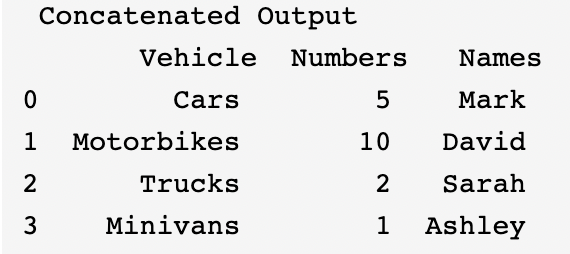
So what if we want to concatenate the DataFrames sideways? By default, the concat command merges the DataFrames on axis = 0. However, we can manually update that by simply adding axis =1 in concat command in line 15 below.
import pandas as pd #importing pandas library#DataFrame 1data=[['Cars',5],['Motorbikes',10],['Trucks',2],['Minivans',1]]df1=pd.DataFrame(data,columns=['Vehicle','Numbers'])print('DataFrame 1 \n' , df1)#DataFrame 2data=[['Mark'],['David'],['Sarah'],['Ashley']]df2=pd.DataFrame(data,columns=['Names'])print('\n DataFrame 2 \n' ,df2)#concatenationlst = [df1, df2] # List of your dataframesdf_result= pd.concat(lst, axis =1)print('\n Concatenated Output \n' ,df_result)
The output of the coding example above is as follows:
Free Resources