How to create an Azure resource group from the Azure portal
Azure Resouce Group is a logical group of resources that includes virtual machines, databases, web applications, and storage accounts.
The resource group stores metadata about the resources that it contains. The location of the metadata is specified in the “location” part of the resource.
Creating a resource group
- Log in to Azure portal.
- Search for “resource group” in the search bar .
- Select “Resource groups”.
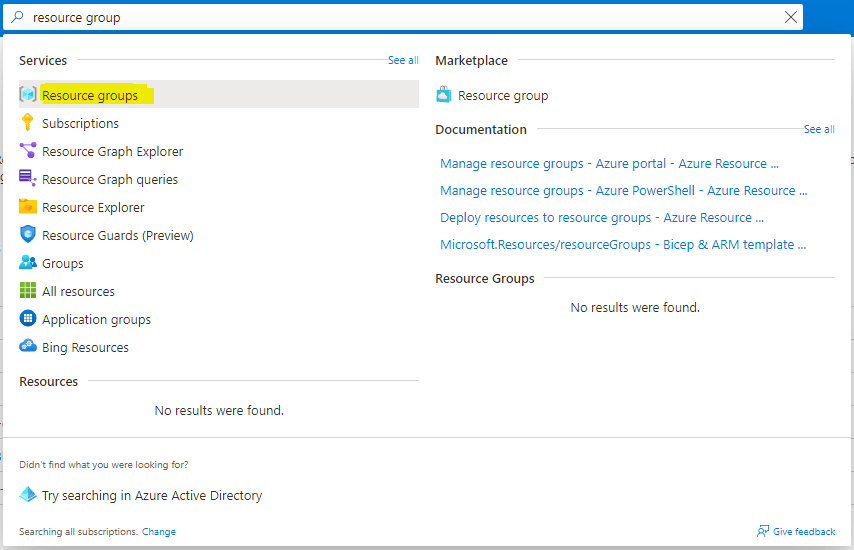
1
- It will display all the resource groups under your subscription.
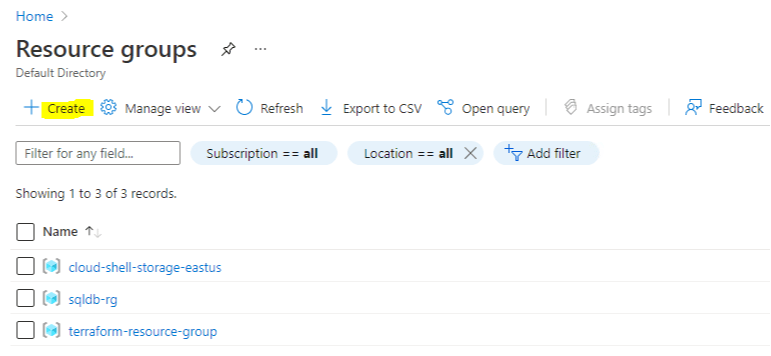
2
- Click on
+ Create. - It will open a form to create a resource group.
- Select your subscription.
- Provide a unique name for
Resource group. - Select the
Region.
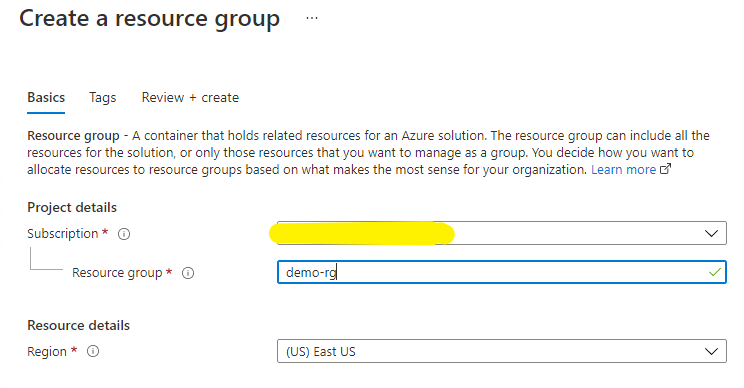
3
- If you want to provide
tags, you can do it by clickingNextotherwise click onReview + Create. - Azure will take some time to validate.
- If validation is successful, then click on
Create. - If validation fails, check the error and resolve it.
- You can check the progress in the notifications.
- After your resource group is created, you can check it in
Resource Groupsas shown in the second image.