How to create guess the number game in React JS
React, a JavaScript library, is used for building the user interface of web applications by leveraging its component-based architecture.
This approach allows developers to break a web page into modular sections, making the development process more organized and scalable. Building a Guess the Number game is a practical way to gain hands-on experience with React.
This engaging yet straightforward project offers a practical way to understand how React components work together, how to manage state, and how to handle user interactions. By building this game, learners can grasp the fundamental concepts of React in a fun and interactive manner.
The main idea of this game is that the system will generate a random number and store it somewhere in a variable. Then, the user will guess that hidden number (providing the instruction by the system whether to try for a lower or higher than the current number) by multiple attempts until the correct number is guessed.

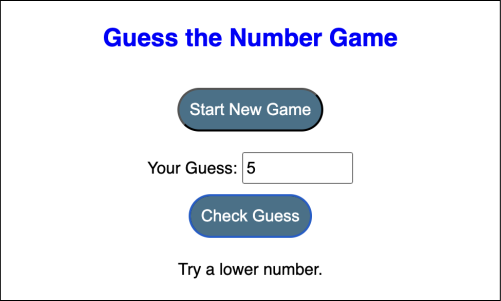
Create the game component
Let’s first create a basic game component, containing some input fields required to display the game interface to the user.
<div><h1>Guess the Number Game</h1><button onClick={generateRandomNumber}>Start New Game</button><div><label>Your Guess:</label><input type="number" value={guess} onChange={handleInputChange} /></div><button onClick={checkGuess}>Check Guess</button><p>{message}</p></div>
In the above code, we define a div element to contain the interface. Inside this div element:
Line 2: We use an
h1element to display the main heading “Guess the Number Game.”Line 3: We create a
buttonelement with the text “Start New Game.” TheonClickevent will call thegenerateRandomNumber()function when the button is clicked.Lines 4–7: We start another
divelement to group the input field and its label. Inside thisdivelement.Line 5: We use a
labelelement with the text “Your Guess:” to describe the input field.Line 6: We create an
inputelement of typenumberto allow the user to enter their guess. Thevalueattribute is set to theguessvariable to hold the current value of the guess. TheonChangeevent will call thehandleInputChange()function when the input value changes.Line 8: We create another
buttonelement with the text “Check Guess.” TheonClickevent will call thecheckGuess()function when the button is clicked.Line 9: We use a
pelement to display themessagevariable, which likely contains feedback for the user based on their guess.
Create state variables
We’ll need the following state variables to make this game executable:
To store the random hidden number to be guessed, we’ll need a
numberand itssetNumberstate variable.To store the guessed number, another state variable
guesswill be required.To display the message and to provide instructions to the user for lower or higher number, one more
messagestate variable will be used.
const [number, setNumber] = useState('');const [guess, setGuess] = useState('');const [message, setMessage] = useState('');
In the above code:
Line 1: We use the
useStatehook to declare a state variablenumberand a functionsetNumberto update it. The initial value ofnumberis an empty string''.Line 2: Similarly, we use the
useStatehook to declare another state variableguessand a functionsetGuessto update it. The initial value ofguessis an empty string''.Line 3: Lastly, we use the
useStatehook to declare a third state variablemessageand a functionsetMessageto update it. The initial value ofmessageis an empty string''.
Initializing state variables with useState('') hook ensures that our game component starts with appropriate initial values, maintaining clarity and consistency in the user interface. It also helps dynamically update the feedback displayed to the user and enhances the game’s interactive and instructional aspects.
Implement functionalities
Now we’ll create the functions required for this game development. Let’s discuss them one by one:
generateRandomNumber(): Once the game gets started, a random number will be generated by the system usingMath.randomthe function.checkGuess(): Every time the user enters a new number, we’ll verify whether this number is lower, higher, or equal to the generated random number and provide the instructions respectively.handleInputChange(): An input handler to set the number (entered by the user) in the input field.
const generateRandomNumber = () => {// Generate a random number between 1 and 100const randomNumber = Math.floor(Math.random() * 100) + 1;setNumber(randomNumber);setMessage('');};const checkGuess = () => {if (guess === '') {setMessage('Please enter a number.');} else {const userGuess = parseInt(guess);if (userGuess === number) {setMessage('Congratulations! You guessed the correct number.');} else if (userGuess < number) {setMessage('Try a higher number.');} else {setMessage('Try a lower number.');}}};const handleInputChange = (event) => {setGuess(event.target.value);};
In the above code:
Lines 1–6: We define the
generateRandomNumber()function. Inside this function:Line 2: We generate a random number between 1 and 100. For this, we use the
Math.random()method, and multiply the result by 100. We call theMath.floor()method to take the floor value and add 1.Line 3: We call the
setNumber()method to update thenumberstate with this randomly generated number.Line 4: We call the
setMessage()method to reset themessagestate to an empty string.
Lines 8–21: We define the
checkGuess()function. Inside this function:Line 9–10: We check if the
guessstate is an empty string. If theguessis empty, we call thesetMessage()method to update themessagestate to “Please enter a number.”.Line 12: Otherwise, if the
guessis not empty, we use theparseInt()method to parse it to an integer and store it in theuserGuessvariable.Lines 13–14: We check if the
userGuessis equal to thenumber. If it is, we call thesetMessage()method to update themessagestate to “Congratulations! You guessed the correct number.”Lines 15–16: If the
userGuessis less than thenumber, we call thesetMessage()method to update themessagestate to “Try a higher number.”Lines 17–18: If the
userGuessis greater than thenumber, we call thesetMessage()method to update themessagestate to “Try a lower number.”
Lines 23–25: We define the
handleInputChange()function. Inside this function:Line 24: We call the
setGuess()method to update theguessstate with the value of the input field.
Code example
Here’s the integration of the complete code:
Summary
In this Answer, we explored how to create a Guess the Number game using React, a popular JavaScript library for building user interfaces. Our game involved the system generating a random number, in which the user has to guess with guidance on whether to try higher or lower numbers until they guess correctly.
Free Resources