How to dismiss a React-Bootstrap popover on click outside
Bootstrap is a powerful open-source CSS framework containing prebuilt design templates using HTML, CSS, and Javascript. Bootstrap is useful for increasing our styling productivity.
Note: To enhance our styling experience in React, we can make use of the
react-bootstraporbootstrappackages that allow us to integrate Bootstrap within our React code.
Here's an answer that can help you set up Bootstrap with React.
Popovers
A popover contains content that can be shown over the default content present on the screen already. This content is displayed when a user performs an action such as clicking or hovering over a front-end element. This element is known as the trigger element.
We can use it to provide added information or options related to the main content.


Take the illustration above, if we click the button, a popover will appear over the content without disrupting the content flow.

Popover in React-Bootstrap
Luckily, React provides us with a built-in component for popovers through React-Bootstrap. This Popover component accepts several props as well for a better user experience.
Required parameters
id: A unique identification number for the popover.content: The main content of the popover i.e. a string or a React element.
Apart from these, we can add optional props to customize our experience as well.
Optional parameters
title: The heading of the popover element.placement: The placement of the popover with respect to the element that triggers it. For instance, "top" or "left-end".trigger: The event that triggers the popover we aim to show. The values for this could be one of the following: "click", "hover", "focus", "hover focus", or "manual".rootClose: A boolean value that is responsible for indicating if the popover should be closed when we click outside of it. The default value isfalse.onHide: A callback function that is called when the popover is hidden or closed.show: A boolean value that indicates if the popover should be shown i.e.trueor hidden i.e.false.
Note: More than one triggers can be combined using a string separated by spaces. The default value for trigger is "hover-focus".
Dismissing a popover by clicking outside it
The following code demonstrates how we can click over an element to show a popover and then click anywhere outside of it to dismiss it.
import React from 'react';
import ReactDOM from 'react-dom';
import App from './app.js';
import './style.css';

ReactDOM.render(
  <App />,
  document.getElementById('root')
);
Code explanation
Line 2: We import the
Popovercomponent from React-Bootstrap here. Other components are imported for the page content.Line 7: We use a ref object named
targetRefthat binds with the button.Lines 9–15: We define functions to set the
showPopoverstate to true or false.Lines 25–39: Our button upon clicking changes the showPopover to true initially and then just reverses the current boolean value.
Lines 41–61: The
Overlaycomponent is used to wrap thePopovercomponent, allowing the popover to be shown or hidden based on theshowPopoverstate. It further positions the popover relative to the target button and handles events like clicking outside the popover to close it i.e.rootCloseby using theonHideprop to call thehandleOverlayClosefunction.Lines 49–58: This line creates a
Popovercomponent we rendered in Overlay with a border and aCardinside it. We initialize the title and text content for our Popover here.
Output
After our application is rendered and the popover is clicked, it looks like this:
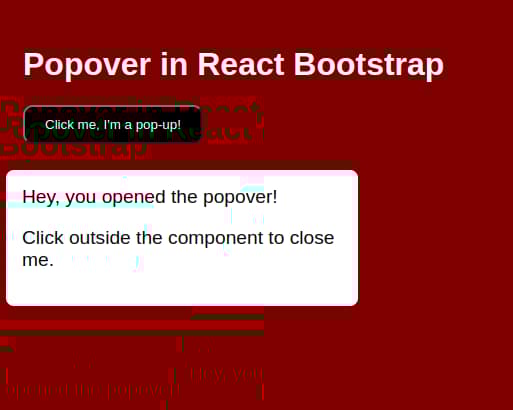
Now when we click at any point outside the popover, the popover is dismissed.

Benefits of using popovers
From our application, we can conclude that popovers help in the following areas and are commonly used in UIs to provide on-demand interactions without needing to clutter our main content.


If we haven’t set the value for our trigger, what will the setting be on first loading the page?
Free Resources