How to dockerize Drupal Env using Docker & Nginx
Previously, we discussed how to set up a quick web server based on nginx & php-fpm for our drupal stack.
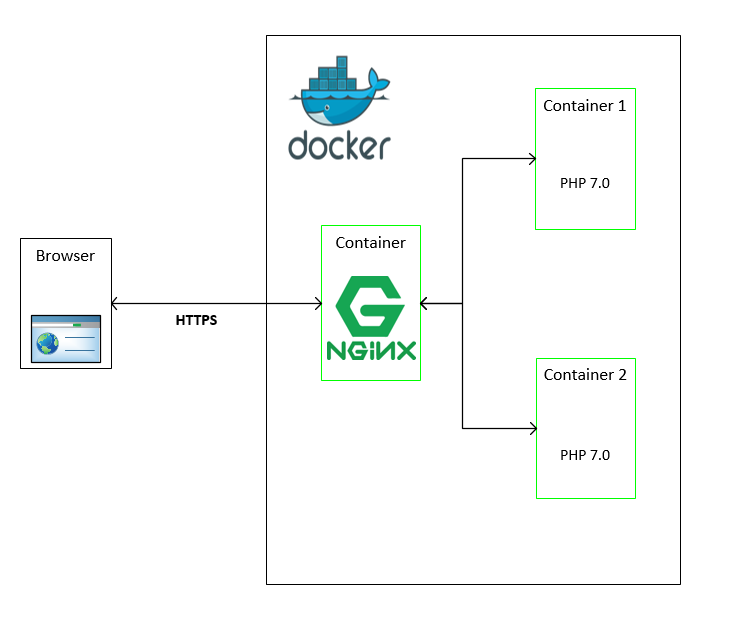
Basic docker knowledge is a must to go further. The first thing we’ll need is a docker-compose file where we will group the services we need for our case:
nginxphp-fpmmariadbmemcached(optional)redis(optional)
We’ll provide the needed config files for each one of our containers (same files as from the first tutorial) – these files will be copied directly into our containers.
Next, we will:
-
expose & map each service with the port of our choice on the host machine
-
mount the intended codebase project as a volume in the
nginx&php-fpmcontainers so that we can access it within the container -
we need persistent database schemas, so we will have to add an external volume to store data from the
Mariadbcontainer
By linking webserver - database and php-fpm, we can add dependencies for the mandatory services to make sure that the webserver won’t start before it has an accessible PHP container & MariaDB.
Now that I covered the configuration files, let’s move on to the used docker images.
I’ve just used the official image from docker-hub for mariadb because I don’t need any prior on build config.
As for the PHP image, I’ve created a custom image with some drupal tweaks that I find useful, like adding gd, imagck, apcu, memcached, redis, composernginx image for two reasons:
- Brotli – compression support
- User setting – for both
php&nginximages a user needs to own the project root
Note: changing the config files of
nginxcan be tricky, so to play it safe, I’ve managed to do it on build time in the Dockerfile.
Finally, we will get the following docker-compose file:
version: "3"
services:
  web:
    build: ./web
    restart: always
    ports:
      - "80:80"
      - "443:443"
    links:
     - php
     - database
    networks:
      vpcbr:
        ipv4_address: 172.28.0.101
    environment:
      - NGINX_PORT=80
    volumes:
      - ../:/var/www/html
  php:
    build: ./php
    restart: always
    container_name: d8_php
    links:
      - database
    ports:
      - "9000:9000"
    volumes:
      - ../:/var/www/html
    networks:
      vpcbr:
        ipv4_address: 172.28.0.102

  database:
    image: mariadb:latest
    restart: always
    hostname: mysql
    environment:
      - MYSQL_ROOT_PASSWORD=root
    networks:
      vpcbr:
        ipv4_address: 172.28.0.103

    volumes:
      - "./db:/var/lib/mysql"
      - "./database:/etc/mysql/conf.d"
    ports:
      - "3307:3306"
  redis:
    image: redis
    ports:
      - "6379:6379"
    networks:
      vpcbr:
        ipv4_address: 172.28.0.104
  memcached:
    image: memcached
    ports:
      - "11211:11211"
    networks:
      vpcbr:
        ipv4_address: 172.28.0.105
networks:
  vpcbr:
    driver: bridge
    ipam:
      config:
        - subnet: 172.28.0.0/16
Next, we’ll discuss the Drupal config and how we can link all the containers together.
(Spoiler: Notice the use of the network key in the
docker-composefile)
Free Resources
- undefined by undefined