How to flash multiple messages with links in Laravel

Overview
In this shot, we will learn how to flash a message to viewers, along with a URL if you choose to include one.
Note: This is supported by prebuilt Tailwind CSS alert blade components.
Usage
You may want to add a subject to messages you want to flash, such as:
- Subject: Good News
- Message: Your post has been saved
- Link: example.com
See the sample image below:
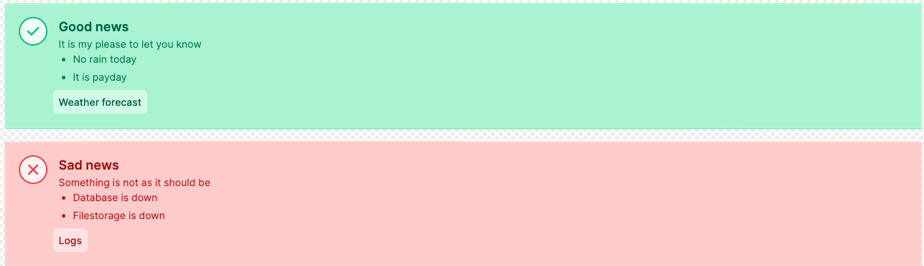
In this shot, we will use the laravel-flash-message package.
Installation
Run the composer command below:
composer require bilfeldt/laravel-flash-message
Implementation
We will implement this package from the controller.
Let’s make a controller named TestController for test purposes. Run the command below to make your test controller:
PHP artisan make:controller TestController
This new controller can be found in the app/Http/Controllers directory as TestController.php. Delete the existing code, then copy and paste the code below:
<?php

namespace App\Http\Controllers;

use Bilfeldt\LaravelFlashMessage\Message;// Ensure to import this classes
use Illuminate\Http\Request;

class PostController extends Controller
{


    public function index(Request $request)
    {
        $message = Message::warning('This is a simple message intended for you') // message/success/info/warning/error
            ->title('This is important')//Add message title here
            ->addMessage('account', 'There is 10 days left of your free trial')// your message
            ->link('Read more', 'https://example.com/signup');

        return view('posts')->withMessage($message);
    }
}
How to display the message
To display the message to the viewer, you just need to add this component line of code:
<x-flash-alert-messages />