How to get a select element's value in React-Bootstrap
React-Bootstrap, a complete reimplementation of the popular CSS framework Bootstrap in React, offers a set of ready-to-use
Example
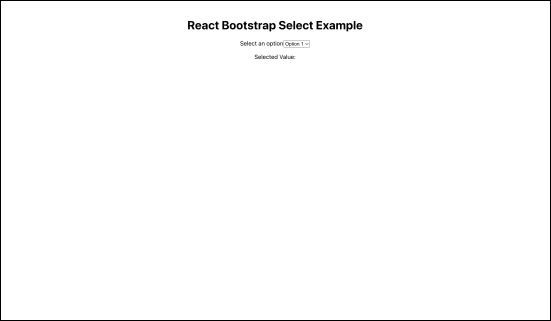
The React application consists of a select component with different options. When we select an option from the drop-down menu, its value is displayed below it. The UI of the application is as follows.

Implementation
To create this basic UI, go to the App.js file and replace the app function with the following:
{/*importing required libraries*/}import React, { useState } from 'react';import { Form } from 'react-bootstrap';import './App.css';function App() {{/*using the useState hook update the values*/}const [selectedValue, setSelectedValue] = useState('');{/*taking the value of select element and updating it through the function*/}const handleSelectChange = (event) => {setSelectedValue(event.target.value);};return (//code for application UI<div className="App"><h1>React Bootstrap Select Example</h1>{/*an input that has multple options*/}<Form><Form.Group controlId="exampleForm.ControlSelect1"><Form.Label>Select an option</Form.Label>{/*Implementing the method to update the value once changed*/}<Form.Control as="select" value={selectedValue} onChange={handleSelectChange}><option value="option1">Option 1</option><option value="option2">Option 2</option><option value="option3">Option 3</option></Form.Control>{/*Outputing the changed value*/}</Form.Group><p>Selected Value: {selectedValue}</p></Form></div>);}export default App;
Explanation
Line 1–6: We first import the
useStatehook from thereactlibrary. Then, we import theFormcomponent fromreact-bootstrap. We also importApp.cssfor styling of the application.Line 8–13: Using the
useStatehook, we declareselectedValueandsetselectedValue. Through thesetselectedValuemethod, we get the latest value of the component and then updateselectedValuethrough thehandleSelectChangemethod.Line 15–22: We create a basic Form application using the
Formcomponent ofreact-bootstraplibrary.Line 24–37: We assign the value of the select component to the
selectedValuestate variable defined on line 8. We also sethandleSelectChangeas theonChangemethod to update the state variable whenever the value of the select component changes and display it in the web application.
Code
Click on the “Run” button below to start the React application. Then, click the link below the “Run” button to view and interact with the application.
F)Ù ¾@@ÀPNG
IHDR(-SPLTEbÙûbÙûbÙûbÙû7^iU´ÐI¨2QZFD
A{?v>r6[f]ÍíYÀÞT±ËK¯6Zd3T^*;@]ËêO¤¼N¡¹L´=p~:fs9dp1OW0JR(36a×ø`ÕöW¹ÕH¢D8`l-@F,?D$&'"""\ÈçJ«DC<ky;jx(25Þ³ûtRNSæJIR6w¯IDATÓUÏGÂ0PÜíô^éIè÷¿
IðþâÏèm4"[ã¥y,WP$E̹W$¹ÒPÊ×°
æ_` ýáÐSѲvÇîf
C&LÔ
wÄ&À«
¦)¨@R2æ0µÿîýÚÇ%Ap¦Mª÷{6Þ9X[î"
KñpµRÂo»
R9Pá0Ð'¥^æÏïºÀ"QÃVGX`ó?óBÅ
Ûm/IEND®B`PNG
IHDRשÍÊPLTEbÙûbÙûbÙûbÙûbÙûbÙûbÙûbÙû"""C<lz7^i3S\-BG+=BV¶ÒK6[e*8<^ÎîX¾ÛH¢@z:fs8`k%,.R«ÅJª0IQ)59'25$')]ËêL±GB}@w>r5XbaÕ÷\ÈçS±ËQ¨ÂF8co/GM\ÉèO¤½N¶L³I§`ÓôZÃáÕç
tRNSíî¬ø»"2IDAT(Ïm×nÃ0
EÑÞ{ÏìÙþÿ·U²@@Ã^ ÄaWü³Íjmmç
Kèù³~[K~'§Öð"»9ð 1?Ub÷#ËÎÁl!³?»;*ĨÞSlj¨=eÏÊUN^)I¨rAF¡
pÞÀ§©mgèQÔ_Só¶Èx
¶
~,
¼v4¸£#H0T©xWÀt5
AºÎà)Ч{à
Þ®i¯Ä)i¹E\Û4^~Õ
aQ²²QöÝ©ÇtRä¬ê{ÀÆg6 A²´P×zVÄ£ òº \Ì5öuhH<oúØ3é10WØd·ì|¸¾â[øh_ê|6 Ïçµü
U2ËIEND®B`PNG
IHDR D¤Æ®PLTEbÙûbÙûbÙûbÙûbÙûbÙûbÙû"""%,.#&'O¢ºL²1MU/GN,@FG¡YÀÝQ«ÄQ¨ÁK(36^ÍíJ©EB@z8bm5Yd2PY`ÓôZÅãWº×UµÐT²ÌDC;kx:hu3S\.DK'02F=n|4V`0JR+:?)7;_Ðñ\ÉèV¸ÔR®È?uI¦I¥`Õ÷?u
>sk¦tRNSñ&ïó(go¸IDAT8Ë
o£0Ý´Û@HBî@Î6i»»ÿÿ
i-5
k@ß³ìá=ñÒOøFO¢÷"zÏx çwÂkkC§µ¢ÛÿãßÆÍ>ùF¿Ú
®,®tÿÄhÔ
ÒËûIÂÉ@[µµÒQBºµñOìZ ©ÍÔ·¯4kÆhÁ¬.ZÀXs×½ÐrdCzRg)Ϥ
÷ÿaJáË:&
ÃLÃX¥ô/kp¬oúÍ9°Z5@L¡¿VS
ÈPyæ
}ÄjõëZ{ô©Þ 5a¬-ÍÍ~
QS4E[çÐzS¼ah!n÷
rö5^l¤YéÉ!òè4·%óÕyntXsÍëË*§ìw9
%Y&Çæ G<&%)×V¾I2¨ªÀ$éscE½E.Ó,KéF3ȱì³~1³¸´ûÁo&#¿îpòÖn;ʳ2ý3Ìî=[Àå¨.w?n¹²$·n.öhn0ÝQÜMÖÚE78%Äëãá}ýqüÿíá0¢gû×ÐIEND®B`PNG
IHDR@@·ìäPLTEbÙûbÙûbÙûbÙûbÙûbÙûbÙûbÙûbÙûbÙûbÙûbÙûbÙû"""(48$')[Åä3T^.DKP¥¾K®0LT-AG\ÈçX¼ÙJ¬G¢%*,O¢ºL±D
<m{;iw8am&-/#%&`ÔõT²ÌS¯ÉN ·=q7_k+<A*9>^Îí/GN,?D'14##$]ËêI¨)7;aÖøZÂàM´I¥@w^ÏïX¿ÜV¶ÑCAzQªÄF6\g_ÑòV¹Õ9co5Yc3QZR¬ÆMµB}2PXP§À®ùï«
tRNSù×+ô½» £)ÒÓLIDATXÃ¥wcÚ0ÅIÒÝúçÁ0Ãìö&lI mòý¿O½À2PÓ÷Ò!=ëNïNRÈ»Ûé?qs{÷!äàãgéøþÃÿMz7¾~4 >IWà³éÿÍ57 Bw§Vuñpnpâþù.t{lz)ÂÓ
ßzk@/öv<ú6tìÁ/\Ô=cEÃEúØÐ!äÖÓ6&V{c
Úr^ëhÂ1Á&ÖïÏ:NXÍEÈÛëIÁòAÛ4 T¤
Ю¸Æ&á`îÛ£<I5És¦Ô$ø I¯ÂÏ2J AÆ ç
ÆÜ¿G@(<
ÝA ¨`HÃøADÝ¢Ï
*¤ ":٠$XÀú )LéÁ8D>
@xÉÛ³0¥±íVÉÛü
ÅÙ%!i6Qe\#·Ýí¶9êãû¸e
ó 9Ýè
'PôM6-3
&HÔñP
vÂ&:Ã"
1(OvصlV²«éÖ
ô¬&cã5U>Kð´
b#(Ký"º$@§ØF ÝýÀïÙ)ÁÄâïæï7Èv,y ¡aþt)Tò]"uD0ÛÔÌJÒÊ¢mï?>ö÷5em¥ÒØ
êÛHo@Ñ!mÈKåg9göÕ
1¤''MÐT=Q´¸ä`Có,¶rØ
JÙIäúÂ^p
Ë
¼é²ÕÊã"ï#ÄT}1Í{Ú!uêë
ÖêÆ@SÕ%ÈøÀÄå«r@Úô¯¨KrÔá{=GðjÍðpïð
JºóÆ©**¨N1¢!
ÛÁÃ>¨Ì82Üç
û?5¨ va&½½:óÈSZMl4fc[o
ÐmyBwAv
,F%º¶¨
=èì]OHÑ¡9?!JY±ÌÈ]JZîÆjÕ9ÓCVØ+íÁêQ2e
¹Jä)=ÙN2%VcÊò4Õ
¸Ù11
óqWÛJíálAgÛX(é
n-ù5è½ç¤ÆRý{I«lðÐiÇ´íV
xÐÏ3XÝäôUæ
äÝ4*»PÛ¶ïOÈ@¥
k·cu´Adne¯F3à©HÞ;"J;'oVH0î0jÏN²0¢|?¨À@,-½~Kª©ÕK§ó/ß
E
BÖ÷2àøü_+PÊ
G\ZÁXèö
PÒ¬ a¸#î¨ïþçûdÀTÐ`!é²5×µùQñ¢F
¬\'Õiä·£«î/³qAÊ}àw5eÉBßwÙÎ&MvæT
´Óç®û))ÀZ¦7éãGÐ£Ò Á'Ó"]i{òü|>5~1<Wá6tw
ÁÝÕϾ+ ®~ú^ÿø~÷óÿûüÿ´(Ç»|IEND®B`Free Resources