How to implement a Python desktop notifier using the plyer module
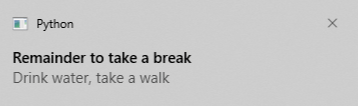
This shot explores how to create a desktop notifier application in Python with the plyer module. We will create a Remainder application that will remind us to take a break while doing work.
Implementation
-
Install the
plyermodule withpip.
pip install plyer
-
plyercomes with a class callednotification, which helps us create a notification. Import it like this:
from plyer import notification
-
The
notificationclass provides a method callednotify, which accepts the following parameters:-
title(str): Displays the title of the notification. -
message(str): Accepts message description of the notification. -
app_icon(str): Displays the icon for the notification. -
timeout(int): Provides how much time in seconds the notification is to be displayed. -
ticker(str): It will display the text provided in the status bar when a notification arrives. -
toast(bool): This will display a toast message in Android instead of a full notification.
-
Some of the parameters won’t work on desktop. For example,
toastandtickercan only be used on Android devices.
Code
In the following code snippet:
-
Line 2: We import the
notificationclass from theplyermodule. -
Line 4: We import
time, to make this program temporarily sleep to create a time gap between notifications. -
Line 7: Use a
whileloop to createnotificationindefinitely until you stop the program manually. -
Line 9: We call the
notifymethod and pass the necessary parameters as shown below. -
Line 15: After displaying a notification, we will make it sleep for
1 houror60 minutes. You can choose a different interval.
The notification shows for every 60 minutes.
#import notification from plyer modulefrom plyer import notification#import timeimport time#Use while loop to create notifications indefinetlywhile(True):#notificationnotification.notify(title = "Reminder to take a break",message = '''Drink water, take a walk''',timeout = 60)#System pause the execution of this programm for 60 minutestime.sleep(60*60)