How to make a circular color gradient in Python
A color gradient is a way to subtly switch between two or more colors. The term refers to a particular color gradient alternating between colors in a circular pattern, usually beginning with one color in the center and gradually moving to others as you move outward.
Python's circular color gradient function can be a helpful tool for data visualization or for enhancing a project's visual appeal. The Python Imaging Library (PIL) and matplotlib libraries are two of the more popular ways to make a circular color gradient in Python. Both options will be discussed in this Answer, along with examples.
Create a circular color gradient using Matplotlib
Given that matplotlib is a powerful and effective data visualization library in Python and offers numerous ways to create various types of plots, including circular color gradients, it is a common choice among Python programmers to create circular color gradients.
We'll use numpy and matplotlib to create a color gradient by defining a color map.
Example
import numpy as npimport matplotlib.pyplot as pltfrom matplotlib.colors import LinearSegmentedColormap# defining the color mapcmap_colors = [(1, 0, 0), (1, 1, 0), (0, 1, 0), (0, 1, 1), (0, 0, 1), (1, 0, 1), (1, 0, 0)]colormap = LinearSegmentedColormap.from_list("my_cmap", cmap_colors)# creating the meshgridA, B = np.meshgrid(np.linspace(-1,1,100), np.linspace(-1,1,100))C = np.sqrt(A**2 + B**2)# plotting the color mapplt.figure(figsize=(7,7))plt.pcolormesh(A, B, C, cmap=colormap)plt.axis("equal")plt.show()print("Circular gradient created successfully!")
Explanation
Line 1: We import
numpywith an aliasnp.Line 2: We import
matplotlibwith an aliasplt.Line 3: Import the
LinearSegmentedColormap, a colormap object based on linear segment lookup tables.Line 6: We create a list of colors, with each color within a tuple and following the RGB format. The colors are assigned to the variable
cmap_colors.Line 7: The
cmap_colorsis passed into theLinearSegmentedColormap.Line 10: We make a rectangular grid out of two given one-dimensional arrays of numbers that are evenly spaced over a predetermined range using the
meshgrid()function.Line 11: The two one-dimensional array is raised to the power of two, added and then the square root is assigned to a variable
C.Line 14: Using the
matplotlibaliasplt, we determine the size of the plot.Line 15: With the
pcolormesh()we can create 2D image-style plots, passing the variablesA,B,Cand thecolormapinto it.Line 16: This ensures that the axes are equal.
Line 17: We show our color gradient using the
.show()method.Line 18: This is a confirmation message.
Create a circular color gradient using PIL
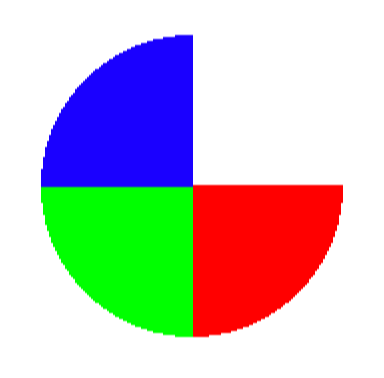
Another well-liked option for Python image manipulation is the PIL library. We can create a new image and then use the ImageDraw module to draw a circular color gradient using PIL.
Example
from PIL import Image, ImageDraw#create an image with a white backgroundimage = Image.new("RGB", (200,200), (255, 255, 255))#create a draw objectobj = ImageDraw.Draw(image)#define the starting and ending angles for the pie slicestart = 0end = 90#define the color gradientcolor_gradient = [(255,0,0), (0,255,0), (0,0,255)]#draw the pie slice with the color gradientfor i, color in enumerate(color_gradient):obj.pieslice([25, 25, 175, 175], fill=color, start=start, end=end)start += 90end += 90#show the imageimage.show()
Explanation
Line 1: Import the
ImageandImageDrawmodule from PIL.Line 3: Create a new image with a white background.
Line 6: Create the draw object.
Line 9: Define the starting angle of the pie slice.
Line 10: The ending angle of the pie slice is defined.
Line 13: We defined the color gradient with three colors in RGB.
Line 16: Loop through the color gradient, the
color_gradientvariable is converted to an enumerate object.Line 17: The
obj.pieslice()takes four aruguments.Line 18: Increment the starting angle by
. Line 19: We also increment the ending angle by
. Line 22: This shows our
PILimage.
Conclusion
In conclusion, using Python to create a circular color gradient is helpful for visually appealing data visualizations. Numerous applications, including data visualization, graphic design, and image processing, can benefit from this. All this is achievable with the aid of PIL and matplotlib libraries.
Free Resources