How to make a hollow triangle pattern in JavaScript
In this shot, we will learn how to make a hollow triangle pattern in JavaScript.
Desired output
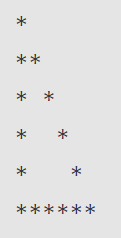
We will be printing the pattern shown below:
Code
// total number of rowslet n = 6;for (let i = 1; i <= n; i++) {// printing stars and spacesfor (let j = 0; j < i; j++) {if(i === n) {process.stdout.write('*')}else {if (j == 0 || j == i - 1) {process.stdout.write('*')}else {process.stdout.write(' ')}}}console.log();}
Explanation
-
Line 1: We initialize a variable
nwith an integer, which represents the total number of rows that make up the hollow triangle. You can also think of this as the height of the triangle. -
Line 3: We have our first
forloop, which will iterate over the total number of rows. In the example above, the number of rows is six. -
Line 5: We have our nested
forloop, which will iterate for less than the current row number. For example, wheni=3in our outerforloop, that means we’re on row three of the triangle. Hence, our nestedforloop will run only three times for the following values ofj:-
j= 0 -
j= 1 -
j= 2
-
-
Lines 6 to 8: The condition
if(i===n)is used to check ifi(current row) is equal ton(last row). This will only be true on the last iteration of the outerforloop. When this condition is true, the entire row is printed, consisting of only*'s and no spaces. -
Line 9: If
iis not equal ton, we’re not on the last row of the triangle. Therefore, theelseblock will execute. -
Lines 10 to 12: Inside the
elseblock, we again have a conditionif (j == 0 || j == i - 1)to check if the value ofjin the nestedforloop is equal to 0 ori-1. If this condition istrue, that means we’re at an end point of the current row of the triangle. In this case, we’ll print a*for the row. -
Lines 13 to 15: If the
ifcondition explained directly above isfalse, thenjis either greater than 0 or less thani - 1. This means that we’re currently on an iteration of the nestedforloop that is not at either of the endpoints of the current row being traversed. In this case, we’ll execute the nestedelseblock, and print a' '(space) for the row. -
Line 18: We used
console.log()withnull, as it will change to a new line. We can also useprocess.stdout.write('\n')to change the line.
Conclusion
We successfully completed the task to print the hollow triangle using *'s. However, this is only one way to go about doing this. There can be several algorithms to achieve the same result.