How to run MongoDB locally
What is MongoDB?
MongoDB, which is short for Mongo Daemon, is a
- fast.
- object-oriented.
- simple.
- dynamic.
- scalable.
- used for modern applications.
How to run MongoDB locally
Here are the steps to get MongoDB to run on your computer.
Step 1
Visit the official website and download the MSI community version.
Step 2
Double-click the downloaded file to install MongoDB.
Step 3
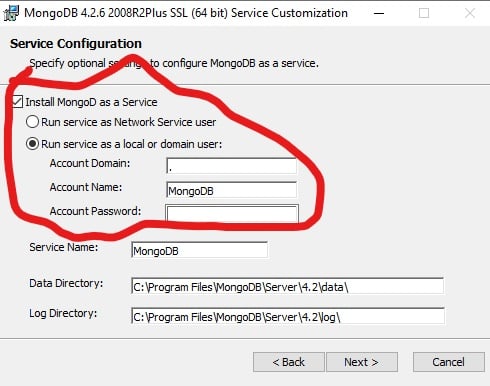
Select Install MongoDB as a service.
Step 4
Locate the installation path and copy the .bin address. The bin address should look like this: “C:\Program Files\MongoDB\Server\4.4\bin”
Step 5
Save the address in the environment variable of your computer.
Step 6
Open your command prompt (cmd) and type mongo; this will start up your MongoDB database.
To run commands, here is a shot on how to get started: 12 basic MongoDB commands.