







DeepSeek and ChatGPT serve similar purposes, but their strengths differ. DeepSeek focuses on long-context understanding and open-source accessibility, while ChatGPT is optimized for conversational AI and general knowledge.
How to use DeepSeek
Key takeaways:
DeepSeek is an AI platform that simplifies data analysis and decision-making with advanced algorithms like mixture of experts (MoE), multi-head latent attention (MLA), and reinforcement learning (RL).
Users can create an account on the website or mobile app, log in, and start using the chatbot to write prompts for AI-driven responses.
Using advanced technologies and tools is crucial to staying ahead in this fast-growing digital world. Businesses, researchers, and technology enthusiasts require powerful AI-driven solutions to process large datasets, extract meaningful insights, and automate decision-making. As industries like finance, healthcare, and marketing increasingly rely on AI for efficiency and innovation, the demand for sophisticated platforms continues to grow. Here comes DeepSeek.
What is DeepSeek?
DeepSeek is one of the most advanced platforms offering sophisticated data analysis, AI, and machine learning solutions. It stands out with features like AI-driven contextual search, multimodal data processing, advanced natural language understanding (NLU), continuous learning, and scalable customization, making it a powerful tool for modern AI applications. Equipped with cutting-edge technologies such as a mixture of experts (MoE), multi-head latent attention (MLA), and reinforcement learning (RL), DeepSeek enables businesses to enhance productivity, improve decision-making, and drive innovation.
Getting started with DeepSeek
Create an account: To begin using DeepSeek, visit the
official website https://www.deepseek.com/
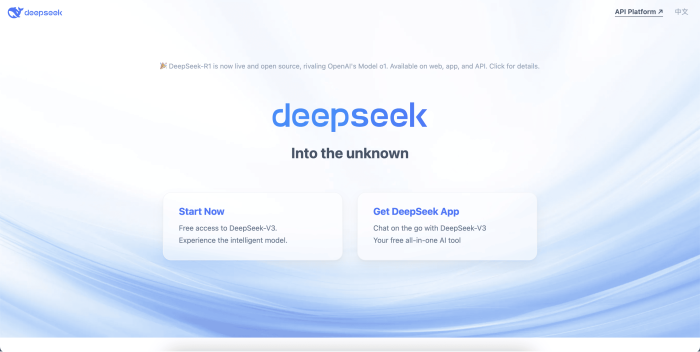
DeepSeek landing page
1 of 2
By clicking the “Start Now” button, you will be directed to the web version of DeepSeek. However, clicking “Get DeepSeek App” will give you a QR code that you can scan on your mobile and ask you to download its application from the app store.
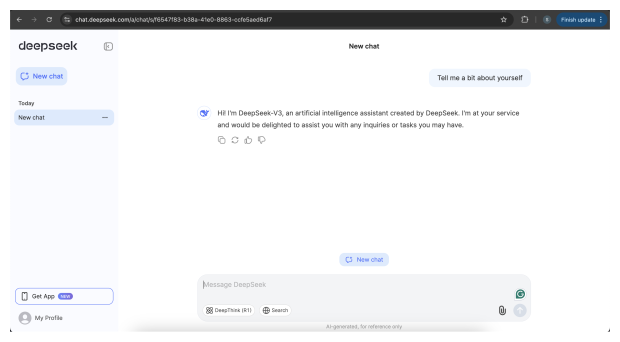
Write your first prompt: Once you are logged in, you can start using the DeepSeek chatbot and write your prompts for answers.
Start writing your prompt
DeepSeek features:
DeepSeek V3: DeepSeek’s V3 model offers a free chatbot feature that allows users to interact seamlessly with AI to answer questions, solve logical problems, and write code. As it is the default model, users can access it through DeepSeek via a web-based interface on the official website.
DeepSeek R1: A strong reasoning model designed for tasks requiring deep problem-solving and sophisticated reasoning is DeepSeek-R1. Consider it your first choice if the work at hand requires sophisticated cognitive processes, equivalent to those of professional or expert reasoning.
Extracting text: DeepSeek allows users to attach images, PDFs, or CSV files and extract text from them. It serves as an
OCR OCR (Optical Character Recognition) is a technology that enables computers to recognize and extract text from images, scanned documents, and handwritten or printed text. It converts non-editable text (such as scanned PDFs or photos of documents) into machine-readable and editable formats. Live internet searching: This feature enables the user to search for a query on DeepSeek, and it scrapes multiple web pages to give a final answer.
DeepSeek V3
1 of 4
DeepSeek use cases
Here are a few examples of how you can use DeepSeek in some real-world scenarios:
1. Debugging code
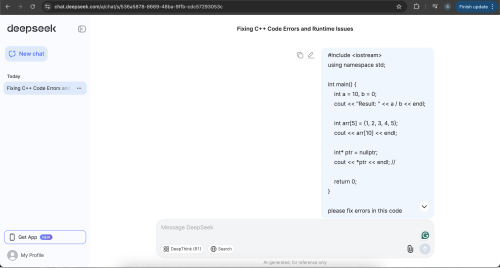
DeepSeek can read and understand the code it is given and fix any potential issues in the code:
Code debugging by DeepSeek
1 of 3
2. Extracting information from PDF(s)
DeepSeek can take large PDFs as input and provide a summary of what is in the document:
DeepSeek OCR and analysis
3. Analyzing data from CSV
It can also analyze large datasets and provide key insights into the dataset:
Reading CSV file and providing key insights
How to use DeepSeek on mobile
DeepSeek is available on the Apple app store. Once you open the app store, type DeepSeek in the search bar and tap on install to download the app. Then, register on the DeepSeek app by providing your email ID and password.
Tips for maximizing DeepSeek’s potential
Leverage automation: Use DeepSeek’s automation features to streamline repetitive tasks and save time.
Stay updated: Regularly check for updates and new features to ensure you use the latest tools.
Unlock the power of AI with “All You Need to Know About Prompt Engineering.” Learn essential techniques, role-specific applications, and how to become a skilled prompt engineer.
Conclusion
DeepSeek is a game-changer for anyone looking to harness the power of data and AI. By following this Answer, you can easily navigate the platform and unlock its full potential. Whether you’re analyzing customer behavior, optimizing business processes, or conducting research, DeepSeek provides the tools you need to succeed. Start your journey today and experience the transformative impact of DeepSeek!
Frequently asked questions
Haven’t found what you were looking for? Contact Us
Is DeepSeek better than ChatGPT?
How to use DeepSeek in cursor?
Why is my DeepSeek not working?
Can I use DeepSeek API for free?
Free Resources
Copyright ©2026 Educative, Inc. All rights reserved