
DeepSeek offers a free tier for their API, allowing developers to experiment and build applications. The specifics of the free tier (e.g., usage limits, available models) can change, so it’s best to check the official DeepSeek website and their developer documentation for the most up-to-date information on their free tier offerings. Look for details on rate limits, request quotas, and any other restrictions that might apply.
How to use DeepSeek API
Key takeaways:
DeepSeek API provides access to advanced AI and machine learning models, enabling tasks like sentiment analysis, text classification, and data extraction. It includes two models: DeepSeek-V3 (for general AI tasks such as text summarization, chatbot interactions, and document generation) and DeepSeek-R1 (for complex coding, math, and reasoning).
To use DeepSeek API, developers need to sign up for API credentials, review the documentation for pricing and new model updates, set up a development environment, make API requests, and handle responses efficiently.
To ensure optimal performance, security, and efficient usage of the DeepSeek API, follow these best practices:
Secure your API key
Test implementations in a development environment
Monitor usage to avoid exceeding rate limits
Stay updated with API improvements to maximize its effectiveness
Think of the DeepSeek API as a smart assistant for your applications. It helps process text, analyze data, and even power AI-driven chatbots—all without needing to build complex models from scratch. Just like ordering food from a menu, you send a request, and the API delivers the results. Whether you're a developer, data analyst, or entrepreneur, DeepSeek API makes AI integration simple. Let’s see how you can start using it!
What is DeepSeek API?
DeepSeek API is an innovative interface that provides access to advanced AI and machine learning models. It enables users to perform sentiment analysis, text classification, data extraction, and more tasks. The two DeepSeek models are:
A generalist model called DeepSeek-V3 (deepseek-chat) was trained on 15 trillion text tokens.
A model called DeepSeek-R1 (deepseek-reasoner) is intended for complex coding, math, and reasoning problems.
Steps to use the DeepSeek API
To use the DeepSeek API, here are the following steps:
1. Sign up and get API credentials
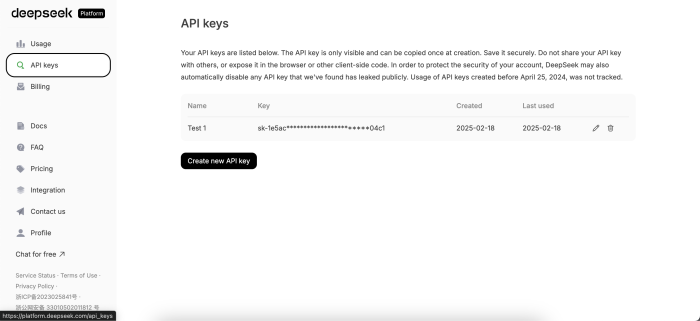
To start using the DeepSeek API, you must create an account on the DeepSeek platform. Once registered and logged in, click "API keys." You’ll receive API credentials, including an API key. This key is essential for authenticating your requests and accessing the API’s features.
DeepSeek API key
2. Read the documentation
Before diving into coding, take time to review the official DeepSeek API documentation. It provides detailed information about endpoints, parameters, request formats, and response structures. Understanding the documentation will help you make the most of the API’s capabilities.
3. Set up your development environment
Ensure your development environment is ready to make API calls. Most developers use programming languages like Python, JavaScript, or Ruby to interact with APIs. Install necessary libraries, such as requests in Python or axios in JavaScript, to simplify the process of sending HTTP requests.
4. Make your first API request
Using your preferred programming language, construct a request to the DeepSeek API. For example, if you’re using Python, you can send a request to analyze text sentiment.
Add your API key on line 3 and you can change the model name on line 6 to either use DeepSeek-V3 (deepseek-chat) or DeepSeek-R1 (deepseek-reasoner).
from openai import OpenAIclient = OpenAI(api_key="<DeepSeek API Key>", base_url="https://api.deepseek.com")response = client.chat.completions.create(model="deepseek-chat",messages=[{"role": "system", "content": "You are a helpful assistant"},{"role": "user", "content": "Hello"},],stream=False)print(response.choices[0].message.content)
Lines 1–3: This Python code uses the OpenAI library to interact with the DeepSeek API for generating chatbot responses. First, it imports the
OpenAIclass and initializes a client instance using an API key and a custom base URL (https://api.deepseek.com).Lines 5–10: The
client.chat.completions.createmethod is then called to send a chat request to the DeepSeek model (deepseek-chat). The conversation consists of two messages: a system message defining the assistant's role as "a helpful assistant" and a user message saying "Hello."Line 11: The
streamparameter is set toFalse, meaning the response will be returned as a complete object rather than streamed in parts.Line 14: Finally, the script prints the assistant's response by accessing
response.choices[0].message.content.
5. Handle API responses
DeepSeek API responses are typically returned in JSON format. Parse the response to extract relevant data and integrate it into your application. For instance, you can use sentiment analysis results to categorize user feedback or tailor responses in a chatbot.
6. Optimize and scale
Once you’ve successfully integrated the DeepSeek API, focus on optimizing your implementation. Use caching to reduce redundant API calls, handle errors gracefully, and monitor usage to stay within rate limits. As your application grows, consider scaling your API usage to accommodate increased demand.
Best practices for using DeepSeek API
Secure your API key: Keep your API key confidential to prevent unauthorized access.
Test thoroughly: Test your implementation in a development environment before deploying it to production.
Monitor usage: Track API usage to avoid exceeding rate limits and optimize costs.
Stay updated: Regularly check for updates to the DeepSeek API to leverage new features and improvements.
Build intelligent applications with Using OpenAI API for Natural Language Processing in Python. Learn text generation, embeddings, moderation, and Flask integration for real-world AI solutions.
Conclusion
DeepSeek API is a powerful tool that can transform how you analyze data, automate tasks, and build intelligent applications.
By following this Answer, you can seamlessly integrate DeepSeek API into your projects and unlock its full potential. Whether you’re analyzing customer feedback, extracting insights from data, or enhancing user interactions, DeepSeek API is your gateway to smarter, more efficient solutions.
Frequently asked questions
Haven’t found what you were looking for? Contact Us
How to use DeepSeek API for free?
How to call DeepSeek-V3 API?
How to use a 3rd party API?
How to use Scroll API?
Free Resources
Copyright ©2026 Educative, Inc. All rights reserved