How to use JavaScript in an HTML document
JavaScript in HTML
To add interactiveness to a web page, we use the JavaScript <script></script> tag and include it in the HTML file.
The location of the JavaScript element in the HTML file can be either in the head or body tag
Example
We can place the <script></script> tag in the <head> and <body> section of an HTML file, as shown in the image below:
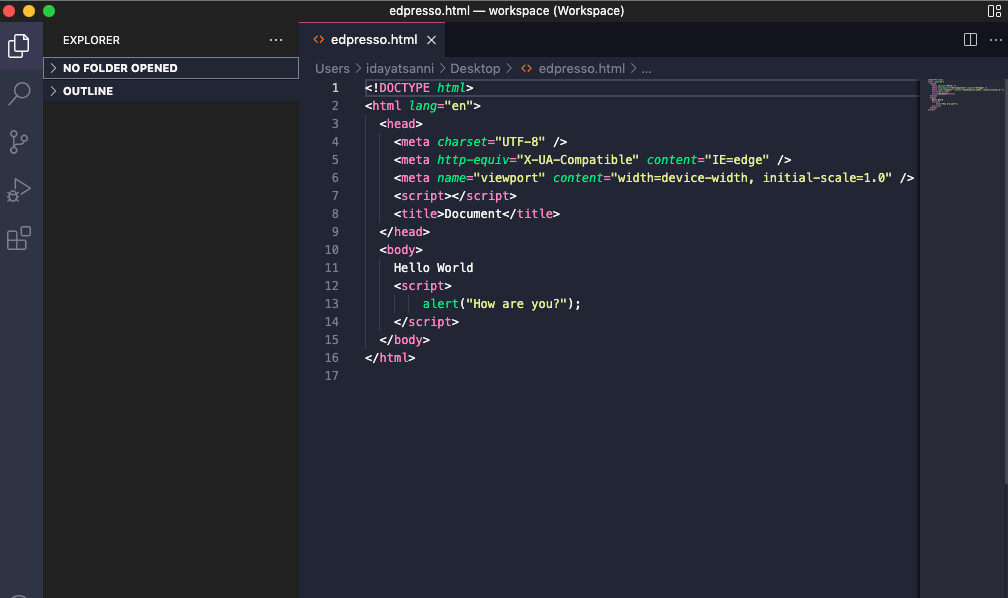
However, if we run different functions, it is best to put the <script></script> tag in the body section before the </body> closing tag. This ensures that the webpage loads faster.
External JavaScript file
We can place the JavaScript codes in another file with the .js extension. The JavaScript file should then be linked with the src attribute.
In the example below, we create files in the src folder with the .js extension:

To link the JavaScript file to the HTML file, we need to input the code <script src="src/app.js"></script> in the </body> section of our HTML file before the
