How to use the REPLACE() function in MySQL
The REPLACE() function in MySQL is used to update all occurrences of a substring with another substring, in a given string argument.
Syntax
The REPLACE() function expects three arguments. Have a look at the function signature below:

Note that all three string arguments passed to the
REPLACE()method are case-sensitive.
Examples
Here are some examples demonstrating how to use the REPLACE() function.
1. Case sensitive
REPLACE() function is case-sensitive. The following query successfully replaces the substring since “STATES” occurs in “UNITED STATES” and is replaced by “KINGDOM”.
SELECT REPLACE('UNITED STATES', 'STATES', 'KINGDOM');
On the other hand, the following query is unable to successfully replace the substring since “states” does not occur in “UNITED STATES”.
SELECT REPLACE('UNITED STATES', 'states', 'KINGDOM');
2. Using a column name from a table
Consider the following table, Persons. Given below is a query that demonstrates how to use the REPLACE() function on a column in the table:
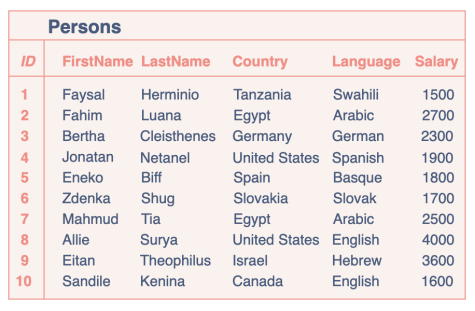
The query below generates a table with two columns, one with the original Country entries and the other one with updated Country entries where every “States” has been replaced with “Kingdom”.
Note: DO NOT forget the comma following the column name, before the
REPLACEkeyword.
SELECT Country, REPLACE(Country, 'States', 'Kingdom')FROM Persons;
Free Resources