
The watershed algorithm is based on the concept of treating the image as a topographic surface, where pixels represent elevation. It segments the image by simulating the flooding of the surface and identifying boundaries where water would meet.
Implementation of watershed segmentation algorithm in OpenCV
Key takeaways:
The watershed algorithm segments overlapping and connected objects in images effectively.
It overcomes limitations of traditional methods like thresholding.
OpenCV is an open-source library for computer vision and machine learning.
Implementation involves preprocessing and applying the watershed algorithm.
Preprocessing includes image loading, grayscale conversion, and noise reduction.
The algorithm identifies connected components and marks regions for separation.
It enhances segmentation precision beyond traditional techniques.
The watershed algorithm of OpenCV is used for classic image segmentation. The images having objects that are overlapping and connected by boundaries can be easily segmented by using a watershed algorithm. Traditional algorithms like thresholding and contour detection sometimes cannot detect the objects in the images. But by using the watershed algorithm, we can efficiently perform image segmentation.
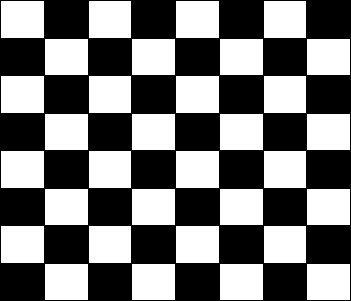
Sample images that we can use for the watershed algorithm are given below:
Sample image
OpenCV
OpenCV is an open-source library of computer vision and machine learning. This library includes all the computer vision and machine learning methods, like image segmentation, object detection, face recognition, and many other machine learning methods. To include this library, run the following command in the terminal:
!pip install opencv-python
Let’s dive into the implementation
A watershed algorithm is an OpenCV function used for image segmentation. We divide the code into two steps. The first step is related to the preprocessing required for the image segmentation, and the second step contains the main implementation of the watershed algorithm.
Step 1: Preprocessing
Here is the code for preprocessing:
import cv2
import numpy as np
from matplotlib import pyplot as plt

img = cv2.imread("checkerboard.png")
gray = cv2.cvtColor(img, cv2.COLOR_BGR2GRAY)

ret, binary_img = cv2.threshold(gray, 0, 255, cv2.THRESH_BINARY_INV + cv2.THRESH_OTSU)
kernel = cv2.getStructuringElement(cv2.MORPH_RECT, (3, 3))
binary_img = cv2.morphologyEx(binary_img, cv2.MORPH_OPEN, kernel,iterations=2)

fig, axes = plt.subplots(nrows=2, ncols=2, figsize=(5, 5))

sure_bg = cv2.dilate(binary_img, kernel, iterations=3)
axes[0, 0].imshow(sure_bg, cmap='gray')
axes[0, 0].axis('off')
axes[0, 0].set_title('Sure Background')

dist = cv2.distanceTransform(binary_img, cv2.DIST_L2, 5)
axes[0, 1].imshow(dist, cmap='gray')
axes[0, 1].axis('off')
axes[0, 1].set_title('Distance Transform')

ret, sure_fg = cv2.threshold(dist, 0.5 * dist.max(), 255, cv2.THRESH_BINARY)
sure_fg = sure_fg.astype(np.uint8)
axes[1, 0].imshow(sure_fg, cmap='gray')
axes[1, 0].axis('off')
axes[1, 0].set_title('Sure Foreground')

unknown = cv2.subtract(sure_bg, sure_fg)
axes[1, 1].imshow(unknown, cmap='gray')
axes[1, 1].axis('off')
axes[1, 1].set_title('Unknown')
Preprocessing for watershed algorithm
Code explanation
Here’s a line-by-line breakdown of the code:
Lines 1–3: We import the required libraries. OpenCV (
cv2) is used for image processing, NumPy (np) for numerical operations, andmatplotlib.pyplot(plt) for visualizing the images.Lines 5–6: The image is loaded using
cv2.imreadand then converted to grayscale usingcv2.cvtColor.Lines 8–10: We apply the
cv2.thresholdto the gray image. Then, we set thekernelby usingcv2.getStructuringElement. To remove the noise, we applied thecv2.morphologyEx, which follows two steps: erosion followed by dilation. This step helps to remove the noise and smooth the contour of a large object in the binary image.Line 12: We use
plt.subplots, which creates the figure and arranges the subplots in two rows and two columns.Lines 14–17: We use
cv2.dilateon thebinary_imgto increase the image’s bright regions. Then save the results in thesure_bg. Then, plot the results with the title of sure background.Lines 19–22: Then we use the
cv2.distanceTransformon thebinary_img, which measures the distance of each white pixel to the nearest dark pixel in thebinary_img. Then plot with the name of Distance Transform.Lines 24–28: We use
cv2.thresholdwith a threshold value 0.5 ondistvariable to obtain the foreground insure_fgvariable. Then, plot with the title of the sure foreground.Lines 30–33: To get the unknown areas in the image, we use
cv2.subtractonsure_bgandsure_fg. Then, we plot the unknown areas with the title unknown.
Step 2: Implementation of the watershed algorithm
Here is the code of the implementation:
ret, markers = cv2.connectedComponents(sure_fg)
markers += 1
markers[unknown == 255] = 0

fig, axes = plt.subplots(nrows=1, ncols=3, figsize=(10,10))
axes[0].imshow(markers, cmap="tab20b")
axes[0].axis('off')
axes[0].set_title('Markers')

# Watershed Algorithm
markers = cv2.watershed(img, markers)
axes[1].imshow(markers, cmap="tab20b")
axes[1].axis('off')
axes[1].set_title('“Watershed Result”')

labels = np.unique(markers)
obj_arr = []
for label in labels[2:]:
    target = np.where(markers == label, 255, 0).astype(np.uint8)
    contours, hierarchy = cv2.findContours(target, cv2.RETR_EXTERNAL, cv2.CHAIN_APPROX_SIMPLE)
    obj_arr.append(contours[0])

img_with_contours = img.copy()
img_with_contours = cv2.drawContours(img_with_contours, obj_arr, -1, color=(0, 23, 223), thickness=2)

axes[2].imshow(cv2.cvtColor(img_with_contours, cv2.COLOR_BGR2RGB))
axes[2].axis('off')
axes[2].set_title('Image with Contours')
Implementation of watershed algorithm
Code explanation
Here’s a line-by-line breakdown of the code:
Lines 1–3: In these lines, we use the
cv2.connectedComponentsto identify the connected objects in thesure_fg. Then, we add one tomarkers, so that the background is one instead of zero. Then, mark the region of unknown with zero.Lines 5–8: We use
plt.subplots, which creates the figure and arranges the subplots in one row and three columns. Then, plot the marker by setting thecmap="tab20b".Lines 11–14: The
cv2.watershedfunction takes two parameters,imgandmarkers. Then, we plot the results with the title Watershed Result.Lines 16–21: To obtain the contour objects in the whole image, we are using a loop to iterate over the unique markers named as label starting from 2, because we ignore the unknown and background part of the image. In this loop, we use the
cv2.findContoursfunction that obtains the contour in the image and then appends it toobj_arr.Lines 23–28: We use
cv2.drawContoursto outline the original image namedimg. Then we plot the results with the title, “Image with Contours.”
Conclusion
In conclusion, the watershed algorithm is an effective image segmentation technique for separating overlapping objects, and it can be easily implemented using OpenCV in Python. Its ability to refine segmentation surpasses traditional methods like thresholding and contour detection.
Frequently asked questions
Haven’t found what you were looking for? Contact Us
What is the principle of watershed algorithm?
What are the advantages of the watershed algorithm?
What are the applications of watershed model?
How does watershed work image processing?
Free Resources
Copyright ©2026 Educative, Inc. All rights reserved