Keras dropout layer: implement regularization
Regularization is a crucial technique in machine learning used to prevent overfitting and improve the generalization capability of models. Dropout is commonly used in deep learning models, especially in neural networks.
In this answer, we will explore how to implement regularization using the Dropout layer in Keras, a widely used deep learning library. We will cover the theoretical background of dropout regularization and provide practical code examples to demonstrate its effectiveness.
What is regularization?
Regularization is a fundamental technique used in machine learning to prevent models from overfitting the training data, where the model learns the noise or specific patterns of the training set that may not generalize well to unseen data. Regularization methods introduce additional constraints to the model to discourage complex or extreme parameter values. This promotes simpler models that are less likely to overfit.
Understanding dropout regularization
Dropout is a regularization technique that randomly sets a fraction of the input units to 0 at each training update, effectively dropping out a portion of the neurons during training. By doing so, dropout reduces the interdependency among neurons and prevents co-adaptation. It helps the network to learn more robust and generalizable features.


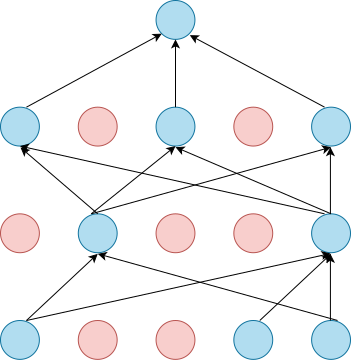
Implementing dropout regularization in Keras
To add dropout regularization to a neural network model in Keras, we can use the Dropout layer. The Dropout layer randomly deactivates input units during training to reduce overfitting by breaking interdependencies among neurons.
Here's how to implement dropout regularization using Dropout layer:
Step 1: Installing Keras
First, we have to make sure that the necessary libraries are installed. Run the following command in the terminal to install Keras:
pip install keras
Step 2: Import the required libraries
Now, we need to import the required libraries. Open any Python editor and create a new file. Import the following libraries:
import numpy as npimport tensorflow as tffrom tensorflow import kerasfrom tensorflow.keras import layers
Step 3: Generate dummy data for training and testing
Next, we generate some dummy data for training and testing our neural network. Let's generate the data:
x_train_data = np.random.random((1200, 25))y_train_data = keras.utils.to_categorical(np.random.randint(5, size=(1200, 1)))x_test_data = np.random.random((200, 25))y_test_data = keras.utils.to_categorical(np.random.randint(5, size=(200, 1)))
Step 4: Create a neural network model
Now, we can build our neural network model. Add the following code:
model = keras.Sequential()model.add(layers.Dense(64, activation="relu", input_dim=25))model.add(layers.Dropout(0.4))model.add(layers.Dense(64, activation="relu"))model.add(layers.Dropout(0.4))model.add(layers.Dense(5, activation="softmax"))
Step 5: Compile the model
After creating the model, we compile it before training. During compilation, we specify the loss function, optimizer, and evaluation metric. Add the following code:
model.compile(optimizer="adam",loss="categorical_crossentropy",metrics=["accuracy"],)
Step 6: Train the model
With the model compiled, we train it using the prepared dataset. We add the following code:
model.fit(x_train_data, y_train_data, epochs=10, batch_size=32, validation_data=(x_test_data, y_test_data))
Step 7: Evaluate the model
To evaluate the performance of our model, we can evaluate it on the test dataset. Add the following code:
test_loss, test_acc = model.evaluate(x_test_data, y_test_data)print("Test Model Loss:", test_loss)print("Test Model Accuracy:", test_acc)
Code implementation
import numpy as npimport tensorflow as tffrom tensorflow import kerasfrom tensorflow.keras import layers# Generate dummy datax_train_data = np.random.random((1200, 25))y_train_data = keras.utils.to_categorical(np.random.randint(5, size=(1200, 1)))x_test_data = np.random.random((200, 25))y_test_data = keras.utils.to_categorical(np.random.randint(5, size=(200, 1)))# Create a neural network modelmodel = keras.Sequential()model.add(layers.Dense(64, activation="relu", input_dim=25))model.add(layers.Dropout(0.4))model.add(layers.Dense(64, activation="relu"))model.add(layers.Dropout(0.4))model.add(layers.Dense(5, activation="softmax"))# Compile the modelmodel.compile(optimizer="adam",loss="categorical_crossentropy",metrics=["accuracy"],)# Train the modelmodel.fit(x_train_data, y_train_data, epochs=10, batch_size=32, validation_data=(x_test_data, y_test_data))# Evaluate the modeltest_loss, test_acc = model.evaluate(x_test_data, y_test_data)print("Test Model Loss:", test_loss)print("Test Model Accuracy:", test_acc)
Code explanation
Here’s the explanation for each line of the code:
Lines 1–4: We import the necessary libraries.
numpyis imported asnp, andtensorflowandkerasare imported astfandkeras, respectively. Additionally, specific modules such aslayersare imported fromtensorflow.keras.Lines 7–10: We generate dummy data for training and testing.
x_train_datais a 2D array of shape(1200, 25)with random values between 0 and 1.y_train_datais a one-hot encoded array of shape(1200, 1)representing class labels. Similarly,x_test_dataandy_test_dataare generated as test data but with shapes(200, 25)and(200, 1)respectively.Line 13: We create a sequential model using
keras.Sequential(). This represents a linear stack of layers.Line 14: We add a
Denselayer to the model with 64 units/neurons andreluactivation function.input_dim=20specifies that the input to this layer has 20 dimensions.Line 15: We add a
Dropoutlayer with a rate of 0.5.Line 16: We add another
Denselayer with 64 units and activation function asrelu.Line 17: We add another
Dropoutlayer with a rate of 0.5.Line 18: We add a final
Denselayer with 10 units andsoftmaxactivation. The softmax activation function is used for multi-class classification problems, as it outputs probabilities for each class.Lines 21–25: We compile the model. The optimizer is set to
adam, a widely used optimization algorithm. The loss function is set tocategorical_crossentropysince we have a multi-class classification problem. We also includeaccuracyas the metric to monitor during training.Line 28: We train the model using
fit(). We pass in the training data, setepochs=10to train for 10 iterations over the entire dataset, and use a batch size of 32. We also provide the validation data to evaluate the performance of model on the test set after each epoch.Lines 31–33: We evaluate the model on the test data using
evaluate(). The test loss and accuracy are computed and printed to the console.
Free Resources