Real-time 3D face mesh
A face mesh is a 3D model representation of a person's face. We can achieve this using a collection of interconnected vertices and edges that define the structure of the face in three-dimensional space. How amazing is that?
Mapping vertices with facial features
The vertices represent specific points on the face, such as the corners of the eyes, nose, mouth, and other facial landmarks. Edges connect these vertices, and polygons form the surface of the 3D model.


OpenCV and Mediapipe
For media processing and face mesh creation, we will be incorporating the two libraries below.
OpenCV
OpenCV is a highly efficient open-source computer vision and machine learning library. We can process images and videos, handle real-time computer vision tasks, perform feature detection, object recognition, and many other computer vision tasks using this library.
Mediapipe
Mediapipe is a library developed by Google that focuses on building pipelines for various media processing tasks including computer vision. It simplifies our work by providing pre-built solutions for tasks like face detection, hand tracking, pose estimation, face mesh generation, and even more.


3D face mesh for images
Let's start with images initially. The following section gives an easy-to-grasp walkthrough on how to set up a mesh for images.
import cv2import mediapipe as mp
First and foremost, we import the required libraries in order to execute the code.
cv2for image processingmediapipefor the face mesh model
def detectFaceLandmarks(imagePath):mpFaceMesh = mp.solutions.face_mesh.FaceMesh(static_image_mode=True,max_num_faces=1,min_detection_confidence=0.7,min_tracking_confidence=0.7,)frame = cv2.imread(imagePath)frameRGB = cv2.cvtColor(frame, cv2.COLOR_BGR2RGB)results = mpFaceMesh.process(frameRGB)return frame, results
We define
detectFaceLandmarksthat takes animagePathas input and returns the originalframeand theresultsi.e. obtained from the FaceMesh model.It creates an instance of the
mp.solutions.face_mesh.FaceMeshclass with customized parameters to perform face landmark detection. We passstatic_image_modeasTruesince we're dealing with an unchangeable image.The image is read from the provided
imagePaththroughcv2.imreadand converted to anRGB red, green, and blue levels cv2.cvtColor.Finally, we apply the face mesh model to our image using
mpFaceMesh.process, and the face landmarks are stored in theresultsvariable.
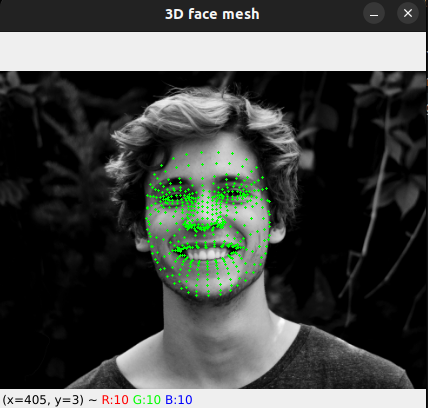
def displayFaceLandmarks(frame, results):frameHeight, frameWidth, _ = frame.shapeif results.multi_face_landmarks:for faceLandmarks in results.multi_face_landmarks:for landmark in faceLandmarks.landmark:x, y = int(landmark.x * frameWidth), int(landmark.y * frameHeight)cv2.circle(frame, (x, y), 1, (0, 255, 0), -1)cv2.imshow('3D face mesh', frame)cv2.waitKey(0)cv2.destroyAllWindows()
Next up, our
displayFaceLandmarksmethod takes theframeandresultsas input and displays the image along with the face landmarks.It extracts the height and width of the
frameusingframe.shapeso that we can map both the face landmarks and the pixels relative to each other.The function checks if any face landmarks were detected using
results.multi_face_landmarks. If landmarks are detected, we draw a green circle at each landmark point on our initial image usingcv2.circle.The processed image is displayed in a window titled '3D face mesh' using
cv2.imshow.
Note: The window will close when any key is pressed
cv2.waitKey(0), and all OpenCV windows will be closed bycv2.destroyAllWindows().
if __name__ == "__main__":imagePath = 'sample.png'frame, results = detectFaceLandmarks(imagePath)displayFaceLandmarks(frame, results)
We define our main function, which is called when the code runs. Here, we can specify the path to our image and see our face mesh in action!
Complete code
Congratulations, we just made our first 3D face mesh! Experiment with the code below and click on "Run" to see it in action.
import cv2
import mediapipe as mp

def detectFaceLandmarks(imagePath):

    mpFaceMesh = mp.solutions.face_mesh.FaceMesh(
        static_image_mode=True,
        max_num_faces=1,
        min_detection_confidence=0.7,
        min_tracking_confidence=0.7,
    )

    frame = cv2.imread(imagePath)

    frameRGB = cv2.cvtColor(frame, cv2.COLOR_BGR2RGB)
    results = mpFaceMesh.process(frameRGB)

    return frame, results

def displayFaceLandmarks(frame, results):
    frameHeight, frameWidth, _ = frame.shape

    if results.multi_face_landmarks:
        for faceLandmarks in results.multi_face_landmarks:
            for landmark in faceLandmarks.landmark:
                x, y = int(landmark.x * frameWidth), int(landmark.y * frameHeight)

                cv2.circle(frame, (x, y), 1, (0, 255, 0), -1)

    cv2.imshow('3D face mesh', frame)
    cv2.waitKey(0)
    cv2.destroyAllWindows()

if __name__ == "__main__":
    imagePath = 'sample.png'
    frame, results = detectFaceLandmarks(imagePath)
    displayFaceLandmarks(frame, results)
Output

3D face mesh for videos
We're now ready to process videos as well, so let's dive straight into it!
import cv2import mediapipe as mp
Similar to the last example, we make our imports first.
def drawFaceMesh(frame, faceLandmarks):mp_drawing.draw_landmarks(image=frame,landmark_list=faceLandmarks,connections=mp_face_mesh.FACEMESH_TESSELATION,landmark_drawing_spec=None,connection_drawing_spec=mp_drawing_styles.get_default_face_mesh_tesselation_style())mp_drawing.draw_landmarks(image=frame,landmark_list=faceLandmarks,connections=mp_face_mesh.FACEMESH_CONTOURS,landmark_drawing_spec=None,connection_drawing_spec=mp_drawing_styles.get_default_face_mesh_contours_style())mp_drawing.draw_landmarks(image=frame,landmark_list=faceLandmarks,connections=mp_face_mesh.FACEMESH_IRISES,landmark_drawing_spec=None,connection_drawing_spec=mp_drawing_styles.get_default_face_mesh_iris_connections_style())
In this block, we define a method called
drawFaceMeshthat takes two parameters:frameandfaceLandmarksi.e. the detected face landmarks usingmediapipe.For this purpose, we use
mp_drawing.draw_landmarksfromdrawing_utilsmodule to draw the face mesh annotations on our input frame.We make it draw three annotations given below.
Tessellation
Contours
Irises
def main():videoCapture = cv2.VideoCapture('https://player.vimeo.com/external/373966277.sd.mp4?s=bc69e79a8007eb5682e9e72a415a2142173228f6&profile_id=164&oauth2_token_id=57447761')videoCapture.set(cv2.CAP_PROP_FRAME_WIDTH, 1280)videoCapture.set(cv2.CAP_PROP_FRAME_HEIGHT, 720)frameRate = 30with mp_face_mesh.FaceMesh(max_num_faces=1,refine_landmarks=True,min_detection_confidence=0.7,min_tracking_confidence=0.7,) as faceMesh:while videoCapture.isOpened():isSuccess, frame = videoCapture.read()if not isSuccess:breakframe.flags.writeable = Falseframe = cv2.cvtColor(frame, cv2.COLOR_BGR2RGB)results = faceMesh.process(frame)frame.flags.writeable = Trueframe = cv2.cvtColor(frame, cv2.COLOR_RGB2BGR)if results.multi_face_landmarks:for faceLandmarks in results.multi_face_landmarks:drawFaceMesh(frame, faceLandmarks)cv2.imshow('3D video face mesh', cv2.flip(frame, 1))if cv2.waitKey(int(1000 / frameRate)) & 0xFF == 27:breakvideoCapture.release()cv2.destroyAllWindows()
Our
mainmethod handles all core things, so let's get straight into the functionalities of it!Create
videoCaptureto read frames from the given URL (changeable).Set the desired width/height of the video frames.
Initialize the FaceMesh model using
mp_face_mesh.FaceMeshby customizingmax_num_faces,min_detection_confidence, andmin_tracking_confidence.Start a loop. This processes each frame of the video. The iterations include the following flow.
Read a frame from the video capture.
Convert the frame from BGR to RGB format since it's a
mediapiperequirement.Process the frame using the FaceMesh model to get the
resultsi.e. landmark detections.Convert the frame back to BGR format.
Check for face landmarks in the current frame using
results.multi_face_landmarks.If landmarks were detected, call the
drawFaceMeshfunction to draw them on the said frame.Show the processed frame with face landmarks in our window
'3D video face mesh'.
Release the video capture object and close all windows after the loop.
Note: The loop will exit when the Escape i.e.
0xFFkey is pressed.
if __name__ == "__main__":mp_drawing = mp.solutions.drawing_utilsmp_drawing_styles = mp.solutions.drawing_stylesmp_face_mesh = mp.solutions.face_meshmain()
Lastly, we define our main function, which renders the video in the window along with the corresponding face mesh coordinates for each frame!
Complete code
The following code is completely executable and renders a face mesh for the frames of the video.
You can replace the video link with any compatible video link as well.
import cv2
import mediapipe as mp

def drawFaceMesh(frame, faceLandmarks):

    mp_drawing.draw_landmarks(
        image=frame,
        landmark_list=faceLandmarks,
        connections=mp_face_mesh.FACEMESH_TESSELATION,
        landmark_drawing_spec=None,
        connection_drawing_spec=mp_drawing_styles.get_default_face_mesh_tesselation_style()
    )
    mp_drawing.draw_landmarks(
        image=frame,
        landmark_list=faceLandmarks,
        connections=mp_face_mesh.FACEMESH_CONTOURS,
        landmark_drawing_spec=None,
        connection_drawing_spec=mp_drawing_styles.get_default_face_mesh_contours_style()
    )
    mp_drawing.draw_landmarks(
        image=frame,
        landmark_list=faceLandmarks,
        connections=mp_face_mesh.FACEMESH_IRISES,
        landmark_drawing_spec=None,
        connection_drawing_spec=mp_drawing_styles.get_default_face_mesh_iris_connections_style()
    )

def main():

    videoCapture = cv2.VideoCapture('https://player.vimeo.com/external/373966277.sd.mp4?s=bc69e79a8007eb5682e9e72a415a2142173228f6&profile_id=164&oauth2_token_id=57447761')

    videoCapture.set(cv2.CAP_PROP_FRAME_WIDTH, 1280)
    videoCapture.set(cv2.CAP_PROP_FRAME_HEIGHT, 720)
    frameRate = 30

    with mp_face_mesh.FaceMesh(
        max_num_faces=1,
        refine_landmarks=True,
        min_detection_confidence=0.7,
        min_tracking_confidence=0.7,
    ) as faceMesh:
        while videoCapture.isOpened():
            isSuccess, frame = videoCapture.read()
            if not isSuccess:
                break

            frame.flags.writeable = False
            frame = cv2.cvtColor(frame, cv2.COLOR_BGR2RGB)
            results = faceMesh.process(frame)

            frame.flags.writeable = True
            frame = cv2.cvtColor(frame, cv2.COLOR_RGB2BGR)
            if results.multi_face_landmarks:
                for faceLandmarks in results.multi_face_landmarks:
                    drawFaceMesh(frame, faceLandmarks)


            cv2.imshow('3D video face mesh', cv2.flip(frame, 1))

            if cv2.waitKey(int(1000 / frameRate)) & 0xFF == 27:
                break

        videoCapture.release()
        cv2.destroyAllWindows()

if __name__ == "__main__":
    mp_drawing = mp.solutions.drawing_utils
    mp_drawing_styles = mp.solutions.drawing_styles
    mp_face_mesh = mp.solutions.face_mesh
    main()
Output
3D face mesh for webcam
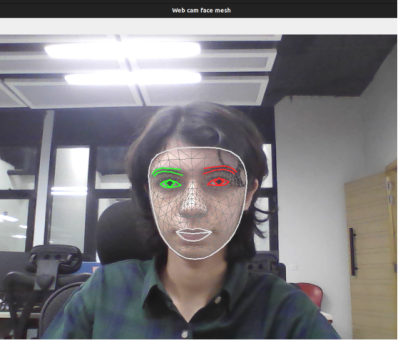
The most exciting part is here! We can also project the 3D face mesh on ourselves by using our own webcam or an external camera.
We pass 0 to the VideoCapture function so that the video source becomes our webcam directly.
import cv2import mediapipe as mpdef drawFaceMesh(frame, faceLandmarks):mp_drawing.draw_landmarks(image=frame,landmark_list=faceLandmarks,connections=mp_face_mesh.FACEMESH_TESSELATION,landmark_drawing_spec=None,connection_drawing_spec=mp_drawing_styles.get_default_face_mesh_tesselation_style())mp_drawing.draw_landmarks(image=frame,landmark_list=faceLandmarks,connections=mp_face_mesh.FACEMESH_CONTOURS,landmark_drawing_spec=None,connection_drawing_spec=mp_drawing_styles.get_default_face_mesh_contours_style())mp_drawing.draw_landmarks(image=frame,landmark_list=faceLandmarks,connections=mp_face_mesh.FACEMESH_IRISES,landmark_drawing_spec=None,connection_drawing_spec=mp_drawing_styles.get_default_face_mesh_iris_connections_style())def main():videoCapture = cv2.VideoCapture(0)videoCapture.set(cv2.CAP_PROP_FRAME_WIDTH, 1280)videoCapture.set(cv2.CAP_PROP_FRAME_HEIGHT, 720)frameRate = 30with mp_face_mesh.FaceMesh(max_num_faces=1,refine_landmarks=True,min_detection_confidence=0.7,min_tracking_confidence=0.7,) as faceMesh:while videoCapture.isOpened():isSuccess, frame = videoCapture.read()if not isSuccess:breakframe.flags.writeable = Falseframe = cv2.cvtColor(frame, cv2.COLOR_BGR2RGB)results = faceMesh.process(frame)frame.flags.writeable = Trueframe = cv2.cvtColor(frame, cv2.COLOR_RGB2BGR)if results.multi_face_landmarks:for faceLandmarks in results.multi_face_landmarks:drawFaceMesh(frame, faceLandmarks)cv2.imshow('Web cam face mesh', cv2.flip(frame, 1))if cv2.waitKey(int(1000 / frameRate)) & 0xFF == 27:breakvideoCapture.release()cv2.destroyAllWindows()if __name__ == "__main__":mp_drawing = mp.solutions.drawing_utilsmp_drawing_styles = mp.solutions.drawing_stylesmp_face_mesh = mp.solutions.face_meshmain()
Note: Run this code on your local machine so that your code can connect to the webcam.
Output

Use cases of a 3D face mesh
The field of computer vision is excelling at great speeds and offers a lot of potential for new discoveries. Currently, 3D face mesh technology finds itself highly useful in the following use cases depicted in the diagram.
Note: Here's the complete list of related projects in MediaPipe or deep learning.
What does passing 0 to the function VideoCapture do?
Free Resources