What are Scala performance characteristics?
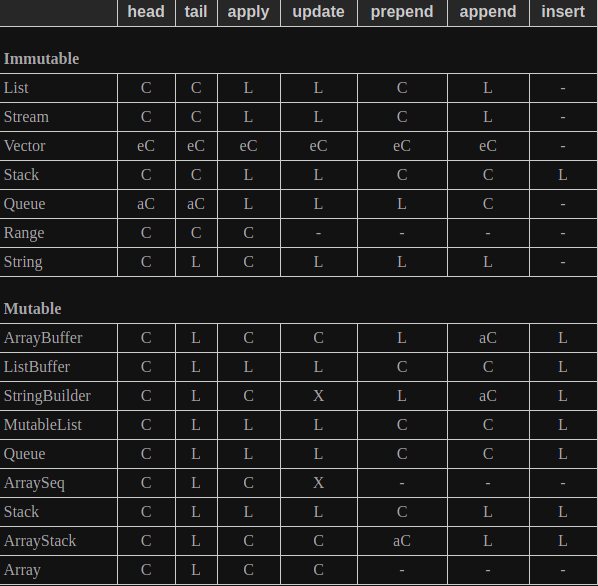
When choosing a collection in Scala, one needs to be aware of their requirements as different collections have different performance characteristics. This way, a user can pick the most optimized choice based on their requirements. The two tables below define the relevant collections and the complexity of using their methods.
Please take a look at the key before looking at the tables for further clarity.
Key:
-
C: This symbol means that the mentioned operation takes constant time, , to complete. -
eC: This symbol means that the operation ideally takes a constant time, , to complete. However, the time complexity is subject to change based on the length of a list or type of hashmap. -
aC: This symbol means means that, on average, the operation takes constant time . However, this operation can takeamortized constant time Some methods of operations might take a little longer time to run. -
Log: This symbol means the specified operation takes logarithmic time, , to complete. -
L: This symbol means that the operation takes linear time, , to complete. -
-: This operation is not supported.
Collections
An immutable object’s value cannot be changed; while, mutable objects allows the values associated to be changed.
Set and maps
A map stores key-value pairs. Given a key, a value is returned (if the key is present). For a set, it also stores key-value pairs. However, the sets return a boolean True or False that indicate whether or not a key is present.

Let’s have a look at what the methods in these two tables represent:
1 . head: Accesses the first element.
2 . tail: Gives a new sequence without the first element.
3 . apply: Performs indexing on data.
4 . update: Functionally updates sequences.
5 . prepend: Adds an element at the
6 . append : Adds an element at the end (as the last element) of a sequence.
7 . insert: Adds/inserts a value at any arbitrary position.
8 . lookup: Searches for if a certain element exists in a set.
9 . add: Adds a new element to a set or a key/value pair to a map.
10 . remove: Removes an element form set – it can also be used to remove a key from a map.
11 . min: Accessse the minimum smallest element/key in the set/map.
For further information, visit the official documentation.
Free Resources