What are Stateful widgets?
Every Flutter application is made up of widgets. This can range from buttons, columns, rows, icons, to even the app itself.
However, to better understand how to manage these widgets in your Flutter applications, it is important that you understand what each state is and what states each widget should take at specific times.
In a previous article, you learned about Stateless widgets in Flutter. A stateless widget is any widget that does not change with user input.
Such as:
- Icons
- Texts
Stateful widgets are reactive to the user’s input.
Understanding stateful widgets
- Stateful widgets change dynamically.
- Stateful widgets change according to a user’s input.
- Stateful widgets change when there is user interaction.
For example: When a user updates a profile picture on an application like WhatsApp or Twitter, it changes the
of the application. state current condition
When you build mobile applications, there are instances where you need to make choices based on the state of the app. You can use
However, if you need to accomplish any of the following tasks:
- Update or rebuild an interface when data changes
- Track data over time
- Trigger rebuilds on their own
- Animate a widget
You need to make use of the stateful widget. The stateful widget has a
Structure of a stateful widget
The snippet below shows a skeletal representation for a stateless widget with a MyStatefulBox subclass. This is a container widget with a blue property color.
import '';class MyStatefulBox extends StatefulWidget {const MyStatefulBox({ Key? key }) : super(key: key);@overrideState<MyStatefulBox> createState() => _MyStatefulBoxState();}class _MyStatefulBoxState extends State<MyStatefulBox> {@overrideWidget build(BuildContext context) {return Container(color: const Colors.blue);}}
The screenshot below shows a stateful widget used in a calculator. This widget has more constructor arguments, each of which corresponds to a final property.
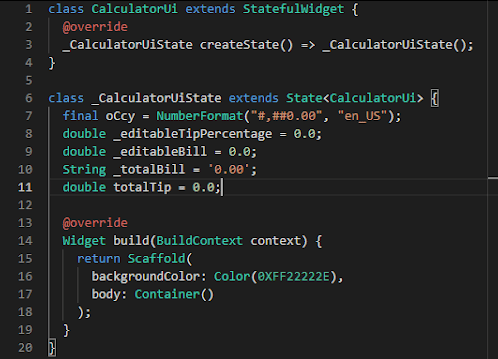
Stateless widget in a tip calculator app
The stateful widget provides immutable configuration info and a state object that can change over time and trigger a rebuild of the UI.
A stateful widget makes it possible for you to manage data based on the user’s input or depending on the system’s state.
A simple application of a stateful widget can be seen in this sample tip calculator below:
The image above shows a tip calculator that allows a user to calculate a tip amount for various percentages of the cost of a service. It also provides the total amount that includes the tip.
The UI has been developed using flutter and is comprised of both stateful and stateless widgets.
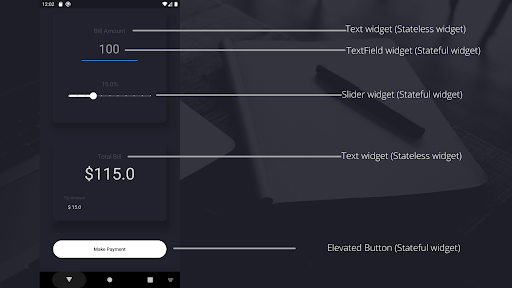
From the image above, you can see a combination of both stateful and stateless widgets coming together to form a functional application.
Examples of Stateful widget
- ‘Slider’ widget allows the user to edit the tip percentage for service.
- elevatedButton allows the user to click and submit the total per service. It also refreshes the screen for a new transaction.
In the application above, the rows, columns, and borders of the app don’t need to change. Therefore, it can be a stateless widget. However, when you input a number into the text field and move the slider, it updates on a part of the screen that is built as a stateful widget.
In summary
Stateful widgets maintain and manage data, and react according to what the data is doing within the mobile application.
Stateful widgets are as important as stateless widgets. It is important to understand where to make use of each, because one will make development easier.
For more information on stateful widgets, head over to
. flutter https://flutter.io/