What are StreamControllers in Dart?
A StreamController object in Dart does exactly what the name suggests, it controls Dart Streams. The object is used to create streams and send data, error, and done events on them. Controllers also help check a stream’s properties, such as how many subscribers it has or if it’s paused.
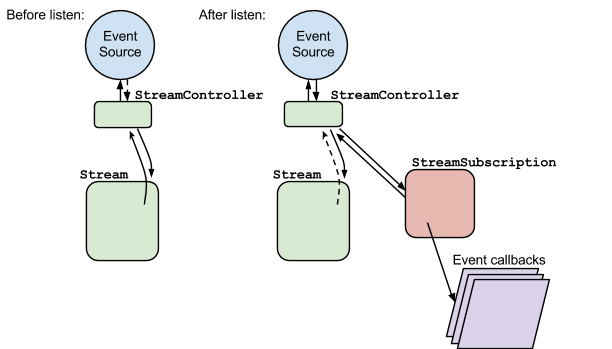
To understand how controllers work, let’s play around with a controller for a stream that supports a single subscriber. The code below shows a single subscriber listening for events sent on a stream through a stream controller:
import 'dart:convert';import 'dart:async';// Initializing a stream controllerStreamController<String> controller = StreamController<String>();// Creating a new stream through the controllerStream<String> stream = controller.stream;void main() {// Setting up a subscriber to listen for any events sent on the streamStreamSubscription<String> subscriber = stream.listen((String data) {print(data);},onError: (error) {print(error);},onDone: () {print('Stream closed!');});// Adding a data event to the stream with the controllercontroller.sink.add('Hello!');// Adding an error event to the stream with the controllercontroller.addError('Error!');// Closing the stream with the controllercontroller.close();}
Although the above code works well with one subscriber, it won’t work if a stream has multiple listeners. To account for this, a stream controller can set up a broadcast stream using the broadcast method. The program below shows how this can be done:
import 'dart:convert';import 'dart:async';// Initializing a stream controller for a broadcast streamStreamController<String> controller = StreamController<String>.broadcast();// Creating a new broadcast stream through the controllerStream<String> stream = controller.stream;void main() {// Setting up a subscriber to listen for any events sent on the streamStreamSubscription<String> subscriber1 = stream.listen((String data) {print('Subscriber1: ${data}');},onError: (error) {print('Subscriber1: ${error}');},onDone: () {print('Subscriber1: Stream closed!');});// Setting up another subscriber to listen for any events sent on the streamStreamSubscription<String> subscriber2 = stream.listen((String data) {print('Subscriber2: ${data}');},onError: (error) {print('Subscriber2: ${error}');},onDone: () {print('Subscriber2: Stream closed!');});// Adding a data event to the stream with the controllercontroller.sink.add('Hello!');// Adding an error event to the stream with the controllercontroller.addError('Error!');// Closing the stream with the controllercontroller.close();}
Now that we know how to add events to and close a stream using the StreamController class, let’s look into some of the classes’ useful methods:
hasListener → bool: determines if the stream has a subscription currently listening to it.isClosed → bool: checks if a stream has been closed.isPaused → bool: checks if a stream is paused.
To learn more about the
StreamControllerclass, visit Dart’s official documentation.