What is a monitor in Java?
In concurrent / multi-thread programming, a monitor is a synchronization mechanism that controls concurrent access to an object.
In multi-thread programming, more than one thread executes a single piece of code simultaneously and tries to share a common code segment called the critical section.
There are two important concepts in concurrent programming:
1. Mutual exclusion
Mutual exclusion (mutex) is a property that states that two threads cannot reside in the critical section at any point during their execution which means that if a thread is running in a critical section, no other thread is allowed to execute in its critical section.
2. Synchronization
When two or more threads are executed to accomplish a single task, they need to exchange information timely to work smoothly. This is done via synchronization.
Note: Monitors are used to achieve both these properties.
Syntax
When a thread executes and holds the critical section while all other threads are blocked, there is a wait until some conditions are met. Monitors allow us to do this.
In Java, monitors are implemented using the synchronized keyword that comes from java.lang.Object
Example
Threads enable the execution of multiple copies of a program run simultaneously to achieve synchronization and mutual exclusion using the monitor.
Note: The concept of the monitor is not limited to the Java language only.
Every Java object has a monitor associated with it, which it inherits from java.lang.Object.
The following Java example code explains the synchronization via monitor:
Code
class Count {// synchronized blocksynchronized void displayCounting(int n) {for (int i = 1; i <= n; i++) {System.out.println(i);try {// sleep for 500 millisecondsThread.sleep(500);} catch (Exception e) {System.out.println(e);}}}}// Thread 1class Thread_A extends Thread {Count c;Thread_A(Count c) {this.c = c;}public void run() {c.displayCounting(5);}}// Thread 2class Thread_B extends Thread {Count c;Thread_B(Count c) {this.c = c;}public void run() {c.displayCounting(5);}}public class main {public static void main(String args[]) {Count obj = new Count();Thread_A t1 = new Thread_A(obj);Thread_B t2 = new Thread_B(obj);t1.start();t2.start();}}
Explanation
-
Lines 3–13: A
synchronizedfunction nameddisplayCounting()is created that is taking an integer parameternand displaying counting from 1 ton. The codeThread.sleep(500);will sleep the thread for 500 milliseconds when this line is executed. -
Lines 17–25: Here, the first thread
Thread_Ahas been created and extended from theThreadclass. Therun()function is executed when a thread is invoked, which calls thedisplayCounting()to print numbers. -
Lines 28–36: This is the second thread named
Thread_B, similar to the first thread. Therun()function is also calling thedisplayCounting()to print numbers. -
Lines 38–46: These lines cover the
mainfunction. Objects ofThread_AandThread_Bare created, and both threads are started. Both threads will call the synchronized functiondisplayCounting()in parallel, but here is where the monitor comes into play. When the first thread executes the function, the monitor will block the second thread till the completion of the first thread. It will then be allowed to execute.
Output
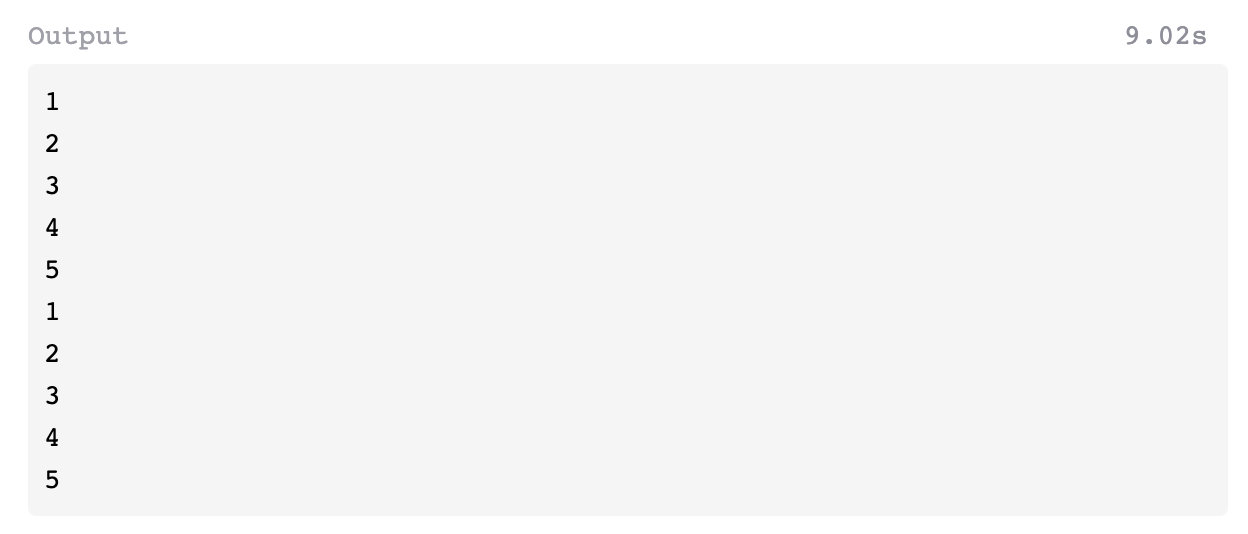
The two threads displayed are from 1 to 5. Both threads are executed in parallel. Here, displayCounting is a synchronized function that blocks the second thread as the first thread starts executing it until its completion. The first thread will print counting from 1 to 5. After that, the second thread plays and prints, counting 1 to 5.
So the output looks like this:
Free Resources