What is a subplots in matplotlib?
The matplotlib.pyplot.subplots method provides a way to plot multiple plots on a single figure. Given the number of rows and columns, it returns a tuple (fig, ax), giving a single figure fig with an array of axes ax.
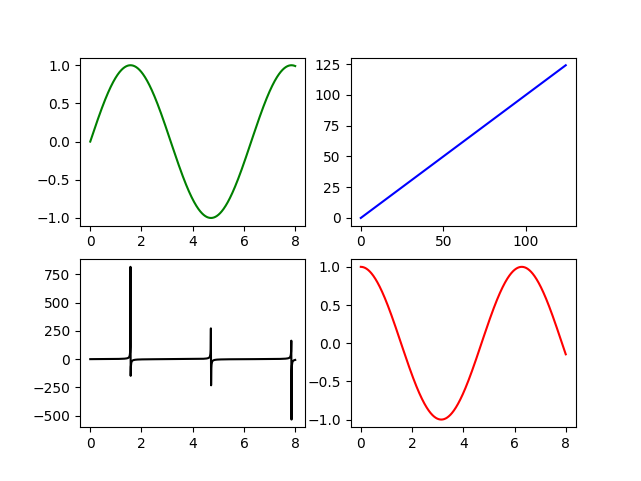
4 subplots in a single figure
Function signature
Here is the function for matplotlib.pyplot.subplots:
matplotlib.pyplot.subplots(nrows=1,ncols=1,sharex=False,sharey=False,squeeze=True,subplot_kw=None,gridspec_kw=None,**fig_kw)
Parameters
Given below is the detail of each parameter to the matplotlib.pyplot.subplots method:
nrows,ncols: Number of rows and columns of the subplot grid. Both of these are optional with a default value of 1.sharex,sharey: Specifies sharing of properties between axes. Possible values are none, all, row, col or a boolean with a default value of False.squeeze: Boolean value specifying whether to squeeze out extra dimension from the returned axes arrayax. The default value is False.subplot_kw: Dict of keywords to be passed to theadd_subplotcall to add keywords to each subplot. The default value is None.gridspec_kw: Dict of grid specifications passed toGridSpecconstructor to place grids on each subplot. The default value is None.**fig_kw: Any additional keyword arguments to be passed topyplot.figure call. The default value is None.
Return
Here is an explanation of the tuple returned by the function:
fig: Thematplotlib.pyplot.figureobject to be used as a container for all the subplots.ax: A single object of theaxes.Axesobject if there is only one plot, or an array ofaxes.Axesobjects if there are multiple plots, as specified by thenrowsandncols.
Example
Here is an example on how to use the matplotlib.pyplot.subplots method:
- Line 1-2: Import
matplotlib.pyplotfor plotting andnumpyfor generating data to plot. - Line 4: Generate a figure with 2 rows and 2 columns of subplots.
- Line 5: Generate some data using
numpy. - Line 7-10: Index the
axarray to plot different subplots on the figurefig. - Line 11: Output the figure.
import matplotlib.pyplot as pltimport numpy as npfig, ax = plt.subplots(2, 2)x = np.linspace(0, 8, 1000)ax[0, 0].plot(x, np.sin(x), 'g') #row=0, col=0ax[1, 0].plot(x, np.tan(x), 'k') #row=1, col=0ax[0, 1].plot(range(100), 'b') #row=0, col=1ax[1, 1].plot(x, np.cos(x), 'r') #row=1, col=1fig.show()
Free Resources
Copyright ©2026 Educative, Inc. All rights reserved