What is a switch in IOS UI?
In IOS, a switch is a user interface (UI) control element that allows users to toggle between two states: on and off. The subclass of UIControl, known as UISwitch, defines the properties and methods that govern the state of a switch.
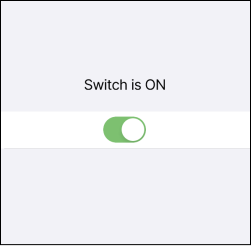
This is an example of what a switch looks like:

Coding example
This following swift code sets up an outlet connection to a UISwitch object in a user interface file and creates an action method to handle the ValueChanged event of the switch.
@IBOutlet weak var mySwitch: UISwitch!@IBAction func switchToggled(_ sender: UISwitch) {if sender.isOn {// do something when switch is on} else {// do something when switch is off}}
Explanation
Line 1: We use the
IBOutletkeyword to declare a property namedmySwitch, which is connected to aUISwitchobject in the user interface file. Theweakkeyword indicates that this property is a weak reference, which means that the property does not prevent the referenced object from being deallocated when it is no longer needed.Line 2: We use the
IBActionkeyword to declare a method namedswitchToggled, which is called when the user toggles the switch. The sender parameter represents theUISwitchobject that triggered the event.Lines 4–8: The method checks the
isOnproperty of the sender to determine whether the switch is in the "on" or "off" state. If the switch is on, the method executes the code in theifblock to perform a specific action. If the switch is off, the method executes the code in theelseblock to perform a different action.
Free Resources