What is ASP.NET Core?
This shot explains what ASP.NET Core is, including its various components and features.
Prerequisite
Basic understanding of the CSharp programming language is necessary. A basic understanding of any other programming language is a plus.
What is ASP.NET Core?
ASP.NET Core is an open-source framework powered by Microsoft for developing fast and secure web application services within .NET. It’s also engineered to work across operating systems (it’s cross-platform).
Initially, its first version was proposed in 2016 with the name ASP.NET Next version, and Microsoft was to change the name to ASP.NET 5 upon its release. However, they later changed the name to ASP.NET Core during its first release in 2016.
ASP.NET Core release history
| Version Number | Release Date | Supported Visual Studio Version |
|---|---|---|
| 1.0 | 2016-06-27 | Visual Studio 2015, 2017 |
| 1.1 | 2016-11-18 | Visual Studio 2015, 2017 |
| 2.0 | 2017-08-14 | Visual Studio 2017 |
| 2.1 (long-term support) | 2018-05-30 | Visual Studio 2017 |
| 2.2 | 2018-12-04 | Visual Studio 2017 15.9 |
| 3.0 | 2019-09-23 | Visual Studio 2017, 2019 |
| 3.1 (long-term support) | 2019-12-03 | Visual Studio 2019 |
| 5.0 | 2020-11-10 | Visual Studio 2019 16.8 |
Why use ASP.NET Core?
Developers all over the world use or have used ASP.NET 4 to create web apps. ASP.NET Core is an advanced version of ASP.NET 4 with some newly introduced features. These include architectural updates, which result in a leaner and more modular framework.
There are numerous advantages in choosing .NET Core, and these advantages increase with each update. Just to list a few of the advantages of .NET Core over .NET Framework:
-
It has inbuilt support for popular JavaScript frameworks, like Angular and Reacts.
-
Cross-platform; runs on Windows, macOS, and Linux.
-
Razor markup more natural with HTML
-
Increased performance
-
Improve testability and Readability
-
Dependency Injection was introduced to avoiding direct referencing a project
-
Build web apps and services, apps, and mobile backends.
Creating a new ASP.NET project
Once you have installed Visual Studio 2019, you can start building a new ASP.NET Core Application from the New Project menu option.
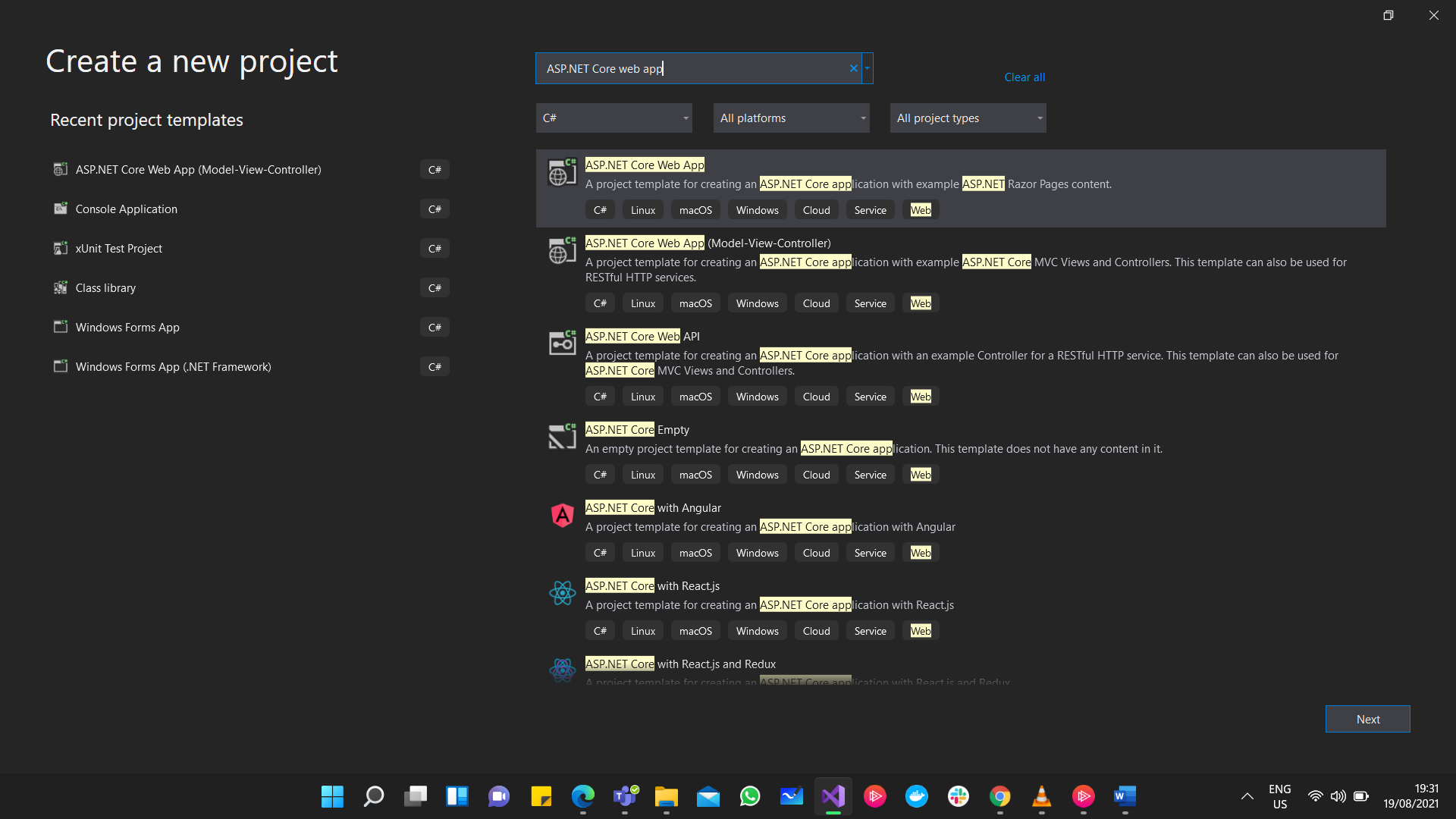
On the New Project dialogue box, you will see different templates for Web projects:
-
ASP.NETWeb Application: This is the simpleASP.NETapplication template. -
ASP.NETCore Web Application: This will start you with a cross-platform compatible project that runs on the .NET Core framework. -
ASP.NETCore with Angular: This starts you with a cross-platform compatible project where you can build your app around a JavaScript framework called Angular -
ASP.NETCore with React.js: This starts you with a cross-platform compatible project where you can build your app around a JavaScript framework called React.js -
ASP.NETCore Web Application (.NET Framework): This starts a new project that runs on the standard .NET Framework on Windows.