What is the use of asterisk (*) selector in CSS ?
Overview
The asterisk (*), also known as the
Example of CSS universal selectors
Example 1
In the first result, all of the text is in black font color with a purple background, as our code overwrites the default background color for all HTML elements.
Example 2
In the second result, all of the text is the same size, as our code overwrites the default font-size for all HTML elements.
Example 3
Let’s say that you have a document that contains the following HTML elements:
- An H1
- Paragraphs
- A table
- Pre-formatted text
- An unordered list
Then, use the declaration below to make sure all elements are purple.
* {color: purple;}
Use the previous declaration instead of the code below to simplify your code.
BODY, H1, P, TABLE, TR, TD, TH, PRE, UL, LI {color: purple;}
Browser Compatibility
Browser Compatibility is the manner in which a web page looks in different web browsers. Different browsers read the website code differently. In other words, Chrome will render a website differently than Firefox or Edge will. Thus, it is important to know in which browser, the code written by a programmer is acceptable.
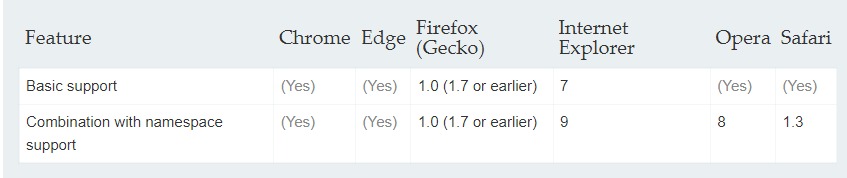
The table above shows that the CSS universal selector is supported by Chrome, Edge, Firefox, Internet Explorer, Opera and Safari.