What is TRIM() in SQL?
The TRIM() function removes the leading and trailing space characters (or other specified characters) from a string.
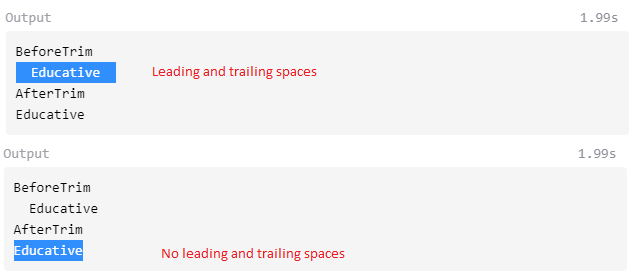
Figure 1 shows a visual representation of the TRIM() function.
Syntax
TRIM(string)
//or
TRIM(BOTH 'characters' FROM string)
Parameter
The TRIM() function takes a string to be trimmed and the characters you want to be removed as parameters.
You can specify whether you want the LEADING characters, TRAILING characters, or BOTH leading and trailing characters trimmed by using those keywords.
Return value
TRIM() returns the source string from the parameter with the specified characters trimmed out. If no characters are specified, it trims any leading and trailing spaces.
Code
The following example shows how to use TRIM() to remove leading and trailing characters from words.
To see the whitespaces that are removed, you can highlight both strings in the output.
SELECT " Educative " as BeforeSpaceTrim;SELECT TRIM(" Educative ") as AfterSpaceTrim;SELECT "&%Educative&%" as BeforeTrim;SELECT TRIM(LEADING '&%' FROM '&%Educative&%') as AfterLeadingTrim;SELECT TRIM(TRAILING '&%' FROM '&%Educative&%') as AfterTrailingTrim;SELECT TRIM(BOTH '&%' FROM '&%Educative&%') as AfterBothTrim;