What is "TypeError: Cannot read property 'state' of undefined"?
Overview
At some point in your development career, you may come across TypeError: Cannot read property 'state' of undefined error.
To debug this error, we have to understand the error message. If you type undefined.state in your browser console, you get the same error message, as shown below.
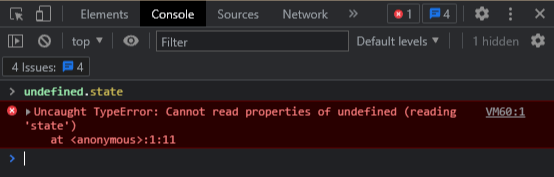
undefined.state and the this keyword
The error message says that you don’t have the state property on an undefined object.
To decode this, we have to understand the this keyword in JavaScript. this refers to an object that executes the current bit of JavaScript code.
Code
Example 1
Let’s look at the following code example.
class Car {setDriveSound(sound) {this.sound = sound;}drive() {return this.sound;}}const car = new Car();car.setDriveSound( "vroom");console.log(car.drive());
Explanation
We have a Car class and two methods. The setDriveSound method initializes the sound variable, and the drive method returns the sound variable.
We instantiate the car object and initialize the sound variable with “vroom”. Then, when we call the car.drive() method, it prints “vroom”.
The drive() method in car.drive() returns this.sound. Here, this is a reference to the car object. This means it returns the sound variable from the object to which this is referenced.
To easily identify what the
thiskeyword refers to, check what is on the left side of the dot (.) on which it is called.
In the example above, this is present in the drive() method and the drive() method is called on the car object. In car.drive(), the car object is to the left of the dot, so this refers to the car object.
Example 2
Let’s add some more code to the example above to understand this clearly.
class Car {setDriveSound(sound) {this.sound = sound;}drive() {return this.sound;}}const car = new Car();car.setDriveSound( "vroom");const truck = {sound: "putputput",driveMyTruck: car.drive,};console.log(truck.driveMyTruck());
Explanation
The code above logs putputput. Here, this refers to the truck object. In the code, we assign the car.drive callback to a variable that is present in the truck object.
So, this can refer to that object when it is called.
Example 3
What if we assign car.drive to a variable that is not present in an object and then call it? What do you think will happen?
class Car {setDriveSound(sound) {this.sound = sound;}drive() {return this.sound;}}const car = new Car();car.setDriveSound( "vroom");const drive = car.drive;console.log(drive());
Explanation
We get “TypeError: Cannot read property ‘sound’ of undefined”.
We get the error because when we call drive(), it is a standalone function. this.sound returns, but the keyword this refers to nothing.
How to resolve these issues
We can resolve this issue in a number of ways. This shot provides the following three methods.
1. Use the bind() method
bind() fixes the value of the keyword this.
class Car {constructor(){this.drive = this.drive.bind(this);}setDriveSound(sound) {this.sound = sound;}drive() {return this.sound;}}const car = new Car();car.setDriveSound( "vroom");const drive = car.drive;console.log(drive());
2. Use the arrow function
Arrow functions automatically bind their components, so we convert the drive method in the car class to an arrow function, as shown below.
class Car {setDriveSound(sound) {this.sound = sound;}drive = ()=> {return this.sound;}}const car = new Car();car.setDriveSound( "vroom");const drive = car.drive;console.log(drive());
3. Use an inline arrow function
We convert the standalone function to an arrow function.
Compare your code with the scenarios above. It should help to debug the error.
class Car {setDriveSound(sound) {this.sound = sound;}drive() {return this.sound;}}const car = new Car();car.setDriveSound( "vroom");const drive = () => car.drive();console.log(drive())
Free Resources
- undefined by undefined