Various Testing Methods with Selenium
Explore different testing methods supported by Selenium, including behavior-driven development with Cucumber, visual testing with AI tools, and automated accessibility testing using the axe-core SDK. Understand how to create test scenarios, capture visual differences, and run accessibility audits within your Selenium tests.
We'll cover the following...
In this lesson, we’re going to look at a few testing types that are supported by the Selenium framework. We’ll cover testing that includes BDD with Cucumber, accessibility testing, and visual testing.
BDD testing with Selenium
In this lesson, we won’t provide a thorough deep dive into BDD. However, it’s important to understand that BDD can be used with Selenium easily. In the context of Agile testing practices, developers who are building software through the BDD method create the test scenarios in Gherkin, which follows the built-in keyword-driven syntax based on GIVEN, WHEN, and THEN. In the following screenshot, we can see an example of a Cucumber test scenario in Gherkin:

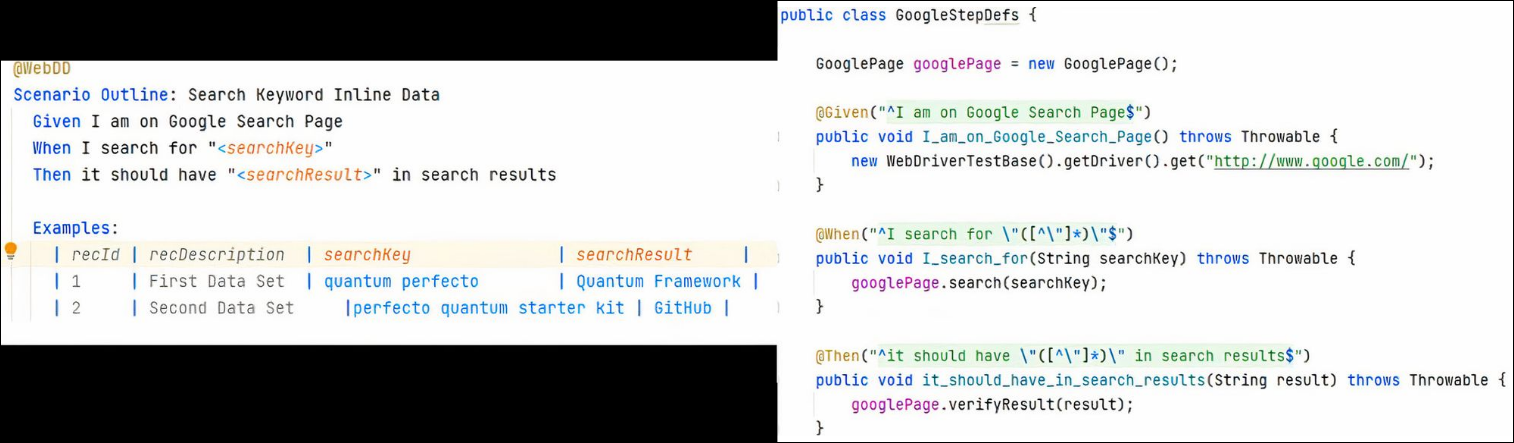
In the preceding screenshot, we can see a full Gherkin-based test scenario with the annotation name of WebDD. The scenario simply navigates to a Google search page to find two search keys that are provided within a table (a data-driven test). A data-driven test within Cucumber is defined using the Examples keyword. Previously, we created two types of data input for the test under the Examples ...