Creating a Project
Explore the steps to create a new Quarkus project using the web interface or developer tools. Understand project structure, how to add extensions and dependencies, and test your application with REST clients to consume external APIs.
We'll cover the following...
We'll cover the following...
Generating a new application
Quarkus offers two main ways of generating a new application.
Using the web page
Generating a new Quarkus application can be done directly by going to code.quarkus.io and selecting the needed extensions, the build tool, and general information about our new project.

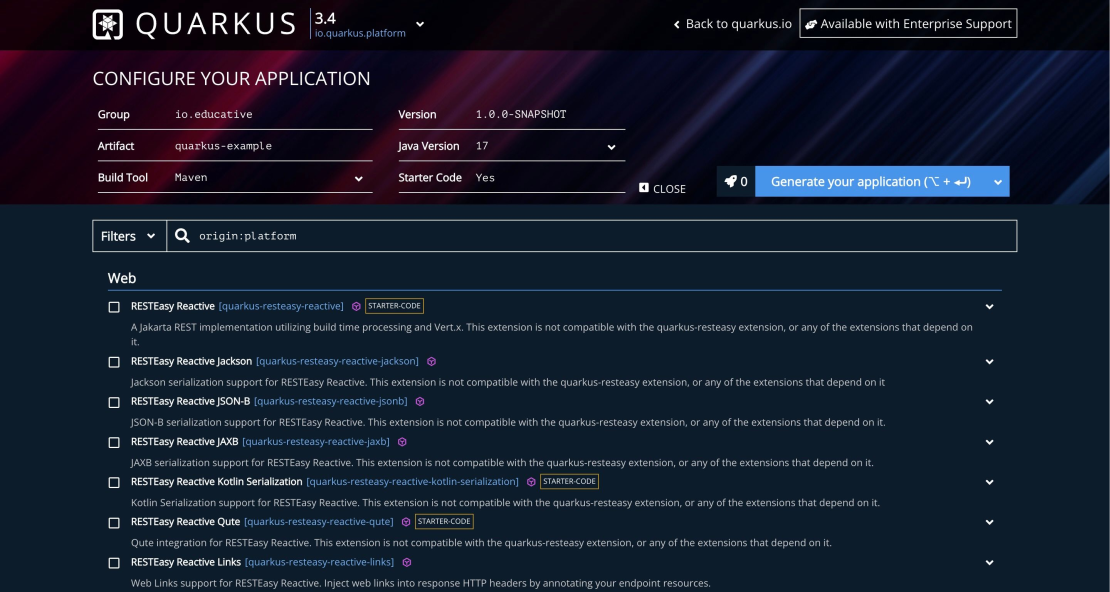
Quarkus web page
As seen in the screenshot above, we can specify multiple options for our new Quarkus application. These include the following:
- Group: Represents the owner of this application and is usually a company name.
- Artifact: A unique identifier for the application.
- Build tool: The preferred build tool can be either Maven or Gradle.
- Version: The generated project version.
- Java version: The Java version to be used.
- Starter code: Whether Quarkus will generate a started code.