Important Features of a Menu
Explore the important features that make dropdown menus effective for website navigation. Understand how to design menus with always-visible top bars, hover-activated submenus organized into labeled columns with images, and seamless content transitions. Learn to create clickable links on both top-level and submenu items, and control menu visibility based on user interaction.
We'll cover the following...
Let’s get started by making a dropdown menu!
Menus can be seen all over the web. Some are simple and expand a single column of options; some are more complex and can nest submenus. If you’re creating a website from scratch with any sort of navigation or extended options, the chances are good that you’ll be implementing a dropdown menu as well.
We’ll base ours on one used by one of the most popular e-commerce websites: eBay.
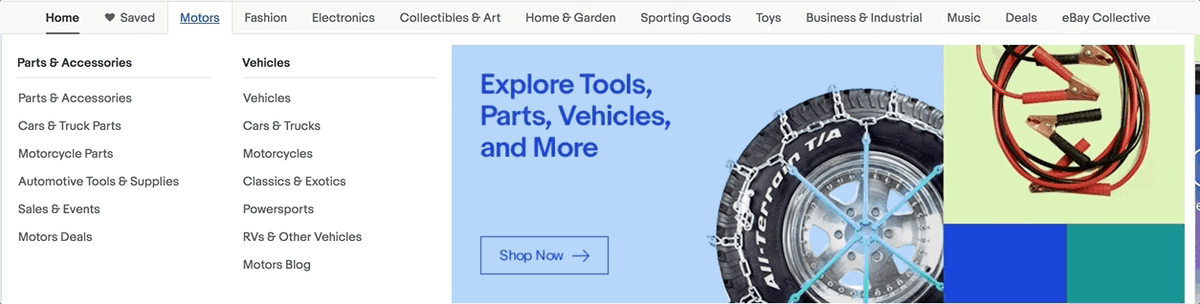
Let’s take note of the features we want to implement.
- There’s a top-level menu bar that is always visible.
- Hovering over an item is what brings up submenus
- Submenus are separated into two, labeled columns
- Submenus include a portion for images
- Submenus are all the same size
- Transitioning from one submenu to another is seamless. Rather than closing and opening animations, the contents change
- The submenu columns have clickable links, but the top-level option is also clickable (e.g., users can click on “Electronics” but also a specific type of electronics)
- Submenu images are also clickable
- When a user’s mouse leaves the submenu, it closes