Test-Driven Development
Explore the principles of Test Driven Development (TDD) using Python and Flask. Understand writing tests before code, the red-green-refactor cycle, and best practices to improve code quality, modularity, and test coverage for maintainable software.
Introduction to test-driven development (TDD)
Test-driven development (TDD) is a software development approach where tests are written before the implementation code. The development process revolves around an iterative cycle of writing a failing test, implementing the code to make the test pass, and then refactoring the code.
Some of the benefits of test-driven development are the following:
Improved code quality: TDD encourages developers to write focused and specific tests, leading to more robust and reliable code.
Faster feedback loop: By writing tests first, developers quickly receive feedback on their code’s correctness and can detect issues early.
Increased test coverage: TDD promotes writing tests for all code paths, resulting in comprehensive test coverage.
Better design and modularity: Writing tests upfront forces developers to think about the code’s design, resulting in cleaner and more modular architectures.
Code maintainability: TDD promotes writing testable code, making it easier to maintain and refactor code over time.
The red-green-refactor cycle

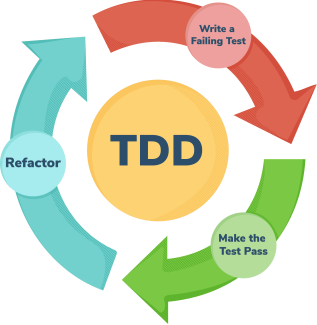
The core of TDD is the red-green-refactor cycle, which involves three steps:
Red: Writing a failing test.
Green: Implementing the code to make the test pass.
Refactor: Refactoring the code to improve its design and maintainability.
This cycle is repeated for each new feature or behavior to be implemented.
Writing the initial test expected to fail
We begin by identifying a small, incremental functionality or behavior to implement. We then write a test that clearly defines the desired behavior or functionality. The test should be focused and capture the expected outcome of the functionality.
We execute the test and observe it fail. This failure indicates that the desired functionality is not yet implemented.
Implementing the minimum code to pass the test
We write the simplest code necessary to make the failing test pass. The focus is on making the test pass, not on writing the entire implementation at once. We’ll keep the code as minimal as possible to achieve the desired functionality.
Running the test and verifying the success
We rerun the test after implementing the code changes. The test should now pass, indicating that the desired functionality is correctly implemented.
Refactoring the code
We refactor the code to improve its design, readability, and maintainability. We’ll focus on improving the code without changing its behavior. We’ll apply best practices, eliminate code duplication, and ensure clarity.
We repeat the red-green-refactor cycle for the next incremental functionality. We’ll start by writing a failing test, implementing the code to pass the test, and then refactoring the code. We’ll continue iterating the cycle until all desired features or behaviors are implemented.
By following the TDD process, we can ensure that our code is thoroughly tested, maintainable, and designed with clear intentions. The iterative nature of TDD helps in building robust and reliable software.
Hands-on TDD: Dive into practical examples
We start by writing a test case that defines the expected behavior of the prime-checking function. Let’s name the test function test_is_prime.
Running the test at this stage will fail since we haven’t implemented the is_prime function yet.
We proceed to implement the is_prime function, which checks whether a number is prime. Here’s a basic implementation using trial division:
The is_prime function iterates through a range of numbers from 2 to the square root of n (inclusive). This loop is optimized for efficiency because, in the search for factors of n, there’s no need to check numbers larger than its square root. Inside the loop, the function checks if n is divisible by the current value of i. If it is, it means n has a factor other than 1 and itself, so the function immediately returns False, indicating that n is not a prime number. If no factors are found within the loop, the function returns True after the loop completes.
We rerun the test to check if the implemented is_prime function correctly determines whether the number is prime. If the test passes, it indicates that the function is working as expected.
To further validate the implementation, we write additional test cases to cover different scenarios, such as prime and non-prime numbers. For example:
As we can see, we missed the edge case for number 1. Let’s refactor the code and test it again.
Now, the function starts by checking if n is less than 2. If n is less than 2, it immediately returns False because prime numbers are defined as greater than 1, and 0 and 1 are not prime. Therefore, all the edge cases are covered.
By following the TDD approach, we gradually build up a suite of tests that ensure our is_prime function behaves correctly for various inputs. The iterative nature of TDD helps us catch potential bugs early and maintain confidence in the correctness of our code.
TDD best practices
TDD has several best practices that help developers create robust and maintainable software.
Test isolation and independence
Tests should be isolated from each other, meaning the outcome of one test should not impact the outcome of another test.
Avoid sharing state or relying on external dependencies between tests.
Ensure that each test can be run independently and produce consistent results.
Test readability and maintainability
Write tests that are easy to read, understand, and maintain.
Use descriptive names for test functions and test cases.
Keep test code clean, well-structured, and organized.
Avoid duplication and use reusable code or fixtures when appropriate.
Test coverage and test suitability
Aim for high test coverage to ensure that critical parts of the code are thoroughly tested.
Prioritize writing tests for important and complex functionality.
Test both positive and negative scenarios, including edge cases and boundary conditions.
Consider different input combinations and scenarios to ensure comprehensive testing.
Test naming conventions
Follow consistent and meaningful naming conventions for tests.
Use descriptive names that reflect the behavior or purpose of the test.
Incorporate the expected outcome or condition being tested into the test name.
Use naming patterns or prefixes to indicate the type or category of the test.
Test case design principles
Use the Arrange, Act, Assert (AAA) pattern to structure test cases.
Follow the single responsibility principle and test one aspect at a time.
Use meaningful and descriptive names for test cases.
Keep test cases small and focused on a single behavior or feature.
Design test cases to be self-contained and independent of external dependencies.
Conclusion
In conclusion, test-driven development (TDD) is a powerful software development approach that emphasizes writing tests before writing the actual code. It promotes a disciplined and iterative workflow that leads to higher code quality, better maintainability, and improved software design. By following the TDD process, developers can gain confidence in their code and ensure that it meets the desired requirements.
By adopting TDD, developers can improve their code quality, reduce bugs, and enhance their overall development process. TDD encourages a mindset shift, placing a strong emphasis on testing as an integral part of the development lifecycle. It enables developers to iterate quickly, catch issues early, and build robust software solutions.
Quiz on TDD
The test.py file given below contains a set of tests for a program that adds numbers. These tests cover different situations, like adding empty numbers, handling custom separators, and even dealing with negative numbers. The task is to complete the StringCalculator class methods to pass all the given tests.
Solution and explanation
The StringCalculator class contains an add method responsible for adding numbers within a given string. It first checks if the input string is empty; if so, it returns 0 immediately. Then, it looks for a custom separator declaration in the string (e.g., //;\n), and if found, it extracts the custom separator and the numbers portion. If no custom separator is specified, it defaults to a comma.
Next, the code splits the numbers using the custom separator or newline and initializes variables for the result and a list to track negative numbers. It iterates through the list of numbers, converting them to integers. Negative numbers are added to the list of negatives, while numbers less than or equal to 1000 are added to the result. If any negative numbers are found, the method raises a ValueError exception with a message listing the negative numbers. Otherwise, it returns the computed result.