Understanding Parts of Speech
Understand parts of speech and learn how to use POS tagging in R to analyze text data. This lesson guides you through using packages like udpipe to identify grammatical categories and enhance NLP projects such as sentiment analysis, information retrieval, and machine translation.
Understanding parts of speech
Parts of speech (POS) are the grammatical categories that words belong to in a sentence. These categories include nouns, verbs, adjectives, adverbs, pronouns, prepositions, conjunctions, and interjections.

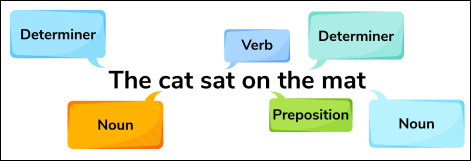
POS tagging is the process of automatically assigning these categories to each word in a text, which can be useful in various NLP tasks, such as text classification, information extraction, and sentiment analysis.
In POS tagging, a machine learning algorithm or rule-based system analyzes the words in a sentence and assigns a POS tag to each word based on its context and the grammatical rules of the language. For example, in the sentence “The cat sat on the mat,” the word “cat” is tagged as a noun, “sat” as a verb, “on” as a preposition, and so on.
Experimenting with a part of speech tagger
In the code playground below, we’ve set up a simple POS tagger based on the udpipe package for R. If we run it, the code will identify the contents of a vector with corresponding tags.
Line 4:
POStextis a vector with sample words.Lines 7–8: Uncomment these lines, which will give
udpipesome real sentences to ...