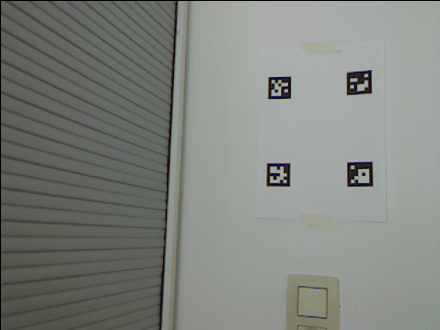
import cv2
import numpy as np
import pandas as pd
def order_points(pts):
rect = np.zeros((4, 2), dtype = "int32")
s = pts.sum(axis = 1)
rect[0] = pts[np.argmin(s)]
rect[2] = pts[np.argmax(s)]
diff = np.diff(pts, axis = 1)
rect[1] = pts[np.argmin(diff)]
rect[3] = pts[np.argmax(diff)]
return rect
def visualizationAR(image, corners, ids, camera_matrix, distortion_coeffs, rvecs, tvecs, marker_length):
if len(ids)==4:
corners = np.array([corner[0] for corner in corners]).reshape((16,2)).astype('int32')
center = np.mean(corners, axis=0).astype('int32')
distances = [(np.linalg.norm(center - corner), corner) for corner in corners]
distances.sort(reverse=True)
points = np.array([x[1] for x in distances[:4]])
ordered_points = order_points(points)
upper_left = ordered_points[0]
ordered_points = ordered_points.reshape((-1, 1, 2))
overlay_image = cv2.imread("./resources/QRcodeEducative.png")
overlay_h, overlay_w = overlay_image.shape[:2]
overlay_points = np.array([[0,0],[overlay_w, 0],[overlay_w, overlay_h], [0, overlay_h]])
h, _ = cv2.findHomography(overlay_points, ordered_points)
warped_image = cv2.warpPerspective(overlay_image, h, (image.shape[1], image.shape[0]))
mask = np.zeros([image.shape[0], image.shape[1]], dtype='uint8')
cv2.fillConvexPoly(mask, ordered_points, (255, 255, 255), cv2.LINE_AA)
element = cv2.getStructuringElement(cv2.MORPH_RECT, (3,3));
mask = cv2.erode(mask, element, iterations=3);
warped_image = warped_image.astype(float)
mask3 = np.zeros_like(warped_image)
for i in range(0, 3):
mask3[:,:,i] = mask/255
warped_image_masked = cv2.multiply(warped_image, mask3)
frame_masked = cv2.multiply(image.astype(float), 1-mask3)
im_out = cv2.add(warped_image_masked, frame_masked)
return im_out
image_file = './resources/marker_images_ar/calibrate_20230616_173854.png'
image = cv2.imread(image_file)
calibration_data_file = "./resources/calibration_data.npz"
camera_matrix, distortion_coeffs = loadCalibrationData(calibration_data_file)
height, width = image.shape[:2]
new_camera_matrix, _ = cv2.getOptimalNewCameraMatrix(camera_matrix, distortion_coeffs, (width, height), 0, (width, height))
image = cv2.undistort(image, camera_matrix, distortion_coeffs, None, new_camera_matrix)
processed_image = preprocessImage(image)
marker_dict = cv2.aruco.Dictionary_get(cv2.aruco.DICT_5X5_250)
detector_params = cv2.aruco.DetectorParameters_create()
detections, ids = detectMarkers(processed_image, marker_dict, detector_params)
marker_length = .04
rvecs, tvecs = poseEstimation(detections, marker_length, camera_matrix, distortion_coeffs)
result = visualizationAR(image, detections, ids, camera_matrix, distortion_coeffs, rvecs, tvecs, marker_length)
cv2.imwrite(f"./output/marker_ar.png", result)