




fs.rename is used to rename or move a file or directory in Node.js. It changes the name or location of a specified file or directory, moving it to a new path.
fs.rename vs. fs.renameSync in Node.js
Key takeaways:
fs.renameis asynchronous and non-blocking, letting other code execute while the rename operation happens in the background.fs.renameSyncis synchronous and blocks further execution until the rename operation is complete.Use
fs.renamefor non-blocking tasks, such as renaming files in web applications while keeping the app responsive.Use
fs.renameSyncfor blocking tasks, like sequential operations, where immediate renaming is crucial for subsequent steps.Handle errors in
fs.renameusing if-else conditions, and infs.renameSyncusing try-catch blocks.Both methods use the same parameters:
path,existingName, andnewName.Import the
fsmodule to access and use these methods.
The fs module is a built-in file system module in Node.js that consists of several methods that can be used to access and manipulate files on the operating system. rename() and renameSync() are the fs methods used to rename an existing directory.
folder 4 is renamed to latest 4.
Key differences
The main difference between both methods is that rename() is an asynchronous method and renameSync() is a synchronous method.
Let’s look at their key differences and get a basic idea regarding when to use which method.
fs.rename vs. fs.renameSync
rename() | renameSync() | |
Asynchronous vs. Synchronous | It is asynchronous that means when this function is called, it renames the existing directory while the other code continues to execute. | It is synchronous that means when this function is called, it will execute and rename the existing directory and send a callback. Till then the system will go in waiting and nothing else is executed. |
Syntax | Use if–else to handle cases. | Use try–catch to handle cases. |
When to Use | Used when there is a need to handle non-blocking requests. Hence, no immediate need to rename the directory. | Used where there is a need for a blocking request to ensure the directory is renamed immediately. |
Real Life Example | We can rename directories asynchronously when using a web application that should stay responsive while the operation is occuring in the background. | We can rename directories synchronously when sequential execution is occuring. For example, if we want to create a file inside the renamed file. So, inorder to use its path sequential execution is required. |
Required import
Import the Node.js package fs to access files:
const fs = require('fs')
Syntax
The parameters for the fs.rename() and fs.renameSync() methods are the same, with a slight difference in syntax.
The syntax for fs.rename() when handling its cases using if–else conditions.
const fs = require('fs');fs.rename('existingName', 'newName', (err) => {if (err) throw err;console.log('Directory renamed successfully!');});
The syntax for fs.renameSync() when handling its cases using try–catch block.
const fs = require('fs');try {fs.renameSync('existingName', 'newName');console.log('Directory renamed successfully!');} catch (err) {console.error('Error renaming directory:', err);}
Parameters
path:The destination of the directory that is to be renamed.existingName: The already assigned name for the directory that we want to rename.newName: The new name assigned to the existing directory that we want to rename.err:A callback function that is called once the method is executed and returns one of the two cases:error: The method fails to rename the specified directory.null: The method successfully renames the specified directory.
Example code
This code renames dir1 directory inside the public directory and then renames the public directory. We have used both methods to communicate the difference between their implementation practically. Moreover, we have used a direct directory and a nested directory with a path to show how it is reached.
Explains the difference between two methods through console outputs.
Output explanation
Let’s understand the output of the above example code and examine the difference in the behavior of a synchronous and asynchronous function.
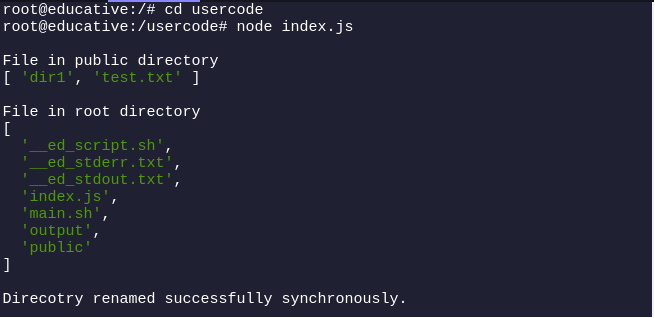
Output of the example above.
Contents of the
publicdirectory are printed and contains adir1directory.Contents of the
rootdirectory are printed, and it contains thepublicdirectory.renameSync()method is executed first, and its success case statement is printed.
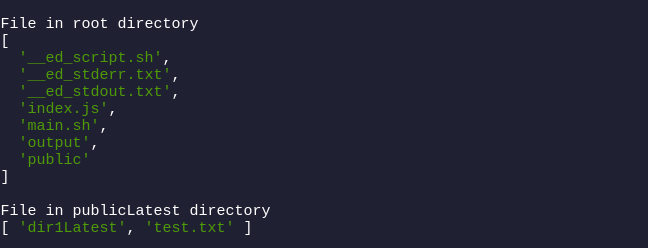
Output of the example above.
Contents of the
rootdirectory are again printed to check if therename()method is executed or not, but no change is reflected.Contents of the
publicdirectory are again printed to check if therenameSync()method’s changed since we already received a successful callback from it. Notice that thedir1directory is renamed todir1Latest.
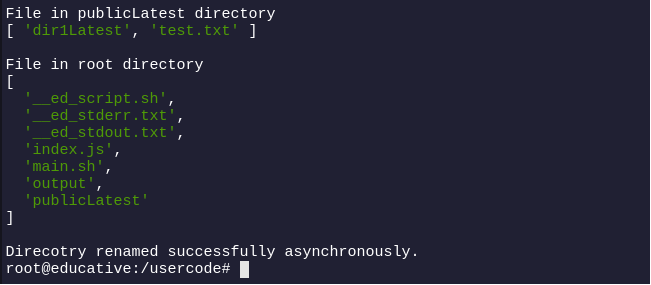
Output of the example above.
Contents of the
rootdirectory are printed once again to check if therename()method executed once all the other existing code has been executed. Notice that thepublicdirectory is renamed topublicLatest.The success case statement of the
renameSync()method is printed once all the other code has been executed and the directory name is successfully renamed.
Test your understanding
A quick quiz to test your understanding.
Q
What will happen if we rename the public directory using the renameSync() and dir1 directories using rename() ?
A)
It will work fine.
B)
It will throw an error.
Conclusion
In conclusion, the fs.rename() and fs.renameSync() methods in Node.js provide essential functionality for renaming files or directories. The key distinction lies in their execution styles:
fs.rename()operates asynchronously, ensuring non-blocking execution suitable for responsive applications.fs.renameSync()works synchronously, ensuring blocking execution for sequential operations where immediate renaming is necessary.
By understanding these differences and the contexts in which each method is applicable, developers can choose the appropriate method to handle file system operations effectively.
Unlock your full potential with our comprehensive Node.js course. Dive deeper into the topic and gain hands-on experience through expert-led lessons:
Frequently asked questions
Haven’t found what you were looking for? Contact Us
What does FS rename do?
What is the purpose of rename?
What is the difference between fs and FS extra in NPM?
What is the use of rename function?
What does rename return?
Free Resources
Copyright ©2026 Educative, Inc. All rights reserved