How to implement form submission with Next.js
Next.js is a widely used and open-source framework in web development. It's a go-to framework in terms of both server-side and client-side rendering. Next provides configurations for React applications and adds its own features on top of the structure as well.
Note: Next.js offers vast features and can be learned through building applications here.
A great way to learn about a new Javascript technology is to try and implement a form using static techniques e.g., HTML, and CSS, and then applying some kind of validation on it.
Moving on with this intent, we will be building an easy-to-understand form in Next.js and allow submission and validation checks on the submitted input. Let's dive right in!


Setting up a Next.js project
Before we move on to the code, let's learn how to get our project up and running first. The procedure for a Next.js project is quite similar to that of React in terms of both commands and syntax.
First, we're going to open up a directory and initialize our project in the same directory.
npx create-next-app .
Then, the terminal will prompt us with a few settings that we'll say either "Yes" or "No" to, according to our project scope and requirements.


The project structure should be similar to the given structure.


We can now run our application using this command.
npm run dev
Form submission through Next.js
To make a form, we can use React or Next.js elements and then make a few validation functions. The validation will be taken care of through our application's backend i.e. the server.
Next.js Form
Here's how we render a form in Next.js.
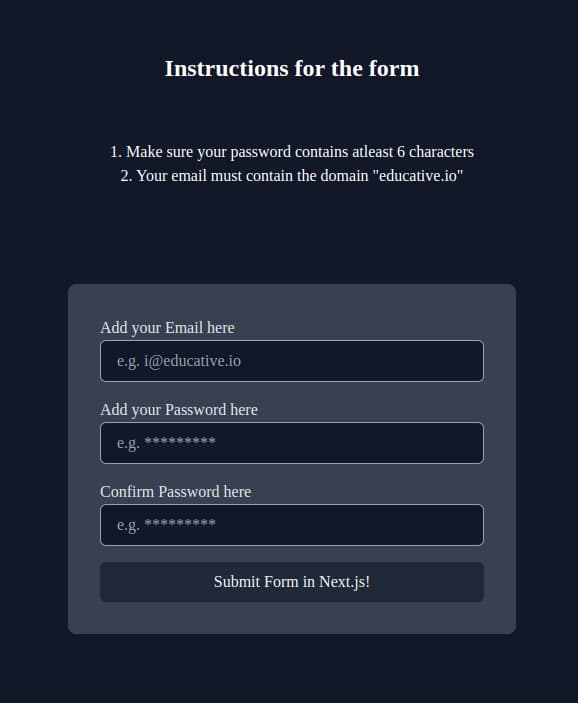
"use client";import React, { useState } from 'react';import './globals.css';export default function Home() {const [myEmail, setMyEmail] = useState('');const [myPassword, setMyPassword] = useState('');const [confirmMyPassword, setMyConfirmPassword] = useState('');return (<div className="flex flex-col text-white items-center justify-center h-screen bg-gray-900"><p className = 'pb-14 font-bold text-2xl'>Instructions for the form</p><p>1. Make sure your password contains atleast 6 characters</p><p className = 'pb-24'>2. Your email must contain the domain "educative.io"</p><form className="rounded-lg w-full max-w-md p-8 bg-gray-700"><label htmlFor="email" className="text-gray-200">Add your Email here</label><inputtype="text"placeholder="e.g. i@educative.io"requiredvalue={myEmail}onChange={(e) => setMyEmail(e.target.value)}name="email"className="w-full px-4 py-2 mb-4 bg-gray-900 rounded-md border border-gray-400 text-gray-100 focus:outline-none focus:border-gray-500"/><label htmlFor="password" className="text-gray-200">Add your Password here</label><inputtype="password"placeholder="e.g. *********"requiredvalue={myPassword}onChange={(e) => setMyPassword(e.target.value)}name="password"className="w-full px-4 py-2 mb-4 bg-gray-900 border border-gray-400 rounded-md text-gray-100 focus:outline-none focus:border-gray-500"/><label htmlFor="confirmPassword" className="text-gray-200">Confirm Password here</label><inputtype="password"placeholder="e.g. *********"requiredvalue={confirmMyPassword}onChange={(e) => setMyConfirmPassword(e.target.value)}name="confirmPassword"className="w-full px-4 py-2 mb-4 bg-gray-900 border border-gray-400 rounded-md text-gray-100 focus:outline-none focus:border-gray-500"/><buttontype="submit"onClick={handleMySubmission}className="w-full py-2 px-4 bg-gray-800 rounded-md text-gray-100 hover:bg-gray-600 focus:outline-none">Submit Form in Next.js!</button></form></div>);}
Now let's assume we have the following requirements:
Each
emailshould contain "educative.io".The
passwordlength should be greater than 6.The contents of the
passwordandconfirmPasswordfields should match.
handleMySubmission(e) in form
To implement submission so that the backend is triggered, let's code up a handleMySubmission function.
const handleMySubmission = (e) => {e.preventDefault();fetch('http://localhost:4000/api/submitForm', {method: 'POST',body: JSON.stringify({ email: myEmail, password: myPassword, confirmPassword: confirmMyPassword }),headers: {'Content-Type': 'application/json',},}).then((response) => {if (response.status === 200) {setMyEmail("");setMyPassword("");setMyConfirmPassword("");}return response.json();}).then((data) => {alert(JSON.stringify(data.message));}).catch((error) => {console.error(error);alert('An error occurred. Please try again.');});};
Server set up for the backend
A safer and widely accepted way of validation of forms is from a backend being set up for our application. Therefore, we will not be handling these checks in our handleMySubmission method.
A server is pretty easy to set up with Express, so let's quickly do that before bringing our application together.
const express = require('express');var cors = require('cors')const app = express();const bodyParser = require('body-parser');const port = 4000;app.use(cors());app.use(bodyParser.json());app.post('/api/submitForm', (req, res) => {const { email, password, confirmPassword } = req.body;if (password.length < 6) {res.status(400).json({ message: 'Your password length must be greater than 6' });return;}if (password !== confirmPassword) {res.status(400).json({ message: 'Password and confirm password fields do not match' });return;}if (!email.includes('@educative.io')) {res.status(400).json({ message: 'Email domain does not match' });return;}res.status(200).json({ message: 'Form submitted successfully' });});app.listen(port, () => {console.log(`API server is running on port ${port}`);});


Full stack application
All that we've learned in this answer can help us make a complete and ready-to-run full-stack Next.js and Express project from scratch. We can now submit a form and see its validation in action.
Let's join the pieces together and run our application!
(F (n00 (-
¾F( $]ºº]$ òÿÿÿÿò 8àÿÿÿÿÿÿÿÿà8 âÿÿÿÿÿÿÿÿÿÿâ ¡ÿÿÿÿÿÿÿÿÿÿÿÿ¡#ôÿÿOOOÿ®®®ÿ«««ÿ«««ÿ«««ÿ«««ÿÿgggÿÿÿô#Yÿÿÿ ÿíííÿÿÿÿÿÿÿÿÿÿÿÿÿÿÿÿÿýýýÿ555ÿÿÿÿY»ÿÿÿÿkkkÿÿÿÿÿÿÿÿÿÿÿÿÿÿÿÿÿÿÿÿÿÿ»»ÿÿÿÿ ÿÍÍÍÿÿÿÿÿÿÿÿÿäääÿÿÿÿÿÿ»YÿÿÿÿÿJJJÿýýýÿÿÿÿÿkkkÿÿÿÿÿÿY#ôÿÿÿÿÿ¶¶¶ÿÕÕÕÿ ÿÿÿÿÿô#¡ÿÿÿÿÿ111ÿDDDÿÿÿÿÿÿ¡ âÿÿÿÿÿÿÿÿÿÿâ 8àÿÿÿÿÿÿÿÿà8 òÿÿÿÿò $]ºº]$( @ ,UèèU,*
ÒùÿÿÿÿÿÿùÒ
*
óÿÿÿÿÿÿÿÿÿÿÿÿó
QáÿÿÿÿÿÿÿÿÿÿÿÿÿÿÿÿáQrûÿÿÿÿÿÿÿÿÿÿÿÿÿÿÿÿÿÿûrrÿÿÿÿÿÿÿÿÿÿÿÿÿÿÿÿÿÿÿÿÿÿrOûÿÿÿÿÿÿÿÿÿÿÿÿÿÿÿÿÿÿÿÿÿÿûOäÿÿÿÿÿÿÿÿÿÿÿÿÿÿÿÿÿÿÿÿÿÿÿÿãÿÿÿÿÿÿÿÿÿÿÿÿÿÿÿÿÿÿÿÿÿÿÿÿÿÿ(õÿÿÿÿÿÿÿÿÿÿÿÿÿÿÿÿÿÿÿÿÿÿÿÿÿÿô'ÿÿÿÿÿÿ888ÿÿÿÿÿÿÿÿÿÿÿÿÿÿÿ___ÿÿÿÿÿÿÿÔÿÿÿÿÿÿ
ÿîîîÿÿÿÿÿÿÿÿÿÿÿÿÿÿÿÿÿÿÿÿÿÿÿÿÿÿÿÿÿÿÿÿÿÿÿÿÿÿÿÿÿÿÿÿÿÿÿÿÿÿÿÿÿSSSÿÿÿÿÿÿÿÔ+úÿÿÿÿÿÿÿhhhÿÿÿÿÿÿÿÿÿÿÿÿÿÿÿÿÿÿÿÿÿÿÿÿÿÿÿÿÿÿÿÿÿÿÿÿÿÿÿÿÿÿÿÿÿÿÿÿÿ®®®ÿÿÿÿÿÿÿÿú+TÿÿÿÿÿÿÿÿÿËËËÿÿÿÿÿÿÿÿÿÿÿÿÿÿÿÿÿÿÿÿÿÿÿÿÿÿÿÿÿÿÿÿÿÿÿÿÿÿÿÿÿôôôÿ,,,ÿÿÿÿÿÿÿÿÿTÿÿÿÿÿÿÿÿÿGGGÿýýýÿÿÿÿÿÿÿÿÿÿÿÿÿÿÿÿÿÿÿÿÿÿÿÿÿÿÿÿÿÿÿÿÿÿÿÿÿÿÿÿÿÿÿÿÿÿÿéÿÿÿÿÿÿÿÿÿÿÿÿÿÿÿÿÿÿÿÿÿÿÿÿÿÿÿÿÿÿÿÿÿÿÿÿÿÿÿÿÿÿÿäääÿÿÿÿÿÿÿÿÿÿÿééÿÿÿÿÿÿÿÿÿÿ+++ÿóóóÿÿÿÿÿÿÿÿÿÿÿÿÿÿÿÿÿÿÿÿÿÿÿÿÿÿÿÿÿjjjÿÿÿÿÿÿÿÿÿÿÿéÿÿÿÿÿÿÿÿÿÿÿÿÿÿÿÿÿÿÿÿÿÿÿÿÿÿÿÿÿÿÿÿÿÿÿÿÌÌÌÿÿÿÿÿÿÿÿÿÿÿÿTÿÿÿÿÿÿÿÿÿÿÿÿãããÿÿÿÿÿÿÿÿÿÿÿÿÿÿÿÿÿýýýÿIIIÿÿÿÿÿÿÿÿÿÿÿÿT+úÿÿÿÿÿÿÿÿÿÿÿhhhÿÿÿÿÿÿÿÿÿÿÿÿÿÿÿÿÿ¯¯¯ÿÿÿÿÿÿÿÿÿÿÿÿú+ÔÿÿÿÿÿÿÿÿÿÿÿÿËËËÿÿÿÿÿÿÿÿÿôôôÿ,,,ÿÿÿÿÿÿÿÿÿÿÿÿÔÿÿÿÿÿÿÿÿÿÿÿÿGGGÿýýýÿÿÿÿÿÿÿÿÿÿÿÿÿÿÿÿÿÿ'ôÿÿÿÿÿÿÿÿÿÿÿÿ±±±ÿìììÿÿÿÿÿÿÿÿÿÿÿÿÿõ(ÿÿÿÿÿÿÿÿÿÿÿÿ333ÿ___ÿÿÿÿÿÿÿÿÿÿÿÿÿãÿÿÿÿÿÿÿÿÿÿÿÿÿÿÿÿÿÿÿÿÿÿÿÿäOûÿÿÿÿÿÿÿÿÿÿÿÿÿÿÿÿÿÿÿÿÿÿûOrÿÿÿÿÿÿÿÿÿÿÿÿÿÿÿÿÿÿÿÿÿÿrrûÿÿÿÿÿÿÿÿÿÿÿÿÿÿÿÿÿÿûrQáÿÿÿÿÿÿÿÿÿÿÿÿÿÿÿÿáQ
óÿÿÿÿÿÿÿÿÿÿÿÿó
*
ÒùÿÿÿÿÿÿùÒ
*,UèèU,(0` - (Lj³ø÷³jK( V ØøÿÿÿÿÿÿÿÿøØ U%áÿÿÿÿÿÿÿÿÿÿÿÿÿÿÿÿá&ïÿÿÿÿÿÿÿÿÿÿÿÿÿÿÿÿÿÿÿÿïQÜÿÿÿÿÿÿÿÿÿÿÿÿÿÿÿÿÿÿÿÿÿÿÿÿÜRþÿÿÿÿÿÿÿÿÿÿÿÿÿÿÿÿÿÿÿÿÿÿÿÿÿÿþÿÿÿÿÿÿÿÿÿÿÿÿÿÿÿÿÿÿÿÿÿÿÿÿÿÿÿÿÿÿ¸ÿÿÿÿÿÿÿÿÿÿÿÿÿÿÿÿÿÿÿÿÿÿÿÿÿÿÿÿÿÿÿÿ¸®ÿÿÿÿÿÿÿÿÿÿÿÿÿÿÿÿÿÿÿÿÿÿÿÿÿÿÿÿÿÿÿÿÿÿ®ÿÿÿÿÿÿÿÿÿÿÿÿÿÿÿÿÿÿÿÿÿÿÿÿÿÿÿÿÿÿÿÿÿÿÿÿPýÿÿÿÿÿÿÿÿÿÿÿÿÿÿÿÿÿÿÿÿÿÿÿÿÿÿÿÿÿÿÿÿÿÿÿÿýOßÿÿÿÿÿÿÿÿÿÿÿÿÿÿÿÿÿÿÿÿÿÿÿÿÿÿÿÿÿÿÿÿÿÿÿÿÿÿßÿÿÿÿÿÿÿÿÿÿÿÿÿÿÿÿÿÿÿÿÿÿÿÿÿÿÿÿÿÿÿÿÿÿÿÿÿÿÿÿ#ñÿÿÿÿÿÿÿÿÿÿÿÿÿÿÿÿÿÿÿÿÿÿÿÿÿÿÿÿÿÿÿÿÿÿÿÿÿÿÿÿñ#ÿÿÿÿÿÿÿÿÿÿÿÿÿÿÿÿÿÿÿÿÿÿÿÿÿÿÿÿÿÿÿÿÿÿÿÿÿÿÿÿÿÿäÿÿÿÿÿÿÿÿÿ$$$ÿhhhÿeeeÿeeeÿeeeÿeeeÿeeeÿeeeÿeeeÿeeeÿeeeÿeeeÿeeeÿeeeÿeeeÿeeeÿeeeÿeeeÿeeeÿeeeÿeeeÿeeeÿeeeÿPPPÿÿÿÿÿÿÿÿÿÿäUÿÿÿÿÿÿÿÿÿÿ
ÿëëëÿÿÿÿÿÿÿÿÿÿÿÿÿÿÿÿÿÿÿÿÿÿÿÿÿÿÿÿÿÿÿÿÿÿÿÿÿÿÿÿÿÿÿÿÿÿÿÿÿÿÿÿÿÿÿÿÿÿÿÿÿÿÿÿÿÿÿÿÿÿÿÿÿÿÿÿÿÿÿÿÿÿÿÿÿsssÿÿÿÿÿÿÿÿÿÿÿU¡ÿÿÿÿÿÿÿÿÿÿÿeeeÿÿÿÿÿÿÿÿÿÿÿÿÿÿÿÿÿÿÿÿÿÿÿÿÿÿÿÿÿÿÿÿÿÿÿÿÿÿÿÿÿÿÿÿÿÿÿÿÿÿÿÿÿÿÿÿÿÿÿÿÿÿÿÿÿÿÿÿÿÿÿÿÿÿÿÿÿÿÿÿÿÌÌÌÿÿÿÿÿÿÿÿÿÿÿÿ¡ ÚÿÿÿÿÿÿÿÿÿÿÿÿÉÉÉÿÿÿÿÿÿÿÿÿÿÿÿÿÿÿÿÿÿÿÿÿÿÿÿÿÿÿÿÿÿÿÿÿÿÿÿÿÿÿÿÿÿÿÿÿÿÿÿÿÿÿÿÿÿÿÿÿÿÿÿÿÿÿÿÿÿÿÿÿÿÿÿÿýýýÿHHHÿÿÿÿÿÿÿÿÿÿÿÿÚ (ùÿÿÿÿÿÿÿÿÿÿÿÿEEEÿüüüÿÿÿÿÿÿÿÿÿÿÿÿÿÿÿÿÿÿÿÿÿÿÿÿÿÿÿÿÿÿÿÿÿÿÿÿÿÿÿÿÿÿÿÿÿÿÿÿÿÿÿÿÿÿÿÿÿÿÿÿÿÿÿÿÿÿÿÿÿ®®®ÿÿÿÿÿÿÿÿÿÿÿÿÿø(Kÿÿÿÿÿÿÿÿÿÿÿÿÿÿªªªÿÿÿÿÿÿÿÿÿÿÿÿÿÿÿÿÿÿÿÿÿÿÿÿÿÿÿÿÿÿÿÿÿÿÿÿÿÿÿÿÿÿÿÿÿÿÿÿÿÿÿÿÿÿÿÿÿÿÿÿÿÿÿÿÿôôôÿ,,,ÿÿÿÿÿÿÿÿÿÿÿÿÿÿLjÿÿÿÿÿÿÿÿÿÿÿÿÿÿ)))ÿòòòÿÿÿÿÿÿÿÿÿÿÿÿÿÿÿÿÿÿÿÿÿÿÿÿÿÿÿÿÿÿÿÿÿÿÿÿÿÿÿÿÿÿÿÿÿÿÿÿÿÿÿÿÿÿÿÿÿÿÿÿÿÿÿÿÿÿÿÿÿÿÿÿÿÿÿÿj´ÿÿÿÿÿÿÿÿÿÿÿÿÿÿÿÿÿÿÿÿÿÿÿÿÿÿÿÿÿÿÿÿÿÿÿÿÿÿÿÿÿÿÿÿÿÿÿÿÿÿÿÿÿÿÿÿÿÿÿÿÿÿÿÿÿÿÿÿÿÿÿÿãããÿÿÿÿÿÿÿÿÿÿÿÿÿÿÿÿ³øÿÿÿÿÿÿÿÿÿÿÿÿÿÿÿÿáááÿÿÿÿÿÿÿÿÿÿÿÿÿÿÿÿÿÿÿÿÿÿÿÿÿÿÿÿÿÿÿÿÿÿÿÿÿÿÿÿÿÿÿÿÿÿÿÿÿÿÿÿÿiiiÿÿÿÿÿÿÿÿÿÿÿÿÿÿÿÿøøÿÿÿÿÿÿÿÿÿÿÿÿÿÿÿÿeeeÿÿÿÿÿÿÿÿÿÿÿÿÿÿÿÿÿÿÿÿÿÿÿÿÿÿÿÿÿÿÿÿÿÿÿÿÿÿÿÿÿÿÿÿÿÿÿÿÿËËËÿÿÿÿÿÿÿÿÿÿÿÿÿÿÿÿÿø³ÿÿÿÿÿÿÿÿÿÿÿÿÿÿÿÿÿÉÉÉÿÿÿÿÿÿÿÿÿÿÿÿÿÿÿÿÿÿÿÿÿÿÿÿÿÿÿÿÿÿÿÿÿÿÿÿÿÿÿÿÿýýýÿHHHÿÿÿÿÿÿÿÿÿÿÿÿÿÿÿÿÿ´jÿÿÿÿÿÿÿÿÿÿÿÿÿÿÿÿÿEEEÿüüüÿÿÿÿÿÿÿÿÿÿÿÿÿÿÿÿÿÿÿÿÿÿÿÿÿÿÿÿÿÿÿÿÿÿÿÿÿ®®®ÿÿÿÿÿÿÿÿÿÿÿÿÿÿÿÿÿÿjLÿÿÿÿÿÿÿÿÿÿÿÿÿÿÿÿÿÿªªªÿÿÿÿÿÿÿÿÿÿÿÿÿÿÿÿÿÿÿÿÿÿÿÿÿÿÿÿÿÿÿÿÿôôôÿ,,,ÿÿÿÿÿÿÿÿÿÿÿÿÿÿÿÿÿÿK(øÿÿÿÿÿÿÿÿÿÿÿÿÿÿÿÿÿ)))ÿòòòÿÿÿÿÿÿÿÿÿÿÿÿÿÿÿÿÿÿÿÿÿÿÿÿÿÿÿÿÿÿÿÿÿÿÿÿÿÿÿÿÿÿÿÿÿÿÿù( ÚÿÿÿÿÿÿÿÿÿÿÿÿÿÿÿÿÿÿÿÿÿÿÿÿÿÿÿÿÿÿÿÿÿÿÿÿÿÿÿÿÿÿÿãããÿÿÿÿÿÿÿÿÿÿÿÿÿÿÿÿÿÿÿÚ ¡ÿÿÿÿÿÿÿÿÿÿÿÿÿÿÿÿÿÿÿáááÿÿÿÿÿÿÿÿÿÿÿÿÿÿÿÿÿÿÿÿÿiiiÿÿÿÿÿÿÿÿÿÿÿÿÿÿÿÿÿÿÿ¡UÿÿÿÿÿÿÿÿÿÿÿÿÿÿÿÿÿÿÿeeeÿÿÿÿÿÿÿÿÿÿÿÿÿÿÿÿÿÌÌÌÿÿÿÿÿÿÿÿÿÿÿÿÿÿÿÿÿÿÿÿUäÿÿÿÿÿÿÿÿÿÿÿÿÿÿÿÿÿÿÿÉÉÉÿÿÿÿÿÿÿÿÿýýýÿHHHÿÿÿÿÿÿÿÿÿÿÿÿÿÿÿÿÿÿÿäÿÿÿÿÿÿÿÿÿÿÿÿÿÿÿÿÿÿÿEEEÿüüüÿÿÿÿÿ®®®ÿÿÿÿÿÿÿÿÿÿÿÿÿÿÿÿÿÿÿÿ#ñÿÿÿÿÿÿÿÿÿÿÿÿÿÿÿÿÿÿÿ¬¬¬ÿûûûÿ,,,ÿÿÿÿÿÿÿÿÿÿÿÿÿÿÿÿÿÿÿñ#ÿÿÿÿÿÿÿÿÿÿÿÿÿÿÿÿÿÿÿ222ÿ}}}ÿÿÿÿÿÿÿÿÿÿÿÿÿÿÿÿÿÿÿÿßÿÿÿÿÿÿÿÿÿÿÿÿÿÿÿÿÿÿÿÿÿÿÿÿÿÿÿÿÿÿÿÿÿÿÿÿÿÿßOýÿÿÿÿÿÿÿÿÿÿÿÿÿÿÿÿÿÿÿÿÿÿÿÿÿÿÿÿÿÿÿÿÿÿÿÿýPÿÿÿÿÿÿÿÿÿÿÿÿÿÿÿÿÿÿÿÿÿÿÿÿÿÿÿÿÿÿÿÿÿÿÿÿ®ÿÿÿÿÿÿÿÿÿÿÿÿÿÿÿÿÿÿÿÿÿÿÿÿÿÿÿÿÿÿÿÿÿÿ®¸ÿÿÿÿÿÿÿÿÿÿÿÿÿÿÿÿÿÿÿÿÿÿÿÿÿÿÿÿÿÿÿÿ¸ÿÿÿÿÿÿÿÿÿÿÿÿÿÿÿÿÿÿÿÿÿÿÿÿÿÿÿÿÿÿþÿÿÿÿÿÿÿÿÿÿÿÿÿÿÿÿÿÿÿÿÿÿÿÿÿÿþRÜÿÿÿÿÿÿÿÿÿÿÿÿÿÿÿÿÿÿÿÿÿÿÿÿÜQïÿÿÿÿÿÿÿÿÿÿÿÿÿÿÿÿÿÿÿÿï&áÿÿÿÿÿÿÿÿÿÿÿÿÿÿÿÿá%U ØøÿÿÿÿÿÿÿÿøØ V (Kj³÷ø³jL( PNG
IHDR\r¨fsRGB®Î
é8eXIfMM*i D"8s
IDATxí] °Õn]<QVAèÄh$ ÊN13*q°ÂdªÄ©I¡DL2ª(Î(Ô2ÖÄÑG Áq_@å±àxÈï»Ð¾{o÷½½ÓýýUß{}»Oå;çÿûôùÏ9ÝÂd®(Dg Ð8 èôNº]î@
hx¥?v
ÀNà3à=`;ð6ð.ð&°
àuâà ±6
P©Ð½Á@ÿà RÓPùiZqÊ^DNãàwp¼
Ø
¼ÐXÐhÐH
g@ÀÌ
:Ùâ|ð5` p"@À'¼É²s{
ëpü*ð2ÀÞ
Ä dÒ¯È|(0ø
0à>Kò
³x
X¬6IJ
ȤC|?$KE
NØ}Ï|Âòµáàöh $ 2
Ù|/§Â.Nz#
¼ÃWeÀ
à5ã
ܶú
à;Ày¾ ñgàs©
h^IÄ
ÈDL(¢;¸8 Ò
Hjgc
H|x 1 ËR"aïôÓGÁÙ@
è9`/`%0è
HÄ@j
ð½~,° ÛK
,t).ÎèIDèT¦Oû)~º
°Vìu$b èª
ÐU%¥7¨ù_É$b 8Aç×ÀßøJö3` 510wQñ?¤øvrðÑá:ü2þKÄ@ ¤øv*{%#íAZå^(õÏ=ñ³g\ãÀWÛÉ!:àß,`à6ýÏ643:@c.FÙ¤ðùäu?Ð<'áÝ_
Üvp: É8
Q¾
IñÅ·
p{3ÎóÐkHÈ¢G¡¼®cñѼ
<62&
×2uCÁÿàÚòæßâ¤Tø3Ú
½ê
;d/~m½.øXÆ@{äw.°ð«d]GÚ{lKÜàEbÿý(P©RuMüTÛ
CÒÚÃ
Àdäï])¿_Lmà=Äû=@bÍ÷KÛGUkÙ^UÓØÆØÖø)1È»gÕT¢Â¯°m`9Ú\Ú®³ÀQþÍ@ØÊÔýâ°6ð:ÚÕ^w¬òï¸ED
¤Áç ü5°àºëÄFÐ,ßÜ
ðX"Òdmð<nB~òì
@´¸÷µt×tx»
ü;ÚfÞ>ñª
íI8µ»¿8Ó¸C1Ûª$B¸§e©Ý+þjl«ÜEZÃÇ& ©ÊS:â:6°möë´ÿ\G1¥ç`¢¨Å!
nl»lÃÆÉ^Q`í·@OcÙSÆÄ@e¸Í·º¹ç¤qbªpÿãSÄ@u
pº±FÀD@å¿Ð¿º¦Ðæ2@#À¹ÆõL3£A $H2Ç_h¶FH
#rq(
íÿOàDò¤¬¨àrunGOWaêb&SgDñ3ÀEDçto§*Ǥú¡Ä9kÝ~)¿¡,$ x¿R1vàK áÀ9D
äU(ðw®&LEÒ
äê©»
S)¹é3ÐY8x8$.i(íÄK¬ÅY
ìðaÈ]´
À4ôÇ c®Å@3¸fàó4ÆÆ¢ÿ
Ð/*bàüþÇþ$!I~
Ø7ÉB*-1` o º $»àÇ¡D¾LûàòßêJ"äÀOQ¢Ë)ö2@#Ðx4"$e¨ø·Iö8àOi8ø"ݼGäÞ8[xÄt<ñ.´´7&m&ØR^³tq÷Øá.¾§ÅYÅ-2Ƚd§ûã*_Üà&d|j\W¼b ã
ôGùö«â*g¯£éÄF4ã"IñØ´/b1qNÈðãÀYD
p
¼Û9îãpÑ
}w\¯óÔ¤£Ó1 j`è
OûîxK
=ÑHñ÷÷A1
#¾
D:U8jÀõýtù©ë$b bA||Ø
U¼Q¿ü26%ªÌ)
1 è
_
Àꢳ!~DÙàºæ¿à+b
>A´Ü:]Ñ E$£50òGDhRÑtèÐÁéÝ»wRÉ)ð
PÇèn$ 3ÜÖë@bS§Nu,Yâ´jÕʲç:»¡ôÜ;ÀáÀßó@£`Ç |ã-[)'OVýÙÕ©sFxÚ®âÛ¥øn}Í7¯ üü³~ýúƺº:»ÀQ©J_¤ÎUKj8q0xðàÆ
;v4
Ì=[õhW=¾ Ýë ¤&·!e5Ë8hÑ¢EãÝwß]¤üüñá 6öïß_õiW}þSZÚ? ¿/`
;vlã¾}û2<±hÑ"»
À§ÐAÜÕX,ã mÛ¶+V¬(©ü<¹wïÞÆ#F¨^íª×;ÖþaHðcû
à)SÊ*¿{aùòåp
ÊØc89(Ñ^þö4&E¦ÛoÃ
®Wü/· uÆ=±^þ*?{k^·_EíÇÅúúz¹íªgöUI-è{
WU*
:pû9
.tÚ·o (/ݺus>ûì3ç'^RgßäÚGâÌI_D®»
åÜ~~½¹{
øúÙ?N0 7½SêØ.Æ׸ÿ~?}/y]nA;êØ£³ã2]ñFOB2C?·_I÷[Ð:°:Ú=#ÀOzKé-ã ÛÏ£ï%å´®Ý?jÐþIÀ®PÛ¯¤æ{NÊ-hUÝÿ t:øõ,â ·G×K
Ê-hUÛç¢chP7 ÿÎ
¡ÂÁ@µn?¿\Ó-¸k×.¹ý2ã:õú ð`ÙáFÛ=ý-á V·_ÉG¿ç¤ÜVéÝõ}¢0WIùªøFºýÊöóèsMr
ZÕ8p J¸QÜ*@OK8ëöó³
r
Z¥
ÔÝa,ßûwËØSéW^y¥¾.· 5íat7ÔØݤüÖTv#Ý~7n
àA"¸üòËÕ+´£WøèpMÂÅ/ªhK8Òíçgä´F/^·«ÅÀM{eì¨èR|ú)qØë7Ýt
æ?
8'ൠKùíP~ºýî¹ç°ú\õýr
ÚÑ> Ç·UkØeP÷ß|ë^xÇéöó³
/V/Àüvòô¯ôå
ä¢*×pâvûù¹Ð¾Ê]JûË}ók8(ÎÅÇÀÄÑ£GÇOÌmÚ´q,X o
úðòe.
â^ ¡Qx
ÐÓßptûùõä4^_
N{à¾øÅyÄ2s¤ÛÏÏÐ-عsgµsÛÌÐiêvZ
8
!~PJ?c«ýîºë®À|Æ]®Ü½{·³zõê¸Rüµ1p
nãÔàzïí¥º¼tl
pû9³fÍrºvíjT殿þzß4*OÊLã~øÑçÔ34Ý~~¯r
;ÔmêxY+üÀ
¡
¤íöó3r
;Ômêx4à÷Å:7]Õq
L4)U· !r
ú1êuê6¿ìÕ$Í
À7®èÀ8ºwïîÌ3Ǹ|5Ï>?î\zé¥ÍOë·
ëÍ×ðø,ïE
ÅÀ3©2¹¹å[ººº2Wu:E¾´¼^p.
H1cJºtû]}õÕBuéÔSOu®º»ÉI
cO¥òÄ%
ÆAZ«ýüüü®kµ ºD
?Ç5Þ
@Q×À
ÿé3Àwê+®¸"ýTÎSÀUÞ¥à13Àî?û
â5M'Ýú>pûþZµj~fjÈ
×סÔn©¦±>×ðÿi5D¤[bf íÕ~a'·`Xc¹ã-¼1ók¢½ÿÄI«ýüÞ÷ý®kµ QºÅ¯|ókßMËé(92È@t°ÉíçÇÝX-èL×aúN4qÜ'$f0@·
@VnAÜYá½L9:â|/^sÇú ¨Ó)0`êj¿°T\wÝuZ-Äèî ¨\ @Ñ:¦±cítûù{È-èÇRb×û1%×ôI,Y%TÛÝ~
r
ú1ØõÂC ,¼$´*Ëé«ýÊf<à¹0zþ¥èhÕFüû¦·«ý|
â¯8Z-èCRü¹Tg×ÐHRfglYíª¹sçÊ-Äp÷Ó'+Ãèî¶mµ_ØgÍÍîçC¿{ô òÃȪÛÏÎ3gÊ-èGR|×¹7`GÞñ¥¡0U·_ÙµZСدD )À±ó\>¬»ýÊüйýõz N¤Ä@ÖÝ~~´Ê-èÇP¬×{rs¿´@¬<|.]ºÔ¸|Îm|gûõëç¬_¿ÞyåWâKD1bàM½¢%¡s\
· ¥r
ú1Ëõnì\
Æ"-ÉÝ`
.4æÛ~%3àI}[0A²$µ=-Ò>BH"G®Û^r<ÂEBGÝiÚ%9Ì@^Ý~~
@«ýüú1Üì
@tû-[¶ÌèÏ{%@CÙ$ðmAgüøñÎ5kÊÑ
Èø/åOÿlßäÓ¿áBÐ@.X°À±uäp¥Oüî6
x²9MPn¿`ß·o_§¾¾^nÁ`t
¥§(úª»\rûùsÆAÒyóæéÛþT
¡
@h
E0lØ0çÎ;ïtÚµÓkƸN ¡¡ÁYµjUà
S#ì|^㽺- |¢ÝpÃ
N.
ØÞ¥`×^{zLñ64Äbç¨öe]&"ªdsÎ9UÞ¥àU0ð!
ÀÁ*nPÐ*`ÿæoÖ¨v¼¹Ái8GåþÔÿhh ØmÍËÀäÉsÏ=×{JÇU0ÀÕóçÏwZ·æþøìö8bEzôèá,Y²Dïþ![C>}7:k×®
noÆÀfö>jvR?#bX
(¶üFÃAT¾FÕÕióê[Á{ì°zvÄç>º¡CÊía+[0B2Dµ=íG~ë(
øĺñÆÕõLO
×\sÜ
>"8|`[)
&Lp8ø'öäÓí4oGeÎ#£Û ÀlÙ_\DÍÜ2ZØl¢Üi´9
täÈ9f Þ¢Ë-¿¼=YÌyn?uQã¯}Xͬ
ÍsAïi>=Ð1æ=RÉí+à +
Ü¡¸.2
Kì«·ßôéÓCÆ¢Û20hÐ Ë«%53À5@
MA¹%¦×Ì£ãÈí¼·j[õä9Î;¸û_(¯ ú§¿µ0ÀÕ~rûÕÂ\¸{ômÁPüÜÿ®x#TT9¾n?¾ÊíN# á×¥&î
}׬¯)
ÝTVL¯!¸ßÔjÁªë`
ïp
ß8 @RrûUAVAå¬Ü=¸ã-Þå÷pLHª`@n¿*È1¨ÜUËõ?}w
]ìH2@·ß´iÓV°¸ [˯%àôÿëß58±)Ð
T`|rZbZ-¸.Ö!da+@×ðÎçßóZígf[0p½¼æôä¤ I´Égr
¸$· o%PÇ_rCy
ÀV|ß½ ÿ¥à"mòYÎÊ-è[
lÚÄkxAãøÛ¯9]¢[pÒ¤IåȨ¬pPÇÏkºFeÙÌÈígHEødnAm"Z$õ5}
zå8üéô2røX| ÅàS
Ü»w¯³råJsJÖ~Tfþz{ÌÍ«÷xÐj?
jµàQEÝnòðjsÀùÁ|Gxзý<dXt(·àQEÝ.¬p¯47Üð)÷¢þ;
Ïysµ_«VD
È-XTiÔí¢ý?~¼èÿÛÏî ·`Qý=Vô
?òú^à
¹ºý.]ª|XÞ
ômÁB~¿?ÆøJõÞD
·äüÜ~Ùhr
êóÿ©ÛERªÀ
AÝóBæìÝ~wÜqÓ¾}û<Å[й5ûdóÚ-Õ`5?
KqÝ~l4ì0@·à)§/I®(¼àØü
¥nÎê9¹ý²Y³4è!CÙ2×*w9ÀÀGKÝõsî&rûe³¦súé¶? 6Ù
8JÊ|(ò
uwOä´d°&K)nA¾Ê?RÒn@7,·
º8Á=õÿrûe½nÁM69k×òM7óÂéý·J´R]e¥nÊê9¹ý²Z³Ååâ /?áo
>Òó¾¤rzrÒÀ óó`åöóV{ö»uëæ4448«VÊra÷ p³îõQRZ<{ädK
.F
9½#~Tâ¾ûîs.¾øâìN%*Ë
ÀðáÃuë8G&²¥ì/W:*x%á{Ã}@¦
»lõõõNc#çAIòÀÀ±Ç
õiÞ÷£
Ë*?ëدÀ0}gãùC"Ä
pÛ¯³ßû¨4èÒ(bÀ
8_QùY áîr7'
`·ÿî ùj¸6à
*©3ÀWögä"¨àl¢
¡Â1:ì±Sg}%È ¹¥P?÷þ1`
£¯ ÉYÐ
ãâ"Dª0b@
¤ÆÝö9¬¦Àðý¾[táF1Àôp`kÐ\UÓ`ÜRø·A#W81 e`)RÛZMÕö÷[
uæF0ð rq.ÀÕ¥Ú
#^ð=C"Ä9
P'«R~f½
ï
pnzdC"Òe ¦§?³\K÷½¨@&$b }jzú3Ûµöx/{
èÄ 1 Ra#ÿ|÷çÆUK=&Ä^æTM¹n2À9ÿ5)?s¦Àû{O'óD
Dàßo[kMÕoK0¿xÿÜTd_@]b ræ ÆGÃĶÀ´;«¯òD
DàêÜ1ÀgaR
Û`ÚÜ'`0Â >
\ë/ùñ½
fÐùøñ÷Åß!fn÷
Z¢|bÜðU .t®åà¤ÑÀÚrª9 Å+
ý±î ýb rnEDk=æé8àÀÙü!b RClãPÞ
EÙ`¼ÜK'~ß
@ Ë}*°!`ø@Á¢6Lô
;À $b@
DÃÀ?#ÈgÞFý
àµ
V
1výÇ;ÃEsôÝQ¹ÇÌ=É®ö4¿ ßb@
TÅÀnþ!¹ò3q¼0^ÊVãcµ1ðܶ´¶[ýïëÀM¹=8IÝÕ1@Ú
@Cu·
·`N¸oÀãWJÄÆWúÑåÇe÷±I¯n¦¹Nàm௸Æ
Ü´ô_
d(Ä4`EÜ
I°
¯"̵Ë1 *3ð+\þEå Ñ\MâÀÍ)g rÁ¦
»è¿8>õ¿pô?vIÒ°0Ç~ü!b øÅ$'Ó%"I¿¿Rý
Ài1 0°
?S~&ÔÓr
äÆ
¤{ n
ô_
ÄÀÈÌLà?ÎTeäÔÆÀ7ùC"rÎÀOQ~"qIË° O
8?$b §
Ürÿ#@×_âv¼JÌ£/¹é3ð'dá/ÈÖ÷W[¤¤ço'Nü
ðló
ú-2ÎÛüå@jÊO~Óî0À2`HÄ@ÆØòÐ+ª¤Ýp
OB®ÞuOè¿È(lãSÔü¦9Èô½ò~ðcß:x/èX
d.ðù
°ÆòdÈÉVày@F$H2Åïü+M*iÜl8O@F$H2Áå®24&r´
POÀ´Ö¢üÔÂûä7NùYS
ó¶ øÀY1`
ðã;ÿJS3n² g['@W@"la`32Ên?'ûHB2p
îhÄmmu ×j@F@
ÜV ²Z!¦¿xIäÉÿH®yѱ)
üù>ÀåZ!6ºàaÎ`äþ¦ÌdDV$9fëù pM¿6»I¨!LG:\LdrwPyË~ýPá§%ÔæL3Æá7çTKÑÄAmmo|³6© 3Ð é-ÒhJ3¿¼?67 á¶
yr¶"û
þàgÈÎ4.$±1À÷ý_¼ [*¸&¸¤S/õdq´Îìãä
Á
CÞ
âh3¿¼>6Ŷ%±¶Èã\#´RZq¦
ð
=lK|ÅXÆÀXäWSej5/¡ýÐÓ$±:äýv@½ Î8Ð×
d1(z2~Fà)´ùö3¢ôÍÁÞÀl®C¿ ëùâè#´í=².\Lt? %Ñ
N$9b %Ê:àþ2ùäu É1|- ldòÁ÷t$b À@?ü¥·@ »FàcÔïÏ^D
d[9ýà zÙàÏ:
HÄ@ ¾P2v)~ ¦®@àüïz5°Ç|úÒ¿R«ÖµªàÁ|`# W39غá<î"-±0Àï\<ìd
ÒåuÀoGLz1Gp°àeå¯d.øj
HÄ@j
ôFÊ3@ c{s<
ÿùJ& É@÷ëöb¸
ÙÀw ²§ ©nÁµàvð²û< ,M;û*p>p!0hHüà{=»ðü
xà]IÄ
ÈDLhèÚâ<'¡h8Ç@V Á#ïãJÿ°àf
ûI
ÈÄHn
¨ûãW}
àNÆt[uò$¢°§åþ
@ 2 ]&)
#3, =%¯TôÕÀkÀ&à I÷I¶®Ó³ðÙ[8 è ´L]È
]tïTðgõÀ6à-@b2UOVºã:
A?¯
}
.iî| àxCÂ÷rvßw ;ÎÀ#ê>éi8_b82WPìÑõè{'n¯á
Ó8ðz;ƤyÝsÃ@¥¦¼P¡·o|ÂSùih$3ðÿ@ß¹jìáIEND®B`Client code explanation
Our only concern is the form that is defined in page.js. The content in the page.js file is the content that gets rendered when running a Next.js application.
Line 1: The "use client" line tells the Next.js application that this is client code.
Lines 7–9: We define the states for
myEmail,myPassword, andconfirmPassword.Line 11: Our
handleMySubmissionfunction is defined which sends data to the backend for validation.Lines 14–22: The
fetchmethod is called to send a POST request to the server containing theemail,password, andconfirmPassword.Lines 23–40: Once the data is received, a chain of
thenfunctions is implemented. If the response is200, that means the form was validated and the fields are then reset. On each outcome, analertis generated to show the user either a success or error message.Line 49: A
formtag is used to implement a form and its styling is done through Tailwind CSS using class names provided by this framework.Lines 55–63: An
inputtag with the typeemailis rendered for our email input and is bound to themyEmailstate.Lines 69–77: An
inputtag with the typepasswordis rendered for our "password input" and is bound to themyPasswordstate.Lines 83–91: An
inputtag with the typepasswordis rendered for our "confirm password" input and is bound to theconfirmMyPasswordstate.Lines 93–99: Lastly, we render a
buttonwith thesubmittype. This button implements an event when it is clicked through theonClickattribute and calls thehandleMySubmissionmethod.
Note: The
fetchcall should include the same port number as the one defined in our server e.g.http://localhost:4000/.
Server code explanation
Our server is defined in the apiServer.js file. Let's have a walkthrough of this file to better understand the underlying working.
Lines 1–4: We import
expressto set up an Express server.corsis required so that the front-end and back-end can communicate easily.body-parseris used to destructure elements sent from the front-end request.Line 6: The
portis set to4000, but any available port can be used instead.Lines 12–14: The
appdefines a POST request that takes a requestreqand responseresas parameters. The POST request from our front-end is directed here. We receive the parameters ofemail,password, andconfirmPasswordfrom our Next.js front-end.Lines 16–20: If the
passwordlength is lesser than 6, we send astatusof400along with an error message.Lines 21–25: If the
passwordandconfirmPasswordare not equal, we send astatusof400along with an error message.Lines 26–30: If the
emaildoes not include the domain "educative.io", we send astatusof400along with an error message.Line 32: Finally, if all checks are passed, we send a
statusof200and return a message of success "Form submitted successfully".Lines 35–38: The defined app starts listening on port
4000when this file is run using node apiServer.js.
Note: To run such a project, make sure you run your server first on one terminal using node apiServer.js. Then, run the front-end on another terminal using
npm run dev.
4 cases of output generation
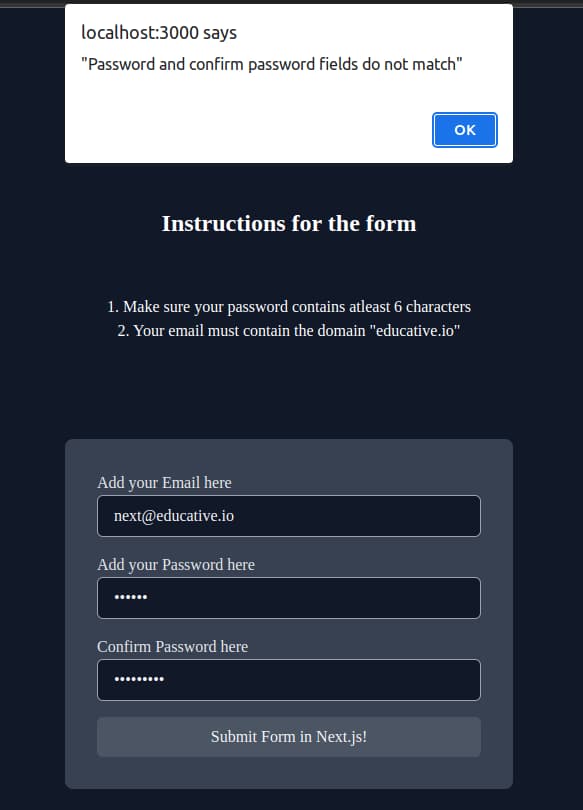
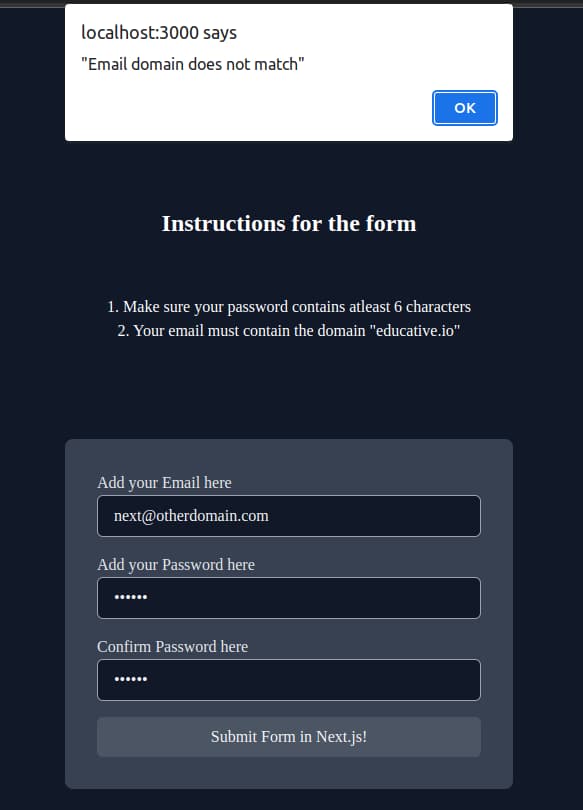
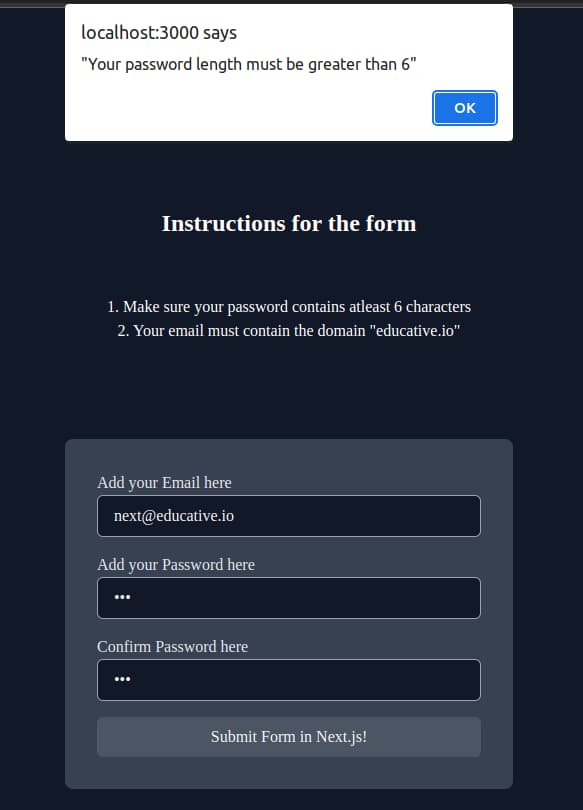
Here's a visual representation of the form we created in our Next.js project. It contains three inputs and based on these inputs sends appropriate messages from the back-end.
The password and confirm password fields have different values.
The email does not contain the domain "educative.io".
Our password length is lesser than 6 characters.
Correct input results in the form being submitted and reset.
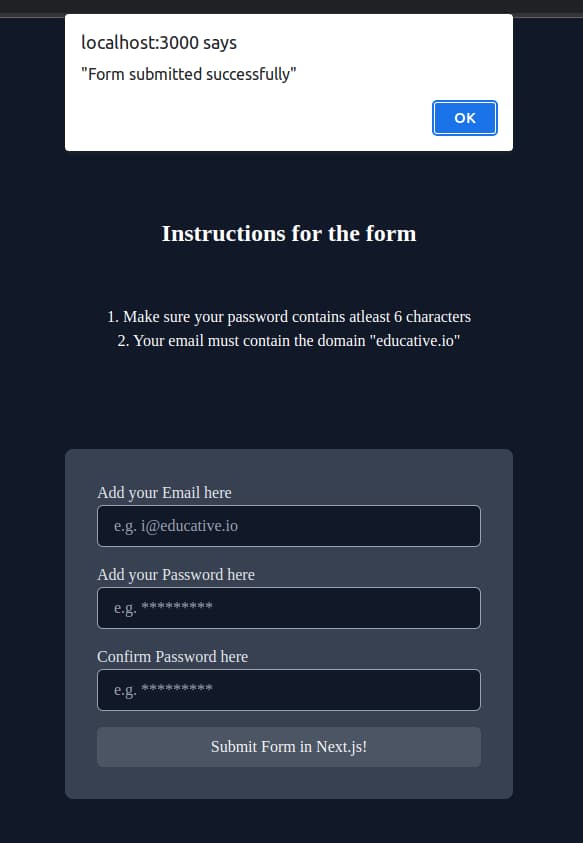
This marks the completion of our project. That was not too hard, and just a basic server and form rendering allowed us to accomplish this!
Note: You can experiment with the form and run the application to see your changes.
Pros of using Next.js
We can think of Next.js as a game changer when paired with React in a few areas.
Superior search engine optimization.
Shorter load times.
Support for TypeScript and CSS.
More accessible URLs.
Prerendering and image optimization.
A brief recap
All in all, forms are made using similar techniques and tags as in React, and a method can be attached to the submit button to handle submissions. This method may converse with a back-end to perform validation checks as well.
Do you know Next.js’ forms well enough?
Why is a POST method used instead of GET in form submissions?
Only POST can handle submissions and reply back to queries.
GET is just for retrieving information.
POST offers a safer way of handling input. It does not append user input e.g. passwords in the URL.
Free Resources