Uploading Necessary Files and Folders
To initiate the setup of a MERN stack application, necessary modifications were made to the app.js file, specifically changing the MongoDB URI and port settings to host the database locally. The adjusted configuration led to the creation of a tarball file, mern_image.tar.gz, containing a Dockerfile and the Basic-MERN-Stack-App folder. This tarball is prepared for upload to the Educative platform, and the next steps will cover the creation of the Dockerfile.
We'll cover the following...
By this time, you might have taken a look at the application we are about to set up so let’s get started. I cloned the repository to my machine and made some changes to app.js file due to some configuration issues.
Here are the changes I made:
Lines 11-12 in app.js which can found in the root directory:
const MONGODB_URI = config.mongodburi || 'mongodb://localhost:27017/basic-mern-app';
const PORT = process.env.PORT || 5000;
have been changed to
const MONGODB_URI = 'mongodb://127.0.0.1:27017/basic-mern-app';
const PORT =  5000;
So previously the application was connecting to mongodb url hosted by Mlab, but now we are just going to host the database on mongodb://127.0.0.1:27017/basic-mern-app.
So after this small change, all the files are zipped with the Dockerfile and present in the mern_image.tar.gz tarball file and can be downloaded.
But before we learn how to upload files on Educative’s platform, we need to see what exactly is inside our tarball.
Here are the contents of the mern_image.tar.gz:
Just a Dockerfile and a folder named Basic-MERN-Stack-App.
This tarball was created using the following command on the terminal of the local machine:
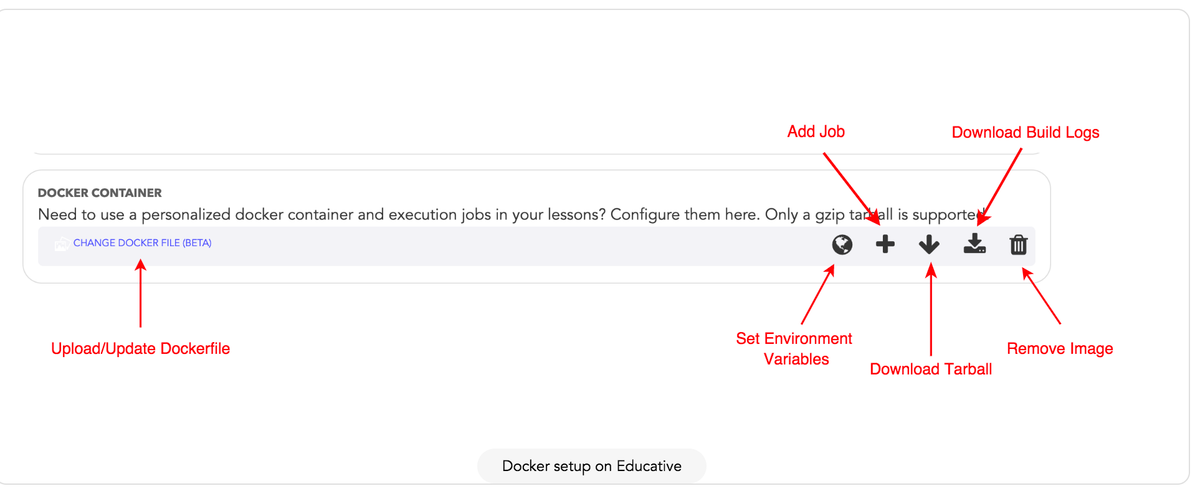
Now you are supposed to upload this tarball in the following section on the Course Edit Page:
So let’s discover how did we make the Dockerfile in the next lesson.