Initialization
Understand the MNIST dataset structure and normalize input images for CNN processing. Learn to initialize model parameters, including input dimensions and output size, to prepare for handwritten digit classification with convolutional neural networks.
We'll cover the following...
Chapter Goals:
- Learn about the MNIST database
- Initialize the model with input and output size
A. MNIST
The MNIST (Modified National Institute of Standards and Technology) database contains 60,000 training examples and 10,000 testing examples. The database contains grayscale handwritten digits that were resized to fit in a 20x20 pixel box, which was then centered in a 28x28 image (padded with whitespace). The images were resized using an anti-aliasing technique to minimize image distortion.
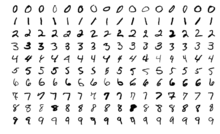
The MNIST database is available on Yann LeCun's website for download. The database is normalized to have floating point values between 0.0 and 1.0. In this case, 0.0 corresponds to a grayscale pixel value of 255 (pure white), while 1.0 corresponds to a grayscale pixel value of 0 (pure black).
B. Inputs and labels
Since each grayscale image has dimensions 28x28, there are 784 pixels per image. Therefore, each input image corresponds to a tensor of 784 normalized floating point values between 0.0 and 1.0. The label for an image is a one-hot tensor with 10 classes (each class represents a digit). In terms of our code, we have input_dim = 28 and output_size = 10 for the MNIST dataset.
When we use a batch of input data, the shape of inputs is (batch_size, self.input_dim**2) and the shape of labels is (batch_size, self.output_size), where batch_size represents the size of the batch.
The shape of inputs is (batch_size, self.input_dim**2) because there are batch_size images and each image is a square with a width of input_dim pixels.
In the example, inputs represents the input data tensor, while labels represents the one-hot label tensor. The batch size is set to 16 in the example.
Time to Code!
In this section of the course you'll be creating a Python class, MNISTModel that represents a CNN for MNIST classification.
Since we aren't using tf.compat.v1.placeholder or tf.compat.v1.Session, we just need to set the height/width dimension of the image data (input_dim) and the number of classes (output_size).
Set self.input_dim equal to input_dim and set self.output_size equal to output_size.