Variables, Strings, Numbers, and Operators
Explore Java variables, data types, and mathematical operators by building a point-of-sale receipt system. Learn to store and manipulate data using variables for quantities and prices, perform calculations with operators, and produce dynamic program output. Practice integrating discounts and use AI assistance to generate and refine code, solidifying your understanding of variables and arithmetic in Java.
The project
Let’s revisit the POS systems: We’ve all been out shopping. We get to the mart, buy our stuff, get to the cash counter, put our stuff through the system, and experience the point-of-sale. There’s this machine there. There is a person behind the counter, but there is a machine that prints receipts. Someone has built a system using code for that machine and the receipt it prints.
You have been hired to create this point-of-sale system. You can see the sample receipt below:

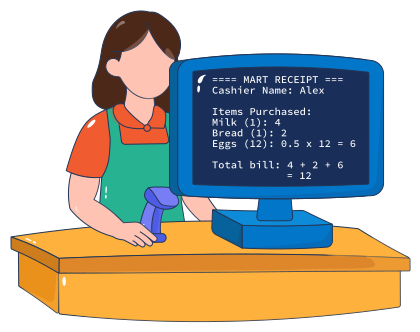
You know how to print stuff on the screen already, but you don’t want to hardcode everything. You want a flexible system, such that if the price of an item changes, you don’t have to change the code manually at various places. The same is the case for the quantity of items.
The programming concept
The programming concept that we’ll explore today is a variable. In programming languages such as Java, a variable is a named place where information can be stored. That information might be text (String), a whole number (int), or a decimal number (double).
We will also look at how Java works with numbers. Many applications, such as a receipt-generating system, need to perform calculations like addition, subtraction, multiplication, division, and percentages. This allows the system to calculate the total bill automatically. A point-of-sale worker should not need to reach for a calculator and add everything by hand while the customer waits in line.
The significance of the concept in the project
Suppose we take a look at the bill and just focus on one item; in this case, let’s go with milk:
Milk (1): 4
If you look closely, there are a few details related to milk as an item on the bill that ultimately contribute to the total amount printed.
It says one as a quantity in parentheses, so it means that the customer has bought one bottle of milk.
It has a price, so there’s a quantity and there’s a price.
It finds its place at the very bottom:
Total bill: 4 + 2 + 6 = 12
First of all, it computes that one bottle equals four dollars. However, when the total bill is calculated, the four-dollar entry comes from the earlier listing of milk as an item.
We do know how to print this entire receipt, word for word, but we don’t want that kind of hard-coding because we don’t want to change the code at multiple locations. In order to avoid a lot of manual work, Java lets us use variables instead to keep track of things. If we can create a variable for the quantity of milk and another for the price of one milk bottle at the top of the code in just one location, we can then reuse the same variables whenever we need to use milk in the bill calculations.
Concept at a glance:
int bill = 10;creates a variable named bill and assigns it the value 10.You can use the operators
+,-,*, and/to perform basic arithmetic.Variables can be included inside a
System.out.println()statement.
Learn to code for the concept
Let’s learn to code for what we’ve just learned as a concept. We want to store 1 as a number inside a variable, which we can call milkQuantity. We can create another variable, milkPrice, and set that equal to 4:
As you can see, we’re not writing System.out.println(1); or System.out.println(4);. Instead, we’re printing whatever values are stored in milkQuantity and milkPrice.
Java fetches the value stored inside the variable in lines 2 and 3, and prints those values in lines 5 and 6, respectively. Its real usage is when these variables and their values can be added and multiplied. Let’s go ahead and complete the code for milk. You can anticipate what we must have to do to include bread and eggs in the bill as well.
We’ll create another variable to compute the subtotal for milk, and print that in the receipt later:
Line 8 uses the multiplication operator * and places the multiplication result in totalMilk.
Why don’t we change the value of milkQuantity to 3 in line 2 and then press the “Run” button? See how the code prints the perfect receipt without you having to make any manual changes anywhere else in the code. That’s the power of variables.
Learn to code with AI
Now that we have learned the concept of variables and mathematical operators, let’s revisit the project we had to build:
=== MART RECEIPT ===Cashier Name: AlexItems Purchased:Milk (1): 4Bread (1): 2Eggs (12): 0.5 x 12 = 6Total bill: 4 + 2 + 6 = 12
We have coded for milk and its bill, but let’s code for the complete receipt listed above. What will need to be added to the code?
Generate code with AI
We don’t want to overemphasize the idea of using AI to generate code for us.
How about we start treating our AI co-partners as well-read, highly educated individuals, and focus on learning how to communicate effectively with them? We need to be specific in our communication, our expectations, and helping it understand the context.
We have to help the AI help us. For starters, tell GPT what you want it to do for you. Here’s an effective prompt that can be used to this effect. Study this prompt, and then copy and paste it into the AI Copilot to generate the code:
I’m a beginner learning Java.I’m trying to create a Java program that generates the following output on the screen:=== MART RECEIPT ===Cashier Name: AlexItems Purchased:Milk (1): 4Bread (1): 2Eggs (12): 0.5 x 12 = 6Total bill: 4 + 2 + 6 = 12But I’ve written a partial code for it, and I want you to complete the code for me:int milkQuantity = 1;int milkPrice = 4;System.out.println("Milk (" + milkQuantity + "): " + milkPrice);int totalMilk = milkQuantity * milkPrice;System.out.println("Total bill: " + totalMilk);
Write your prompt in the AI Copilot below:
Test code with AI
Once the AI has generated the code, copy-paste it into the following code widget, run it, ask the AI Mentor for feedback, and
Food for thought:
What do you think
=really means in Java? (Is it saying equals? Or is it doing something else?)What happens if you do
bill = bill + 1;? Try it. What’s your guess before executing this command?What happens if you do
System.out.println(10+10);vsSystem.out.println("10" + "10");?
Practice makes perfect
Now that you’ve successfully used AI as your Copilot to generate code, solve a problem, and test it (and it works), it’s time to test drive your learning.
We’re only going to add one little feature to the point-of-sale problem. Imagine that a customer has come in and purchased the same groceries, but this time they have a 20 percent discount coupon. The point-of-sale and receipt generation system should include a way to adjust the bill based on the discount, and reflect it clearly on the receipt.
Problem
This is what needs to be generated now. Notice how everything else stays the same, but right before the total bill is calculated, the discount gets factored in.
Code its solution
The following code widget has the functional code, as before. All you need to do is add the code that takes care of the requirement for the discount adjustment. The final output should match the sample output shown above:
Perfect! A more realistic POS app is now ready to be shipped to customers.