Hello Flutter App
Explore how to build a foundational Flutter app that shows a greeting message in English and Spanish. Understand key widgets like MaterialApp, Scaffold, and AppBar, and learn to toggle text with an icon button. By lesson end, you will grasp fundamental Flutter development principles.
We'll cover the following...
Hello Flutter app
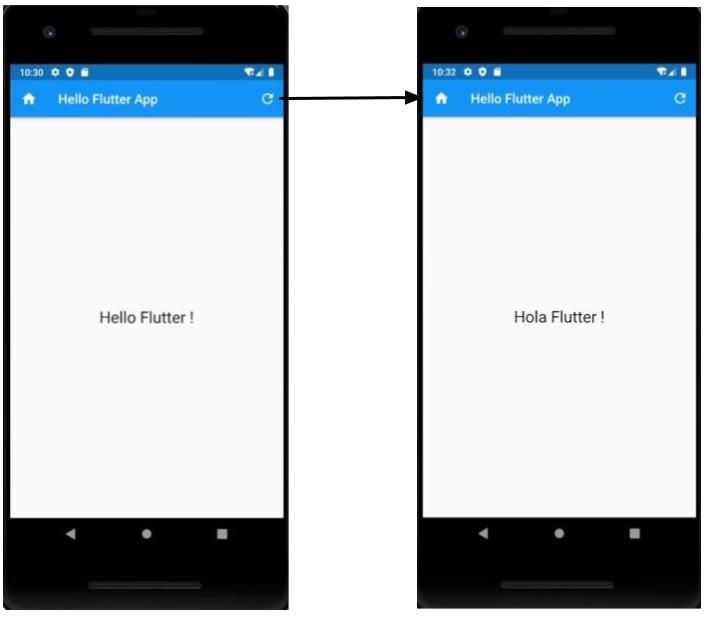
By end of this section, you’ll have a Flutter app for the Android platform displaying a greeting message in two languages.
This app will display text in English and Spanish. The greeting message can be toggled by clicking on the “refresh” icon in the top-right corner.
The displayed text will be centered in the middle of the screen.
Learning goals
By the end of this section, you’ll have a basic understanding of Flutter app development. We’ll cover the following topics:
- App’s entry point
MaterialAppwidget: the root widget for the appCenterwidget: centers the content in the middle of the device screenScaffoldwidget: provides scaffolding to the appSafeAreawidget: helps to avoid operating system notifications overlapping with app’s widgetsAppBarwidget: title, leading and actions- Type of widgets: stateless vs stateful
- Adding an icon button to toggle text in between English and Spanish
We’ll build the “Hello Flutter App” in many iterations to understand each building block step by step. Our final app will look like as below:
In the next lesson, we’ll work on creating a Flutter app to render “Hello Flutter !” text in the center of the device’s screen.