Profile Actions Items
Explore how to add and organize profile action buttons such as Call and Text using Flutter widgets. This lesson helps you implement interactive UI elements with clean, manageable code by using methods like buildCallButton and buildTextButton, enhancing your understanding of Flutter layout and styling options.
We'll cover the following...
Introduction
In this lesson, you’ll work on adding Call, Text, Video Call, Email, Directions & Pay buttons as shown below:
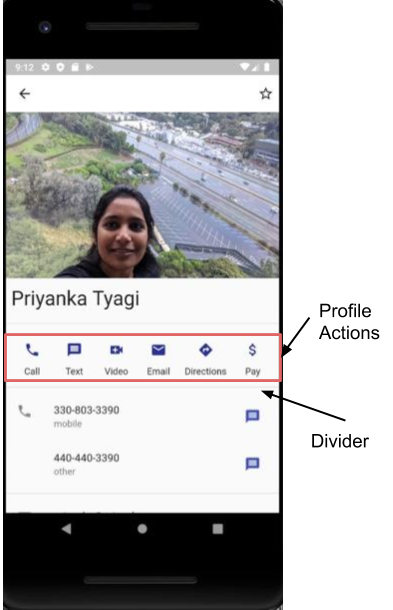
Add Container
Let’s start adding the Container widget and Row child to it. Adding a margin to the Container widget gives some empty spacing around it. Then add mainAxisAlignment: MainAxisAlignment.spaceEvenly to make all profile action items evenly spaced.
Container(
 margin: const EdgeInsets.only(top: 8, bottom: 8),
 child: Row(
   mainAxisAlignment: MainAxisAlignment.spaceEvenly,
   children: <Widget>[],
 ),
),
Organizing code
Each component of the screen is composed of other Flutter built-in widgets. We’ve organized related code in their own methods.
buildCallButton(): builds the “Call” action item of the Profile