Displaying Entry Details
Explore how to build a comprehensive details view by breaking down the page into reusable Svelte components. Learn to create form sections, input and textarea components with props and events, and display dynamic student data including name, age, registration date, and active status. Understand routing integration and component composition to keep templates clean and maintainable.
Now that we’ve implemented routing, let's add some content to the page that we can work with. To keep styles consistent across repeating blocks, we're going to need to outsource some parts of the page into smaller components. Take a look at the overall design to see which parts could be broken down into components:

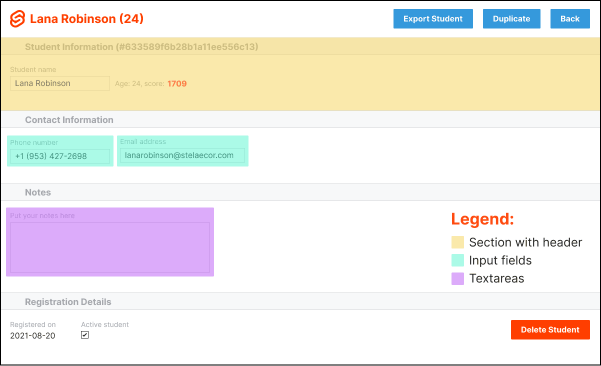
Based on the design, we can outline how we want our template to look in the end. We want to end up with a similar look for the layout's code:
In addition to making the template slimmer and keeping the styles consistent across elements, it will also help with debugging and configuration by making the template more readable. Let's start off by creating a FormSection component that will encapsulate all other components.
Build a section component
In the following example, we’ve added FormSection to the details page four different times, with different titles. We’ve created the FormSection component as well, but the component is currently using a static title. Head over to the ...