HTML Tables
Explore how to build HTML tables by defining rows, columns, headers, and data cells. This lesson teaches you to use table tags effectively, enabling you to present structured data clearly and semantically in web pages.
Overview
There are plenty of instances where you’ll want to present a table of data on your web page. Let’s dive straight in and convert the table below into HTML. If you haven’t worked with tabular data before, it will be useful to know that a table consists of rows and columns. Each row/column pair has a piece of data associated with it, referred to as a table cell.
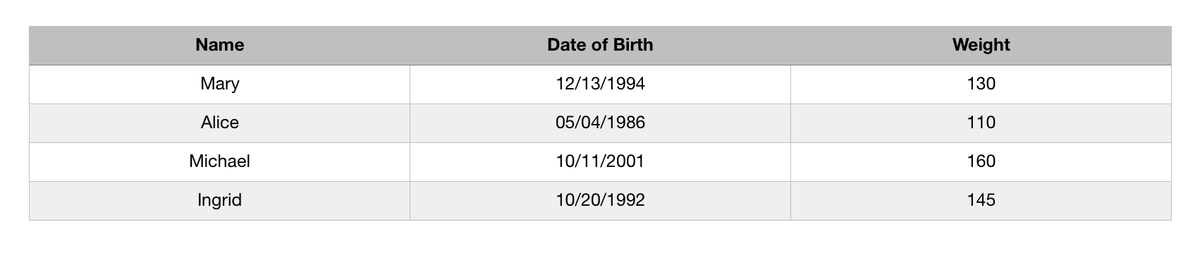
In the table above, the first row is used to declare the data type for each column, and serves as the table header. For the rest of the rows, we have a piece of data for each column (the cells), which has the data type specified in the header.
So how do we apply these concepts into HTML? First, we need to declare an HTML table by using the <table> tag.
<table></table>
To add a row to our table, use the <tr> tag.
<table>
	<tr></tr>
</table>
To add individual pieces of data (the cells) corresponding to the columns, use the <td> tag.
<table>
	<tr>
  	<td>Column 1</td>
    <td>Column 2</td>
    <td>Column 3</td>
  </tr>
</table>
To indicate that a cell is part of the header, use the <th> tag instead of <td>.
Exercise
The code below shows the structure of our table for the header and the first row. Add additional HTML elements to complete the table using the data above.