How OpenClaw Works
Explore OpenClaw's core architecture, including its Gateway server, plugin system, AI agent, and memory layers. Understand how it maintains persistent conversations, handles messaging integration, and enables autonomous task execution, empowering developers to deploy and manage a secure AI assistant effectively.
Suppose that a software engineer recently installed OpenClaw, connected it to Telegram, and issued a simple command: “Check my GitHub PRs.” Within seconds, they received a summary of three open pull requests, complete with highlighted comments and prepared draft responses. Impressed by the speed, they asked a follow-up question regarding a Redis bug from the previous week. OpenClaw recalled the entire debugging session from five days prior and resumed the task exactly where the engineer had left off.
How did the system know to check GitHub? How does it maintain a memory of conversations that occurred days ago? And what, exactly, is running on that Raspberry Pi sitting in the corner?
When you understand what is happening under the hood, you can make informed decisions.
What is OpenClaw, really?
OpenClaw, in simple terms, is a Node.js server that runs continuously on your machine. When you type a command like openclaw gateway in your terminal (don’t worry, we will go through these later in detail), you are starting an HTTP and WebSocket server that listens on port 18789 by default. This server, called the Gateway, serves as the central nervous system for your entire OpenClaw setup.
Messages arrive from platforms like Telegram, WhatsApp, or Slack, are routed through an AI model with tool access, and are finally sent back out. The Gateway orchestrates every part of this process, including routing messages, managing conversation states, executing tools, and broadcasting real-time updates to any connected clients.

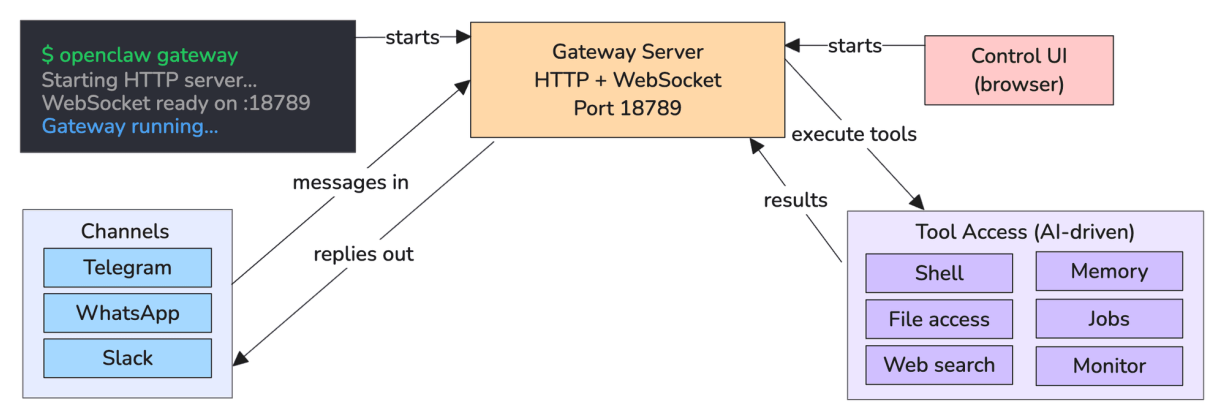
But here is what distinguishes it from simply running ChatGPT in a browser tab: the Gateway runs permanently. It does not shut down when you close a chat window. Instead, it maintains persistent conversations, runs scheduled jobs, monitors systems in the background, and can proactively reach out to you whenever something that needs your attention occurs
Note: “Persistent conversations” does not mean the entire chat history lives inside the model’s context window. Conversations are stored as JSONL files on disk at ~/.openclaw/transcripts/. Recent history is loaded into context for each reply, but when a thread grows too long, OpenClaw triggers compaction, the agent summarizes the conversation so far, and replaces the raw history with that summary, keeping the context window manageable.
Long-term recall, like remembering a debugging session from five days ago, works differently. All transcripts are indexed into a local SQLite database with vector search, and the agent runs a memory_search query against that index before answering.
What happens after starting OpenClaw?
When the Gateway starts up, several things happen in quick succession:
It loads the configuration from
~/.openclaw/openclaw.json, a single file that controls every aspect of how OpenClaw behaves. This includes which AI models to use, which messaging apps to connect, what permissions the agent has, and which automations to run.It discovers and loads plugins. Almost everything in OpenClaw that is not core plumbing is implemented as a plugin. Telegram integration? Plugin. GitHub access? Plugin. Memory system? Plugin. This modular architecture means you can enable only the features you need and add new capabilities without modifying the core OpenClaw code.
Then the Gateway binds to port
18789and starts accepting connections. It serves a browser-based Control UI where you can watch the agent work in real time, manage settings, and approve sensitive commands. If you have configured Telegram, WhatsApp, or other messaging apps, those connections are initialized as well; each runs in parallel, ready to receive messages.Finally, background services spin up: the cron scheduler for time-based automations, the heartbeat runner for periodic check-ins, and the memory indexer, which monitors for new files to add to the agent’s knowledge base
At this point, OpenClaw is fully operational and waiting for input.
What are the main components of OpenClaw?
OpenClaw’s architecture can be understood through five interconnected layers, each responsible for a specific part of the system.


While we don’t need to memorize every detail, just understanding how they fit together will allow us to make informed decisions about permissions and configuration:
The channel layer connects messaging applications to the agent. Each supported application is a plugin that translates incoming messages into the OpenClaw format, routes them through the agent, and delivers replies back to the user. These channels manage platform-specific details, such as authentication and rate limiting.
The Gateway layer serves as the system’s central hub. It routes messages, broadcasts real-time events over WebSockets so we can monitor the agent’s reasoning in the browser, manages authentication, and facilitates hot configuration reloads.
Hot configuration reloads are particularly useful, as they allow you to update settings without restarting the entire system. When the agent attempts to execute a high-risk shell command, the Gateway intercepts the request and waits for your explicit approval through the Control UI before allowing the process to continue.
The plugin system makes OpenClaw extensible. Plugins allow us to add new tools, integrate messaging platforms, run background services, or listen for specific events such as ”before tool call.” While OpenClaw ships with more than 30 bundled plugins, we can also develop our own plugins or install community-created ones.
The agent/LLM layer transforms messages into AI responses. OpenClaw constructs a system prompt by synthesizing the agent’s personality, available skills, memory, and current context. It loads the relevant conversation history, appends the user’s message, and calls the AI model. If the model requires specific tools, such as bash, file access, web search, or memory, OpenClaw executes those commands and feeds the results back into the model until it generates a final answer. We can monitor this entire execution loop in real time through the Control UI.
The memory system provides OpenClaw with long-term knowledge through two distinct types: conversation history and semantic memory. Conversation history uses JSONL files to track every session, while semantic memory uses markdown files for permanent knowledge storage. When you share important information, OpenClaw classifies that as such and saves it to these memory files. The system later retrieves that information by searching these files using a combination of vector embeddings and full-text search to recall the most relevant details.
These five layers work together seamlessly: channels receive your messages, the gateway routes them, plugins extend capabilities, the agent processes requests with AI, and memory ensures nothing important is forgotten.
What next?
Now that you understand OpenClaw's core architecture, we'll explore how skills use lazy-loading to avoid wasting tokens, how cron jobs and heartbeats enable autonomous operation, and why OpenClaw's security design matters when giving an AI access to your system.