User Input and Formatting
Explore how to capture user input with Python's input() function and format outputs for clear, professional receipts. This lesson guides you through building an interactive point-of-sale system that accepts real-time data entry, calculates totals, and applies discounts. Develop skills to make programs user-friendly and adaptable, preparing you for practical coding projects with Python.
The project
We'll revisit the POS system one last time. In our previous lesson, the prices, quantities, and names were typed directly into the Python code, which worked fine for us as coders.
But here’s the problem: Is the cashier also a coder? No. They don’t want to open code, find variables, and change values; they just want to type the customer’s details and prices into the system while the customer is standing there.
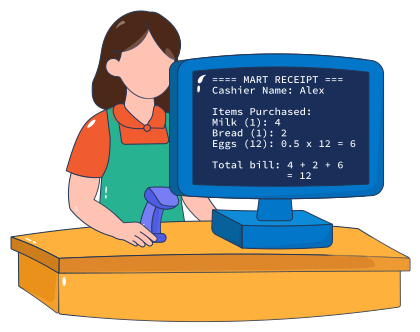
You’ve been hired to create a smarter version of this point-of-sale system, one where the cashier simply enters the quantities and prices at the command line when the app is running, and the program automatically calculates and prints the receipt. The cashier will not need to look at the code. This is what the receipt looks like:

The programming concept
The programming concept for today is user input. While we know how to display something to the user using print() function, sometimes we need to fetch some information from the user instead of displaying something to them. The user can use their keyboard to type in the required information. Python has another built-in function called input() that lets us ask the user (in this case, the cashier) to type something into the terminal. Whatever they type can then be stored in a variable, just like the ones we ...